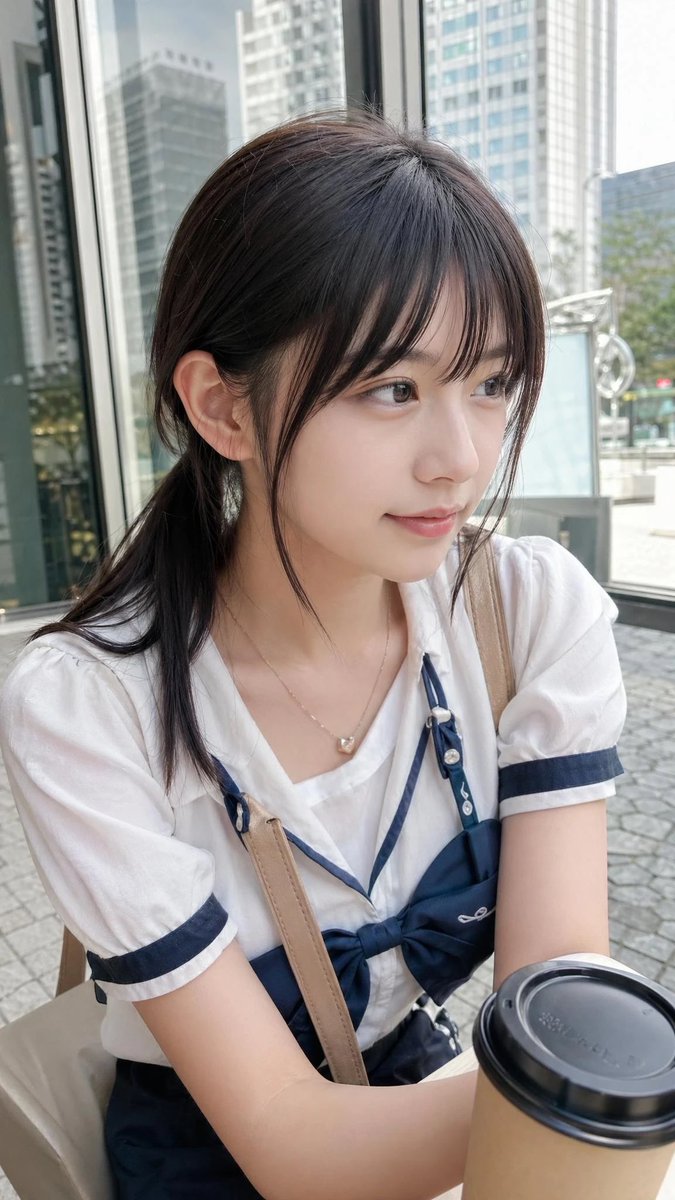
Casual Cafe Portrait in Sailor Blouse
A realistic everyday smartphone portrait of a young woman in a sailor-style outfit at an outdoor city cafe, useful for generating casual lifestyle photography.
This is a GPT Image 2 prompt case for Portrait & Character. Use the copy-ready prompt below to generate similar visuals, and review Awesome GPT Image 2 Prompts attribution plus commercial-use rights before reuse.
Free 1K preview
Generate one preview image instantly, no sign-up required.
Prompt
Copy-ready prompt
A candid smartphone-style portrait photo of a {argument name="subject" default="young woman"} sitting at an outdoor cafe in a modern city business district, framed from the chest up in a vertical composition. She has {argument name="hair color" default="dark brown"} hair tied back in a low ponytail with soft side bangs and a natural, understated everyday look. Her outfit is a Japanese-inspired sailor-style blouse in white with navy trim, short puff sleeves, a wide sailor collar, and 1 large navy bow at the center of the chest, paired with a navy garment visible at the waist. She wears 1 delicate necklace with a small heart-shaped pendant and 1 beige crossbody bag strap running diagonally across her torso. Her arms are relaxed in front of her, and in the lower right foreground there is 1 takeaway coffee cup with a kraft paper sleeve and black plastic lid, slightly close to the camera. The setting includes glass building facades, tall office towers, pavement stones, and a bright overcast daytime atmosphere, with a shallow depth of field that keeps the background softly blurred. The image should feel ordinary, casual, and realistic, like a spontaneous everyday photo, with soft natural light, neutral colors, subtle skin tones, and a clean urban lifestyle aesthetic.Prompt variables
Editable argument placeholders found in the prompt, with their default values.
Best for
- - Portrait & Character visual exploration
- - Image generation and reference-image edits
- - Reusable briefs that keep source attribution visible
Change these parts
- - Subject, product, character, or scene
- - Aspect ratio, camera, lighting, and background
- - Brand, text, color, and output constraints
Recommended model and settings
- - Model: gpt-image-2
- - Input mode: Text to Image
- - Aspect ratio: source
- - Commercial status: review original source
How to use this prompt
- 1. Copy the prompt and preserve its structure for the first test.
- 2. Replace the subject, context, and publishing channel.
- 3. Change one camera, lighting, or style variable per iteration.
- 4. Inspect the output, source, text, and rights before reuse.
Limitations, source, and reuse cautions
- - Generated output is an editable draft, not factual, legal, or rights evidence.
- - Review the linked source, people, brands, logos, text, and third-party media before commercial use.
More cases in this category
Prioritized by category, input mode compatibility, quality, and lower risk.




Reuse and source notes
Use this prompt safely after previewing the case.
- 1.Copy the prompt or open it directly in Dovoo with the generation button.
- 2.Adjust variables, aspect ratio, and reference images for your own use case.
- 3.Before publishing or paid usage, verify source rights, attribution requirements, and brand or likeness risks.
Can I use this prompt commercially?
Commercial-use status is allowed. Review the original source, license, brand constraints, and legal requirements before paid usage.
Where does this case come from?
This case is imported from Awesome GPT Image 2 Prompts; keep attribution visible and check the source URL before reuse.