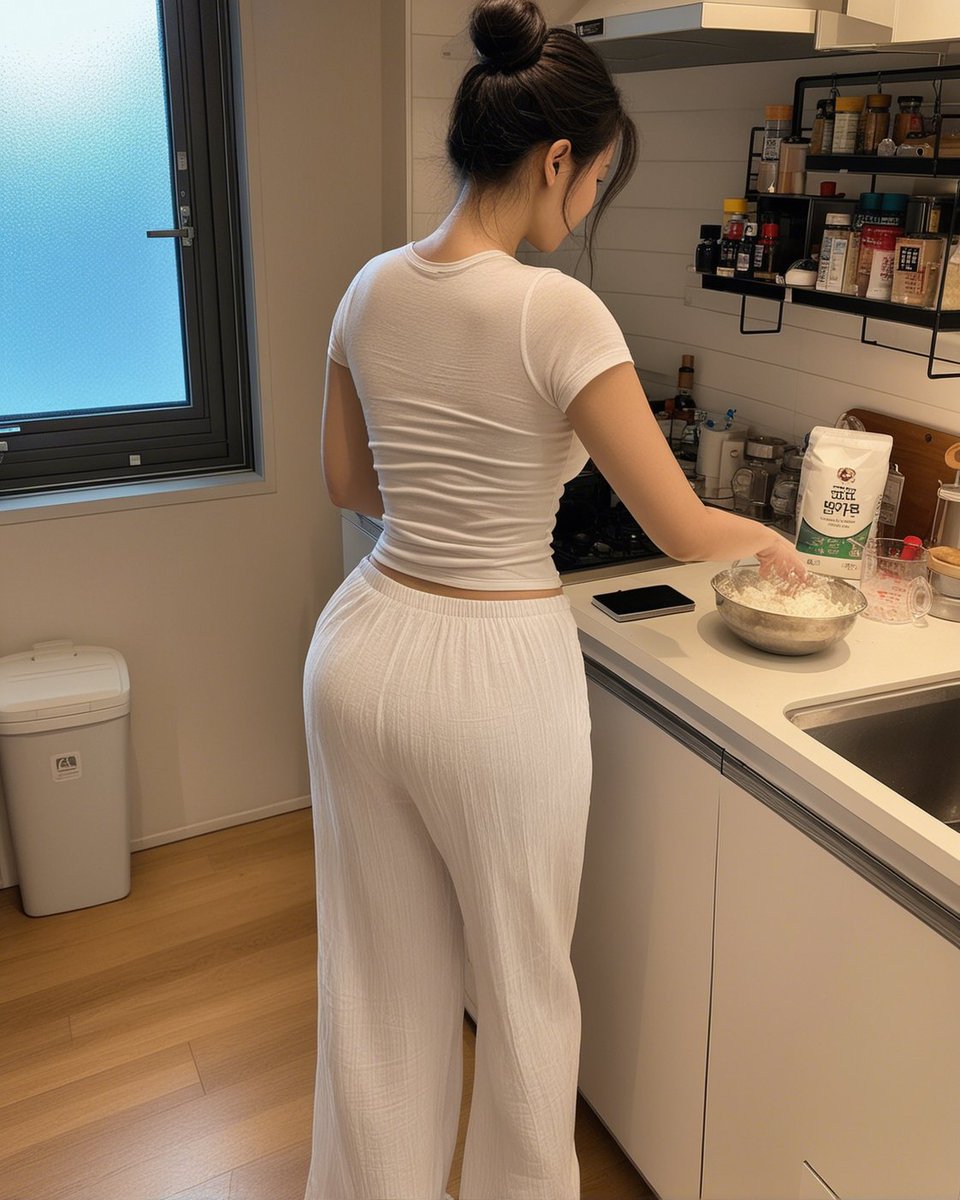
Candid Kitchen Baking Photo
A photorealistic vertical lifestyle shot of an adult woman preparing food in a small modern kitchen, useful for candid domestic scene generation.
This is a GPT Image 2 prompt case for Portrait & Character. Use the copy-ready prompt below to generate similar visuals, and review Awesome GPT Image 2 Prompts attribution plus commercial-use rights before reuse.
Free 1K preview
Generate one preview image instantly, no sign-up required.
Prompt
Copy-ready prompt
Create a realistic candid smartphone-style photo of an adult woman cooking in a compact modern apartment kitchen, viewed from behind at waist-to-head height. Show every face clearly with natural, detailed facial features. She wears a fitted {argument name="top color" default="white"} short-sleeve ribbed crop T-shirt and loose high-waisted {argument name="pants color" default="white"} wide-leg lounge pants with subtle vertical texture. She stands at a white countertop beside a stainless sink, one hand near a metal mixing bowl filled with flour or dough ingredients. On the counter include exactly 4 visible main items: a metal mixing bowl, a white flour bag with Korean-style packaging, a black smartphone lying flat, and a clear measuring cup. The kitchen has white cabinets, a white tile backsplash, a range hood, and two black wall-mounted spice shelves holding many small jars and bottles. On the left side show a large frosted-glass window with a dark frame and a white trash bin below it. Use warm indoor lighting, natural shadows, light wood flooring, casual lived-in atmosphere, vertical 4:5 composition, photorealistic detail, no glamour lighting, no watermark, no added text.Prompt variables
Editable argument placeholders found in the prompt, with their default values.
Best for
- - Portrait & Character visual exploration
- - Image generation and reference-image edits
- - Reusable briefs that keep source attribution visible
Change these parts
- - Subject, product, character, or scene
- - Aspect ratio, camera, lighting, and background
- - Brand, text, color, and output constraints
Recommended model and settings
- - Model: gpt-image-2
- - Input mode: Text to Image
- - Aspect ratio: source
- - Commercial status: review original source
How to use this prompt
- 1. Copy the prompt and preserve its structure for the first test.
- 2. Replace the subject, context, and publishing channel.
- 3. Change one camera, lighting, or style variable per iteration.
- 4. Inspect the output, source, text, and rights before reuse.
Limitations, source, and reuse cautions
- - Generated output is an editable draft, not factual, legal, or rights evidence.
- - Review the linked source, people, brands, logos, text, and third-party media before commercial use.
More cases in this category
Prioritized by category, input mode compatibility, quality, and lower risk.


Reuse and source notes
Use this prompt safely after previewing the case.
- 1.Copy the prompt or open it directly in Dovoo with the generation button.
- 2.Adjust variables, aspect ratio, and reference images for your own use case.
- 3.Before publishing or paid usage, verify source rights, attribution requirements, and brand or likeness risks.
Can I use this prompt commercially?
Commercial-use status is allowed. Review the original source, license, brand constraints, and legal requirements before paid usage.
Where does this case come from?
This case is imported from Awesome GPT Image 2 Prompts; keep attribution visible and check the source URL before reuse.