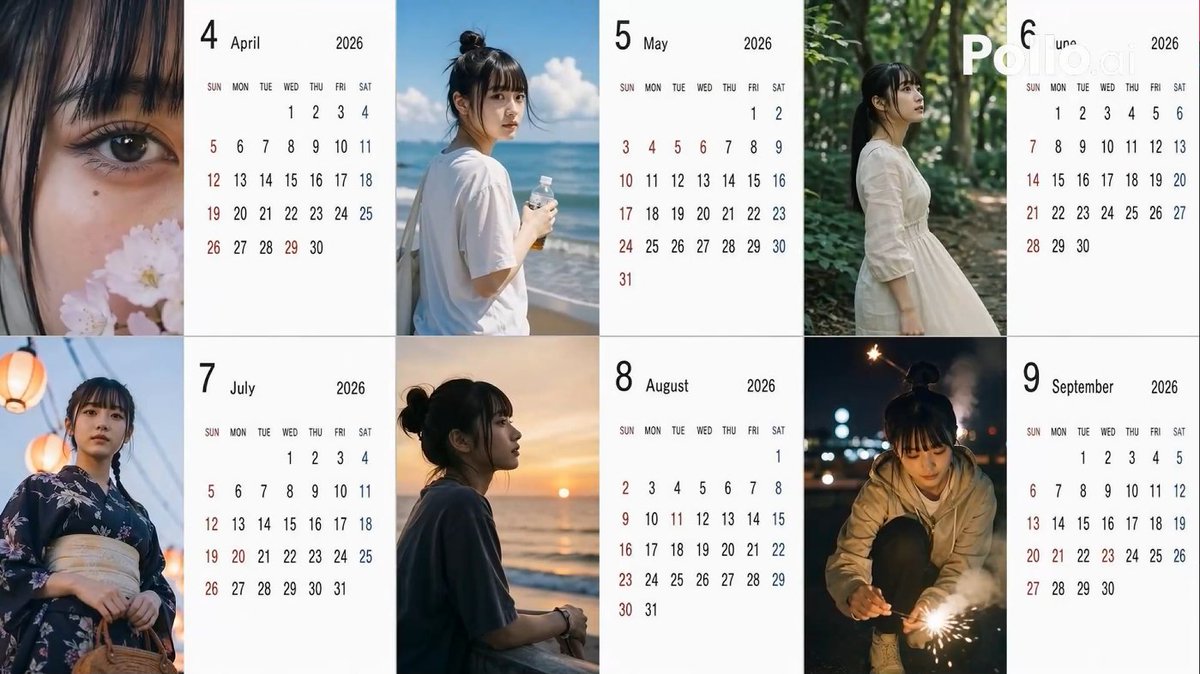
Candid 2026 Japanese Calendar Prompt
A highly structured prompt for generating a 6-month Japanese calendar for 2026, using random variables for angles, hair styles, and poses to create a 'candid smartphone' aesthetic.
This is a GPT Image 2 prompt case for Product & Commercial. Use the copy-ready prompt below to generate similar visuals, and review Awesome GPT Image 2 Prompts attribution plus commercial-use rights before reuse.
Free 1K preview
Generate one preview image instantly, no sign-up required.
Free text preview doesn’t preserve reference-image consistency.
Prompt
Copy-ready prompt
[Theme] A Japanese calendar for {argument name="year" default="2026"} from {argument name="period" default="April to September"} ({argument name="number of months" default="6"} months), using the person in the reference image as the model.
[Calendar] The background of the calendar portion should be white for readability.
[Image] Everyday photos taken by amateurs with an iPhone, themed after the seasons of each month.

[Location] Leave to AI according to the season.
[Distance] Randomly select one for each month: extreme_close, close, bust, mid, far, candid.
[Angle] Randomly select one for each month: eye, low, high, side, back.
[Exposure/Tone] Randomly select one for each month: overexp, natural, warm, cool, dark.
[Hairstyle] Randomly select one for each month: ponytail, bun, down, half_up, messy, wet, short, bob, braid, twin.
[Clothing] Leave to AI according to the season.
[Noise] Randomly select one for each month: low, mid, high, film.
[Blur/Focus] Randomly select one for each month: sharp, slight, motion, soft.
[Pose] Randomly select one for each month: natural_stand, sitting, walking, phone, wall_lean, crouch, look_back.
[Holding] Randomly select one for each month: none, smartphone, bottle, coffee, umbrella, bag, towel, script.
[Time of day] Randomly select one for each month: early_morning, morning, noon, afternoon, evening, night, late_night.
Prompt variables
Editable argument placeholders found in the prompt, with their default values.
Best for
- - Product & Commercial visual exploration
- - Image generation and reference-image edits
- - Reusable briefs that keep source attribution visible
Change these parts
- - Subject, product, character, or scene
- - Aspect ratio, camera, lighting, and background
- - Brand, text, color, and output constraints
Recommended model and settings
- - Model: gpt-image-2
- - Input mode: Image to Image
- - Aspect ratio: source
- - Commercial status: review original source
How to use this prompt
- 1. Copy the prompt and preserve its structure for the first test.
- 2. Replace the subject, context, and publishing channel.
- 3. Change one camera, lighting, or style variable per iteration.
- 4. Inspect the output, source, text, and rights before reuse.
Limitations, source, and reuse cautions
- - Generated output is an editable draft, not factual, legal, or rights evidence.
- - Review the linked source, people, brands, logos, text, and third-party media before commercial use.
More cases in this category
Prioritized by category, input mode compatibility, quality, and lower risk.

Reuse and source notes
Use this prompt safely after previewing the case.
- 1.Copy the prompt or open it directly in Dovoo with the generation button.
- 2.Adjust variables, aspect ratio, and reference images for your own use case.
- 3.Before publishing or paid usage, verify source rights, attribution requirements, and brand or likeness risks.
Can I use this prompt commercially?
Commercial-use status is allowed. Review the original source, license, brand constraints, and legal requirements before paid usage.
Where does this case come from?
This case is imported from Awesome GPT Image 2 Prompts; keep attribution visible and check the source URL before reuse.