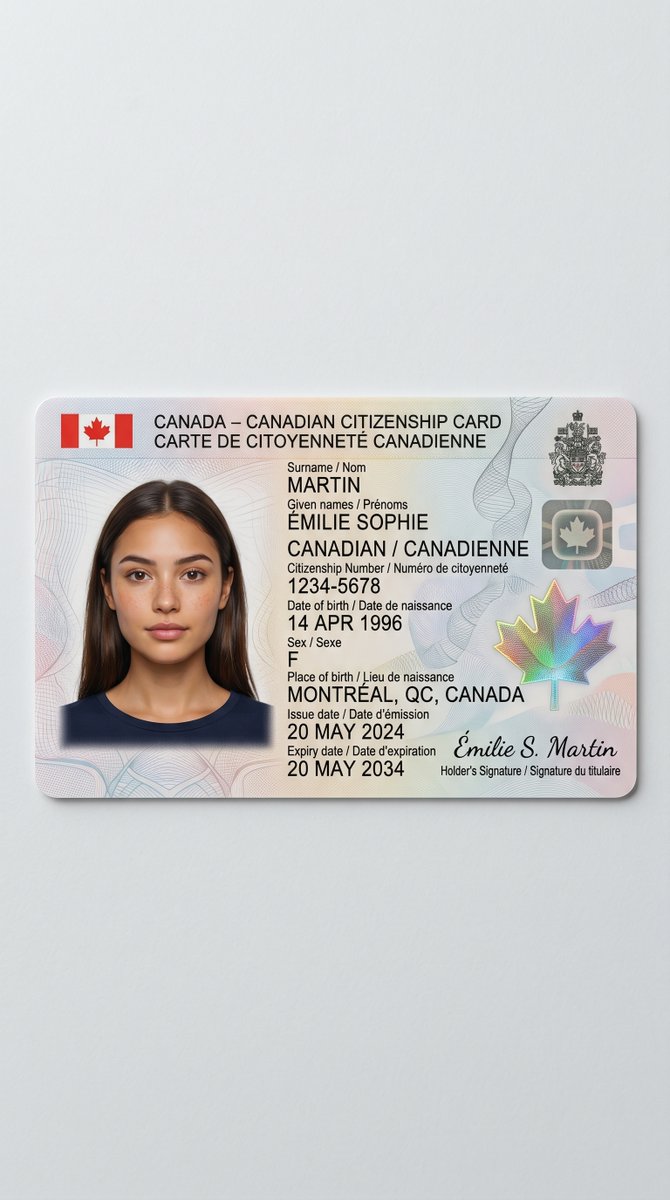
Realistic Canadian Citizenship Card
A realistic studio-style government ID card image useful for document mockups, identity design concepts, or security card visualizations.
This is a GPT Image 2 prompt case for Product & Commercial. Use the copy-ready prompt below to generate similar visuals, and review Awesome GPT Image 2 Prompts attribution plus commercial-use rights before reuse.
Free 1K preview
Generate one preview image instantly, no sign-up required.
Prompt
Copy-ready prompt
A clean studio product photo of a realistic Canadian citizenship card lying flat on a light gray matte surface, centered with generous empty space around it. The card is shown in landscape orientation with rounded corners, subtle thickness, and a soft drop shadow, photographed from a nearly top-down angle with slight perspective. The design is a bilingual Canadian ID card with a pale pastel security background of fine guilloche lines in pink, blue, and gray, plus faint abstract wave patterns. In the top left are 2 small Canadian flags flanking the header text in bold black sans-serif: “CANADA – CANADIAN CITIZENSHIP CARD” on the first line and “CARTE DE CITOYENNETÉ CANADIENNE” on the second. On the left side is 1 passport-style head-and-shoulders portrait of a woman with straight dark brown hair, center part, wearing a navy crew-neck shirt, Show every face clearly with natural, detailed facial features. To the right of the portrait is the main ID text in black, mixing uppercase labels and values, arranged in neat left-aligned lines. Use the visible bilingual fields and values exactly as follows: “Surname / Nom” then “MARTIN”; “Given names / Prénoms” then “ÉMILIE SOPHIE”; nationality line “CANADIAN / CANADIENNE”; “Citizenship Number / Numéro de citoyenneté” then “1234-5678”; “Date of birth / Date de naissance” then “14 APR 1996”; “Sex / Sexe” then “F”; “Place of birth / Lieu de naissance” then “MONTRÉAL, QC, CANADA”; “Issue date / Date d’émission” then “20 MAY 2024”; “Expiry date / Date d’expiration” then “20 MAY 2034”. In the upper right corner include 2 official security elements: a dark Canadian coat of arms emblem and beneath it a small metallic square with a maple leaf. In the lower right include 1 large iridescent holographic maple leaf security feature with rainbow shimmer. Along the bottom right add a cursive signature reading “Émilie S. Martin” with the caption beneath it “Holder’s Signature / Signature du titulaire”. The overall style is highly realistic government-issued document photography, sharp printed text, authentic ID layout, subtle paper-plastic card texture, neutral lighting, minimal background, no hands, no extra objects.
Best for
- - Product & Commercial visual exploration
- - Image generation and reference-image edits
- - Reusable briefs that keep source attribution visible
Change these parts
- - Subject, product, character, or scene
- - Aspect ratio, camera, lighting, and background
- - Brand, text, color, and output constraints
Recommended model and settings
- - Model: gpt-image-2
- - Input mode: Text to Image
- - Aspect ratio: source
- - Commercial status: review original source
How to use this prompt
- 1. Copy the prompt and preserve its structure for the first test.
- 2. Replace the subject, context, and publishing channel.
- 3. Change one camera, lighting, or style variable per iteration.
- 4. Inspect the output, source, text, and rights before reuse.
Limitations, source, and reuse cautions
- - Generated output is an editable draft, not factual, legal, or rights evidence.
- - Review the linked source, people, brands, logos, text, and third-party media before commercial use.
More cases in this category
Prioritized by category, input mode compatibility, quality, and lower risk.




Reuse and source notes
Use this prompt safely after previewing the case.
- 1.Copy the prompt or open it directly in Dovoo with the generation button.
- 2.Adjust variables, aspect ratio, and reference images for your own use case.
- 3.Before publishing or paid usage, verify source rights, attribution requirements, and brand or likeness risks.
Can I use this prompt commercially?
Commercial-use status is allowed. Review the original source, license, brand constraints, and legal requirements before paid usage.
Where does this case come from?
This case is imported from Awesome GPT Image 2 Prompts; keep attribution visible and check the source URL before reuse.