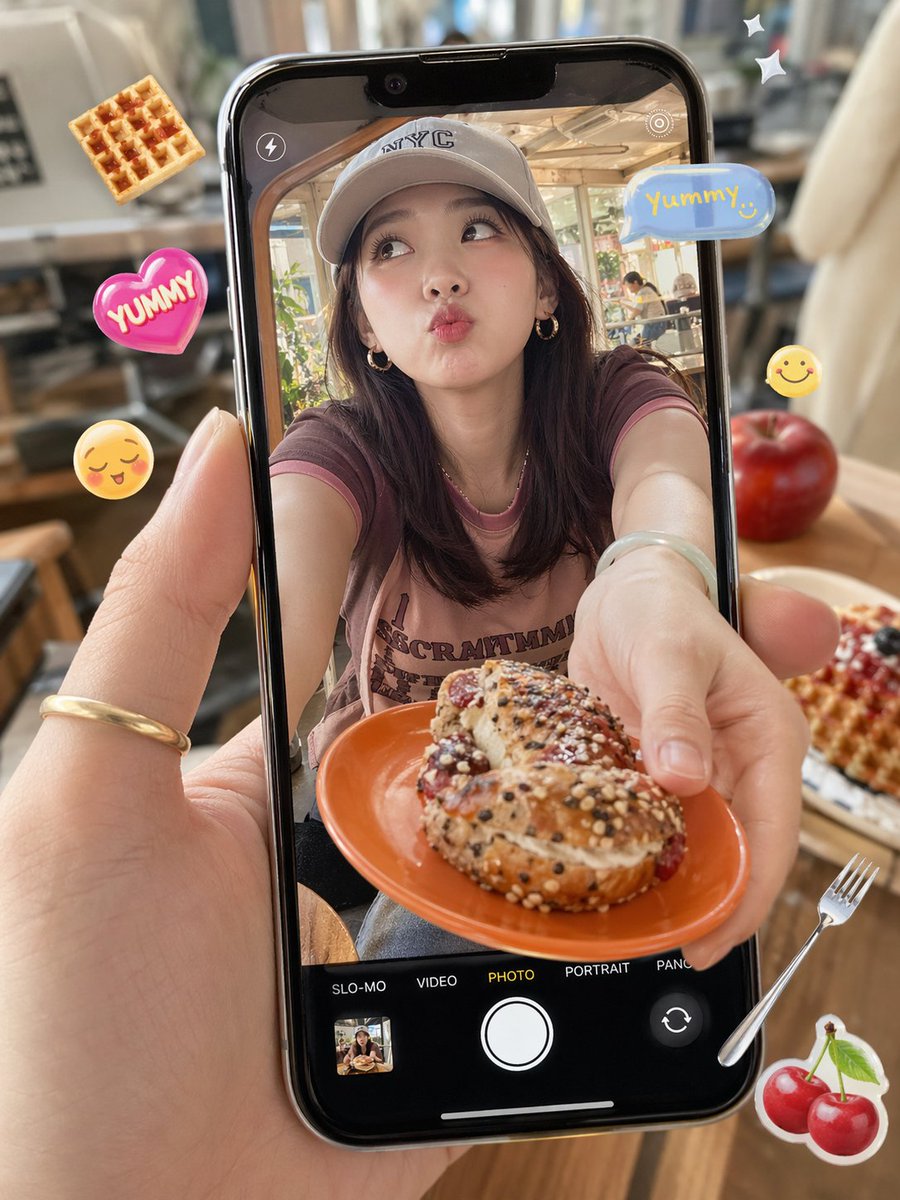
Cafe Phone Camera Food Snapshot
This prompt generates a realistic handheld smartphone photo-in-photo cafe scene with a woman offering a pastry and playful food stickers, ideal for social media lifestyle or AI image comparisons.
This is a GPT Image 2 prompt case for Food & Beverage. Use the copy-ready prompt below to generate similar visuals, and review Awesome GPT Image 2 Prompts attribution plus commercial-use rights before reuse.
Free 1K preview
Generate one preview image instantly, no sign-up required.
Prompt
Copy-ready prompt
A photorealistic close-up of a hand holding a modern black smartphone vertically in a cozy sunlit cafe. The phone screen shows the live camera view in photo mode, with a young woman seated at a table and leaning forward, extending an orange plate toward the camera with both hands. On the plate is 1 seeded cream-filled pastry or bagel-like sandwich topped with mixed sesame and poppy seeds and a dusting of sugar. The woman has shoulder-length dark brown hair, small gold hoop earrings, a light-colored baseball cap with NYC lettering, and a faded mauve-pink ringer T-shirt with darker trim and partially visible vintage text. Show every face clearly with natural, detailed facial features. The smartphone camera UI is clearly visible: 1 flash icon at top left, 1 target or focus icon at top right, and along the bottom 5 mode labels reading SLO-MO, VIDEO, PHOTO, PORTRAIT, and PANO, with PHOTO highlighted in yellow; include 1 large white shutter button, 1 small gallery thumbnail at bottom left, and 1 camera-switch icon at bottom right. Outside the phone, add playful floating food-themed stickers around the scene: 1 waffle at the upper left, 1 pink heart sticker reading YUMMY on the left, 1 yellow smiling face emoji on the left, 1 blue speech bubble at the upper right reading {argument name="sticker text" default="Yummy!"}, 1 small yellow smiley on the right, 2 white sparkle stars at the upper right, 1 silver fork at the lower right, and 1 cherry sticker at the lower right. The real cafe background outside the phone is softly blurred with warm wood tones, chairs, tables, large windows, and on the right side of the table 1 red apple and 1 plate of waffles with berries. Emphasize shallow depth of field, natural daylight, glossy phone reflections, realistic skin texture, and a trendy candid social-media food photo aesthetic.Prompt variables
Editable argument placeholders found in the prompt, with their default values.
Best for
- - Food & Beverage visual exploration
- - Image generation and reference-image edits
- - Reusable briefs that keep source attribution visible
Change these parts
- - Subject, product, character, or scene
- - Aspect ratio, camera, lighting, and background
- - Brand, text, color, and output constraints
Recommended model and settings
- - Model: gpt-image-2
- - Input mode: Text to Image
- - Aspect ratio: source
- - Commercial status: review original source
How to use this prompt
- 1. Copy the prompt and preserve its structure for the first test.
- 2. Replace the subject, context, and publishing channel.
- 3. Change one camera, lighting, or style variable per iteration.
- 4. Inspect the output, source, text, and rights before reuse.
Limitations, source, and reuse cautions
- - Generated output is an editable draft, not factual, legal, or rights evidence.
- - Review the linked source, people, brands, logos, text, and third-party media before commercial use.
More cases in this category
Prioritized by category, input mode compatibility, quality, and lower risk.
Reuse and source notes
Use this prompt safely after previewing the case.
- 1.Copy the prompt or open it directly in Dovoo with the generation button.
- 2.Adjust variables, aspect ratio, and reference images for your own use case.
- 3.Before publishing or paid usage, verify source rights, attribution requirements, and brand or likeness risks.
Can I use this prompt commercially?
Commercial-use status is allowed. Review the original source, license, brand constraints, and legal requirements before paid usage.
Where does this case come from?
This case is imported from Awesome GPT Image 2 Prompts; keep attribution visible and check the source URL before reuse.