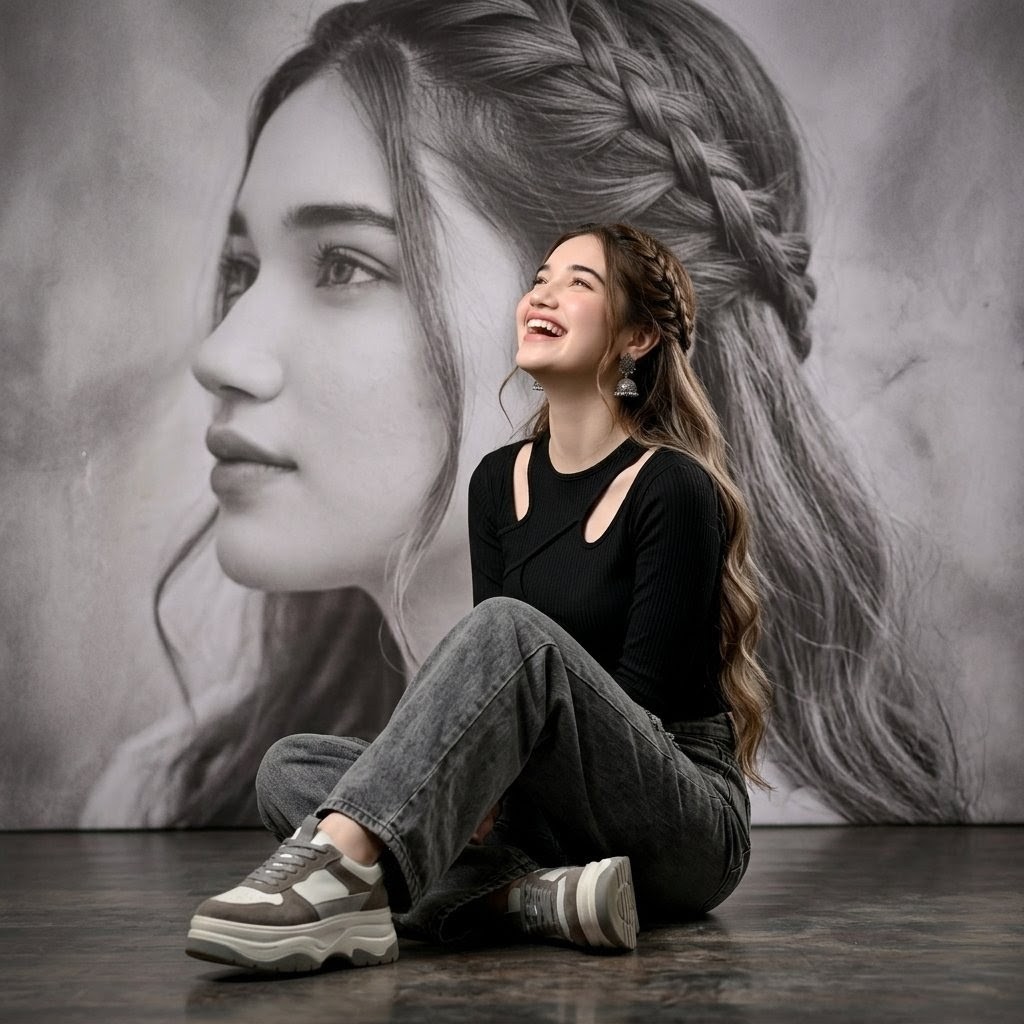
Braided Hair Studio Fashion Portrait
Generates a moody square fashion portrait of a seated woman in black and gray streetwear against a dramatic braided-hair mural backdrop.
This is a GPT Image 2 prompt case for Fashion & Beauty. Use the copy-ready prompt below to generate similar visuals, and review Awesome GPT Image 2 Prompts attribution plus commercial-use rights before reuse.
Free 1K preview
Generate one preview image instantly, no sign-up required.
Prompt
Copy-ready prompt
Create a square editorial fashion portrait of {argument name="character name" default="a young woman"} seated elegantly on a dark polished studio floor, full body visible, posed cross-legged with one knee raised and one leg folded underneath. Keep the face area softly anonymized or unchanged-looking, with no exaggerated expression. She wears a fitted modern black ribbed long-sleeve top with oval shoulder cutouts, loose soft gray washed denim jeans, and chunky gray-and-white platform sneakers. Her hair is {argument name="hair color" default="waist-length wavy milky brown"}, styled half-up with a prominent crown braid and long curled waves falling over one shoulder. Add small dangling silver earrings. The background is a large grayscale mural or photographic backdrop showing an enlarged close-up of braided hair, creating a dramatic monochrome hair-texture composition behind her. Use moody studio lighting, muted gray and black tones, realistic fabric texture, soft shadows, slight floor reflection, high-fashion artistic portrait mood, centered composition, 1:1 aspect ratio. Include exactly 3 main outfit pieces: black cutout top, gray loose jeans, chunky gray-white sneakers. Avoid text, logos, props, extra people, bright colors, or changing the natural seated pose.Prompt variables
Editable argument placeholders found in the prompt, with their default values.
Best for
- - Fashion & Beauty visual exploration
- - Image generation and reference-image edits
- - Reusable briefs that keep source attribution visible
Change these parts
- - Subject, product, character, or scene
- - Aspect ratio, camera, lighting, and background
- - Brand, text, color, and output constraints
Recommended model and settings
- - Model: gpt-image-2
- - Input mode: Text to Image
- - Aspect ratio: source
- - Commercial status: review original source
How to use this prompt
- 1. Copy the prompt and preserve its structure for the first test.
- 2. Replace the subject, context, and publishing channel.
- 3. Change one camera, lighting, or style variable per iteration.
- 4. Inspect the output, source, text, and rights before reuse.
Limitations, source, and reuse cautions
- - Generated output is an editable draft, not factual, legal, or rights evidence.
- - Review the linked source, people, brands, logos, text, and third-party media before commercial use.
More cases in this category
Prioritized by category, input mode compatibility, quality, and lower risk.


Reuse and source notes
Use this prompt safely after previewing the case.
- 1.Copy the prompt or open it directly in Dovoo with the generation button.
- 2.Adjust variables, aspect ratio, and reference images for your own use case.
- 3.Before publishing or paid usage, verify source rights, attribution requirements, and brand or likeness risks.
Can I use this prompt commercially?
Commercial-use status is allowed. Review the original source, license, brand constraints, and legal requirements before paid usage.
Where does this case come from?
This case is imported from Awesome GPT Image 2 Prompts; keep attribution visible and check the source URL before reuse.