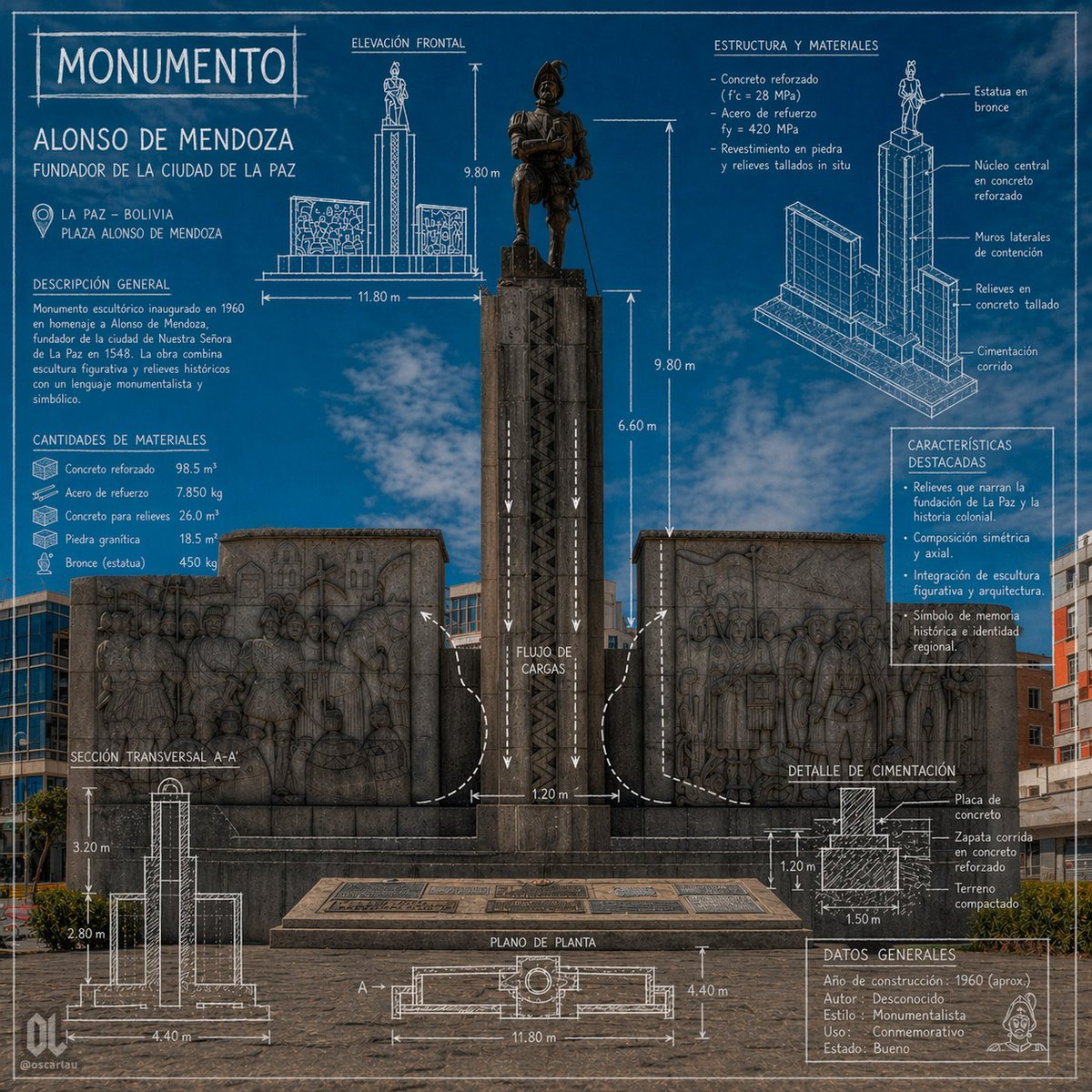
Blueprint Monument Infographic Poster
This prompt generates a square, information-dense architectural infographic poster of a historic monument, suitable for civic heritage, tourism, or educational visualizations.
This is a GPT Image 2 prompt case for Graphic & Poster. Use the copy-ready prompt below to generate similar visuals, and review Awesome GPT Image 2 Prompts attribution plus commercial-use rights before reuse.
Free 1K preview
Generate one preview image instantly, no sign-up required.
Prompt
Copy-ready prompt
{
  "type": "architectural monument infographic poster",
  "subject": {
    "monument_name": "MONUMENTO",
    "person": "ALONSO DE MENDOZA",
    "subtitle": "FUNDADOR DE LA CIUDAD DE LA PAZ",
    "location_city": "LA PAZ – BOLIVIA",
    "location_site": "PLAZA ALONSO DE MENDOZA",
    "main_view": "front-facing photograph of the monument integrated with blueprint-style technical overlays",
    "environment": "urban plaza under a vivid blue sky with light clouds, surrounding mid-rise buildings in the background, paved stone foreground"
  },
  "style": {
    "visual_language": "photorealistic monument photo combined with architectural drafting graphics",
    "color_palette": "deep cobalt blue background overlay, white technical linework and labels, dark gray stone, bronze statue",
    "mood": "formal, commemorative, informative, civic heritage poster",
    "rendering": "sharp, high-detail, symmetrical composition, infographic presentation, blueprint aesthetics"
  },
  "monument": {
    "centerpiece": "tall central pedestal with a bronze statue of a historical conquistador standing on top, flanked by 2 large stone relief walls",
    "count_flanking_reliefs": 2,
    "materials_visible": [
      "bronze statue",
      "dark carved stone pedestal",
      "stone bas-relief panels",
      "concrete base"
    ]
  },
  "layout": {
    "sections": [
      {
        "title": "MONUMENTO",
        "position": "top left",
        "count": 1,
        "labels": [
          "ALONSO DE MENDOZA",
          "FUNDADOR DE LA CIUDAD DE LA PAZ"
        ]
      },
      {
        "title": "DESCRIPCIÓN GENERAL",
        "position": "left upper-middle",
        "count": 1,
        "labels": [
          "Monumento escultórico inaugurado en 1960 en homenaje a Alonso de Mendoza, fundador de la ciudad de Nuestra Señora de La Paz en 1548. La obra combina escultura figurativa y relieves históricos con un lenguaje monumentalista y simbólico."
        ]
      },
      {
        "title": "CANTIDADES DE MATERIALES",
        "position": "left middle",
        "count": 5,
        "labels": [
          "Concreto reforzado 98.5 m³",
          "Acero de refuerzo 7.850 kg",
          "Concreto para relieves 26.0 m³",
          "Piedra granítica 18.5 m³",
          "Bronce (estatua) 450 kg"
        ]
      },
      {
        "title": "ELEVACIÓN FRONTAL",
        "position": "top center",
        "count": 4,
        "labels": [
          "9.80 m",
          "11.80 m",
          "9.80 m",
          "6.60 m"
        ]
      },
      {
        "title": "ESTRUCTURA Y MATERIALES",
        "position": "top right",
        "count": 4,
        "labels": [
          "Concreto armado (f'c = 28 MPa)",
          "Acero de refuerzo fy = 420 MPa",
          "Revestimiento en piedra y relieves tallados in situ",
          "bronze statue"
        ]
      },
      {
        "title": "CARACTERÍSTICAS DESTACADAS",
        "position": "right middle",
        "count": 4,
        "labels": [
          "Relieves que narran la fundación de La Paz y la historia colonial.",
          "Composición simétrica y axial.",
          "Integración de escultura figurativa y arquitectura.",
          "Símbolo de memoria histórica e identidad regional."
        ]
      },
      {
        "title": "SECCIÓN TRANSVERSAL A-A'",
        "position": "bottom left",
        "count": 3,
        "labels": [
          "3.20 m",
          "2.80 m",
          "4.40 m"
        ]
      },
      {
        "title": "PLANO DE PLANTA",
        "position": "bottom center",
        "count": 3,
        "labels": [
          "A'",
          "11.80 m",
          "4.40 m"
        ]
      },
      {
        "title": "DETALLE DE CIMENTACIÓN",
        "position": "bottom right",
        "count": 4,
        "labels": [
          "Placa de concreto",
          "Zapata corrida en concreto reforzado",
          "Terreno compactado",
          "1.50 m"
        ]
      },
      {
        "title": "DATOS GENERALES",
        "position": "lower right",
        "count": 5,
        "labels": [
          "Año de construcción: 1960 (aprox.)",
          "Autor: Desconocido",
          "Estilo: Monumentalista",
          "Uso: Conmemorativo",
          "Estado: Bueno"
        ]
      }
    ],
    "centerpiece": "full monument centered vertically with overlaid arrows, dimensions, and load-flow diagram",
    "supporting_graphics": "1 front elevation sketch, 1 exploded isometric structural diagram, 1 cross-section diagram, 1 plan view diagram, 1 foundation detail diagram, multiple arrows and measurement annotations"
  },
  "text": {
    "headline": "{argument name=\"headline text\" default=\"MONUMENTO\"}",
    "subject_name": "{argument name=\"monument name\" default=\"ALONSO DE MENDOZA\"}",
    "subtitle": "{argument name=\"subtitle\" default=\"FUNDADOR DE LA CIUDAD DE LA PAZ\"}",
    "city": "{argument name=\"city\" default=\"LA PAZ – BOLIVIA\"}",
    "site": "{argument name=\"site\" default=\"PLAZA ALONSO DE MENDOZA\"}"
  },
  "composition": {
    "aspect_ratio": "1:1",
    "camera": "straight-on eye-level shot, centered and symmetrical",
    "density": "information-rich poster with technical annotations surrounding the monument",
    "branding": "small creator mark and social handle in lower corners"
  }
}
Prompt variables
Editable argument placeholders found in the prompt, with their default values.
Best for
- - Graphic & Poster visual exploration
- - Image generation and reference-image edits
- - Reusable briefs that keep source attribution visible
Change these parts
- - Subject, product, character, or scene
- - Aspect ratio, camera, lighting, and background
- - Brand, text, color, and output constraints
Recommended model and settings
- - Model: gpt-image-2
- - Input mode: Text to Image
- - Aspect ratio: source
- - Commercial status: review original source
How to use this prompt
- 1. Copy the prompt and preserve its structure for the first test.
- 2. Replace the subject, context, and publishing channel.
- 3. Change one camera, lighting, or style variable per iteration.
- 4. Inspect the output, source, text, and rights before reuse.
Limitations, source, and reuse cautions
- - Generated output is an editable draft, not factual, legal, or rights evidence.
- - Review the linked source, people, brands, logos, text, and third-party media before commercial use.
More cases in this category
Prioritized by category, input mode compatibility, quality, and lower risk.





Reuse and source notes
Use this prompt safely after previewing the case.
- 1.Copy the prompt or open it directly in Dovoo with the generation button.
- 2.Adjust variables, aspect ratio, and reference images for your own use case.
- 3.Before publishing or paid usage, verify source rights, attribution requirements, and brand or likeness risks.
Can I use this prompt commercially?
Commercial-use status is allowed. Review the original source, license, brand constraints, and legal requirements before paid usage.
Where does this case come from?
This case is imported from Awesome GPT Image 2 Prompts; keep attribution visible and check the source URL before reuse.