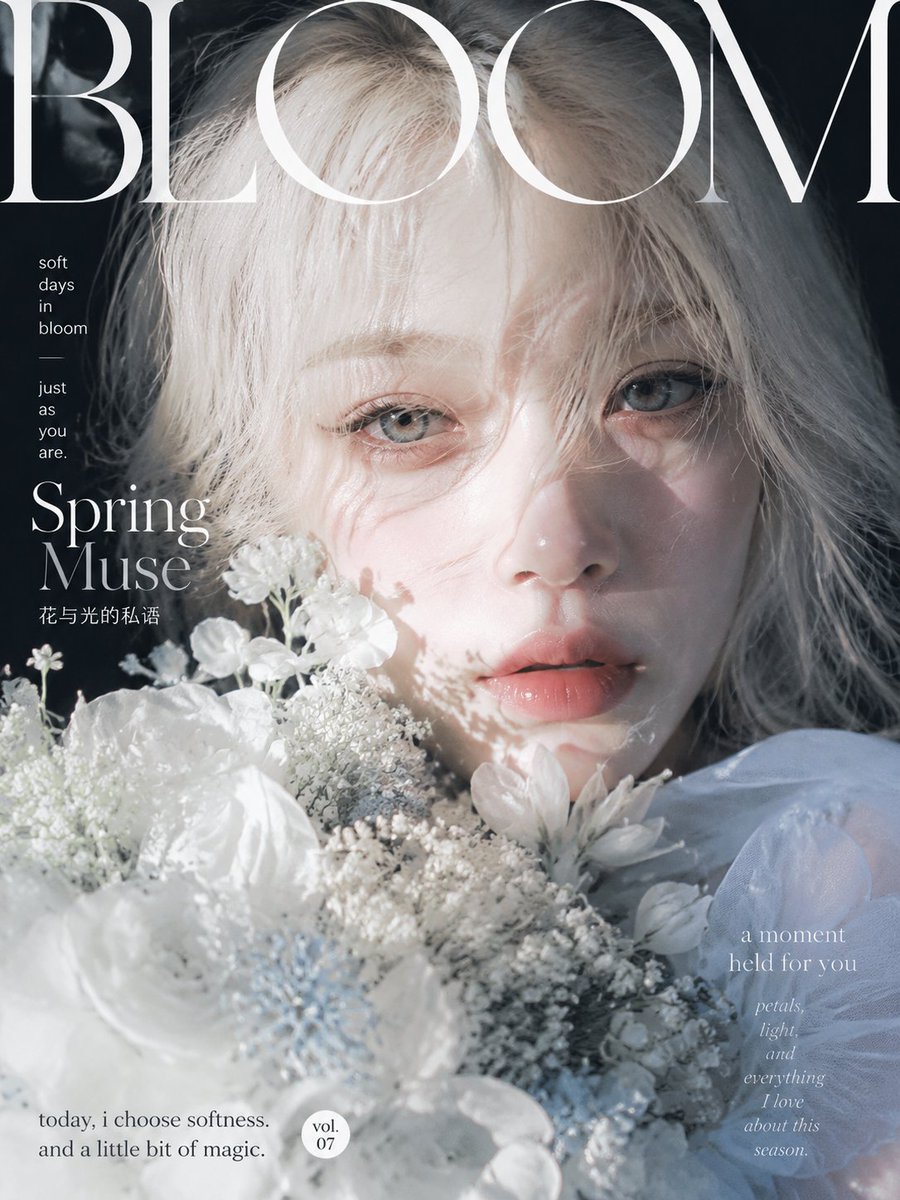
Ethereal Bloom Magazine Cover
A refined prompt for generating a luminous spring fashion magazine cover with a close-up floral portrait and elegant editorial typography.
This is a GPT Image 2 prompt case for Fashion & Beauty. Use the copy-ready prompt below to generate similar visuals, and review Awesome GPT Image 2 Prompts attribution plus commercial-use rights before reuse.
Free 1K preview
Generate one preview image instantly, no sign-up required.
Prompt
Copy-ready prompt
Goal: Create an ethereal fashion magazine cover featuring a close-up spring portrait of a young woman surrounded by white flowers, with high-end editorial typography and soft cinematic light.

Canvas: Vertical magazine cover, 3:4 aspect ratio, full-bleed photography, cool pale blue-white palette with deep shadowed background.

Subject details: A delicate young female muse with {argument name="character name" default="platinum blonde"} tousled hair falling across her forehead and partially over one eye, very fair skin, pale blue-gray eyes, glossy natural peach lips, minimal makeup, dreamy calm expression, looking directly at the viewer. Her face fills the upper center and right side of the cover, cropped closely at the top and sides. She wears airy white translucent fabric around her shoulders.

Flowers and props: Exactly 5 visible flower groups in the foreground: 1 large soft white flower dominating the lower left foreground, 1 cluster of tiny baby's-breath blossoms across the lower center, 1 group of small white flowers rising beside the left cheek, 1 white daisy-like flower near the lower right of the lips, and 1 hazy white floral mass along the bottom edge. The flowers partially cover the lower face and chest, creating a romantic spring bouquet effect.

Lighting and mood: Strong natural sunlight from the upper left creates bright overexposed highlights on the hair, face, and flowers, with lace-like floral shadows cast across the cheek and lips. The right side has cooler soft shadows. Overall mood is fragile, luminous, quiet, romantic, and artistic.

Layout and typography: Design as a luxury magazine cover. Place a huge elegant Didot-style serif masthead across the very top reading {argument name="hair color" default="BLOOM"}, in white, extremely large, partially cropped by the top and side edges and overlapping the subject's hair. Use refined white serif typography throughout.

Text content: Include exactly 6 text elements: 1 masthead at the top: "BLOOM"; 2 small stacked copy on the upper left: "soft / days / in / bloom" then a thin dash and "just / as / you / are."; 3 main cover line on the left: {argument name="magazine title" default="BLOOM"}; 4 small Chinese subtitle beneath it: {argument name="feature title" default="Spring Muse"}; 5 bottom-left sentence: {argument name="bottom caption" default="today, i choose softness. and a little bit of magic."}; 6 lower-right poetic text: "a moment / held for you / petals, / light, / and / everything / I love / about this / season." Add one small white circular badge near the lower center-left reading exactly "vol. / 07".

Constraints: Keep the cover photographic, not illustrated. Do not add extra people, extra headlines, barcodes, logos, or watermarks. Maintain a premium editorial aesthetic with soft grain, shallow depth of field, bright whites, pale skin tones, and elegant negative space.
Prompt variables
Editable argument placeholders found in the prompt, with their default values.
Best for
- - Fashion & Beauty visual exploration
- - Image generation and reference-image edits
- - Reusable briefs that keep source attribution visible
Change these parts
- - Subject, product, character, or scene
- - Aspect ratio, camera, lighting, and background
- - Brand, text, color, and output constraints
Recommended model and settings
- - Model: gpt-image-2
- - Input mode: Text to Image
- - Aspect ratio: source
- - Commercial status: review original source
How to use this prompt
- 1. Copy the prompt and preserve its structure for the first test.
- 2. Replace the subject, context, and publishing channel.
- 3. Change one camera, lighting, or style variable per iteration.
- 4. Inspect the output, source, text, and rights before reuse.
Limitations, source, and reuse cautions
- - Generated output is an editable draft, not factual, legal, or rights evidence.
- - Review the linked source, people, brands, logos, text, and third-party media before commercial use.
More cases in this category
Prioritized by category, input mode compatibility, quality, and lower risk.

Reuse and source notes
Use this prompt safely after previewing the case.
- 1.Copy the prompt or open it directly in Dovoo with the generation button.
- 2.Adjust variables, aspect ratio, and reference images for your own use case.
- 3.Before publishing or paid usage, verify source rights, attribution requirements, and brand or likeness risks.
Can I use this prompt commercially?
Commercial-use status is allowed. Review the original source, license, brand constraints, and legal requirements before paid usage.
Where does this case come from?
This case is imported from Awesome GPT Image 2 Prompts; keep attribution visible and check the source URL before reuse.