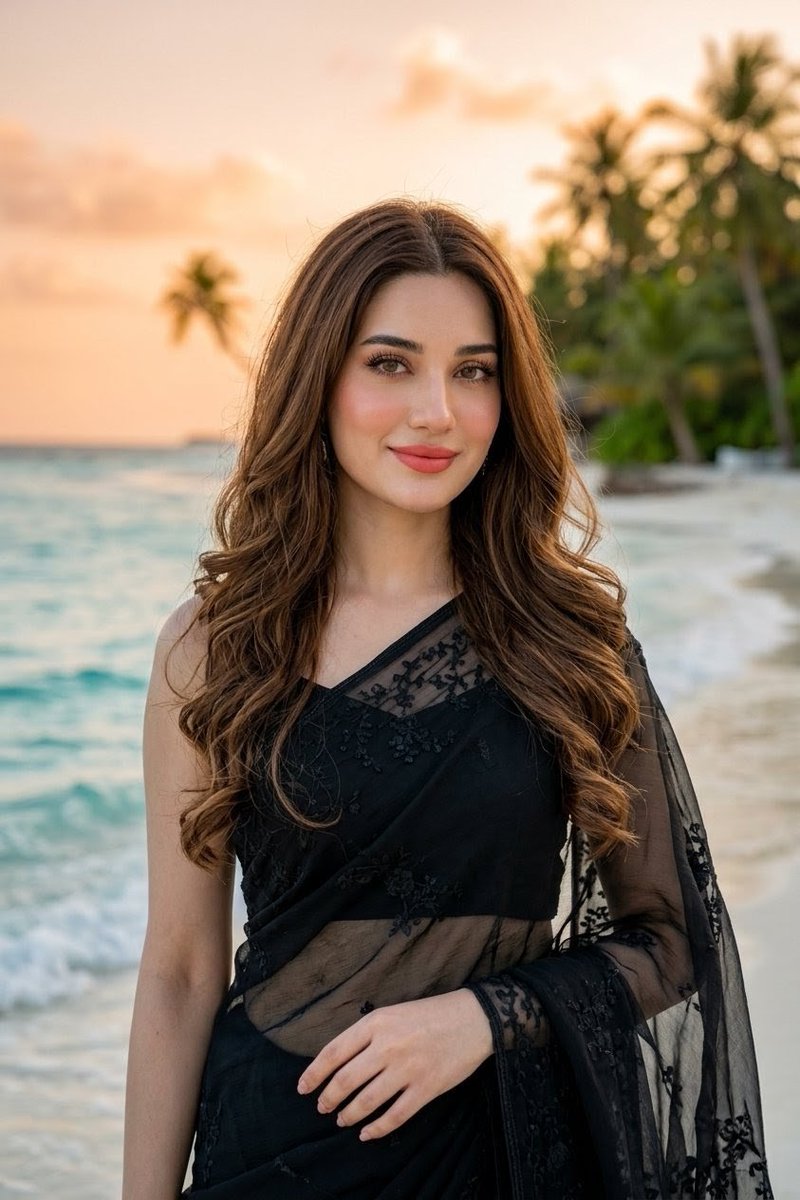
Beach Portrait in Black Saree
A realistic golden-hour beach fashion portrait of an Indian woman in a sheer black embroidered saree with flowing curled hair and an obscured face placeholder.
This is a GPT Image 2 prompt case for Portrait & Character. Use the copy-ready prompt below to generate similar visuals, and review Awesome GPT Image 2 Prompts attribution plus commercial-use rights before reuse.
Free 1K preview
Generate one preview image instantly, no sign-up required.
Prompt
Copy-ready prompt
Create a realistic vertical portrait photograph of an {argument name="ethnicity and gender" default="Indian woman"} standing on a tropical beach at sunset, framed from mid-thigh to above the head. She has long, flowing, soft, voluminous {argument name="hair color" default="brown hair"} with gentle loose curls cascading over both shoulders and down her back, natural free-flowing texture, center part, glossy highlights, and wind-touched strands. She wears an elegant {argument name="outfit" default="black sheer embroidered saree with a matching black blouse"}, with delicate floral lace embroidery, translucent net fabric draped over one shoulder and across the torso, and a sophisticated evening look. Her pose is relaxed and graceful, facing the camera, one arm hanging naturally and the other hand lightly resting near the waist. The face area should be intentionally obscured by a plain rectangular skin-tone placeholder block centered over the face, covering the facial features from forehead to chin while leaving the hair, neck, and outfit visible. Background: shallow-depth-of-field tropical shoreline with turquoise ocean waves on the left, pale sandy beach on the right, blurred palm trees and lush greenery in the distance, warm peach-orange sunset sky, golden-hour lighting, soft bokeh, cinematic travel-fashion photography. Use natural skin tones, realistic fabric transparency, high detail in hair and saree embroidery, vertical 2:3 composition, no text, no watermark, no extra people.Prompt variables
Editable argument placeholders found in the prompt, with their default values.
Best for
- - Portrait & Character visual exploration
- - Image generation and reference-image edits
- - Reusable briefs that keep source attribution visible
Change these parts
- - Subject, product, character, or scene
- - Aspect ratio, camera, lighting, and background
- - Brand, text, color, and output constraints
Recommended model and settings
- - Model: gpt-image-2
- - Input mode: Text to Image
- - Aspect ratio: source
- - Commercial status: review original source
How to use this prompt
- 1. Copy the prompt and preserve its structure for the first test.
- 2. Replace the subject, context, and publishing channel.
- 3. Change one camera, lighting, or style variable per iteration.
- 4. Inspect the output, source, text, and rights before reuse.
Limitations, source, and reuse cautions
- - Generated output is an editable draft, not factual, legal, or rights evidence.
- - Review the linked source, people, brands, logos, text, and third-party media before commercial use.
More cases in this category
Prioritized by category, input mode compatibility, quality, and lower risk.



Reuse and source notes
Use this prompt safely after previewing the case.
- 1.Copy the prompt or open it directly in Dovoo with the generation button.
- 2.Adjust variables, aspect ratio, and reference images for your own use case.
- 3.Before publishing or paid usage, verify source rights, attribution requirements, and brand or likeness risks.
Can I use this prompt commercially?
Commercial-use status is allowed. Review the original source, license, brand constraints, and legal requirements before paid usage.
Where does this case come from?
This case is imported from Awesome GPT Image 2 Prompts; keep attribution visible and check the source URL before reuse.