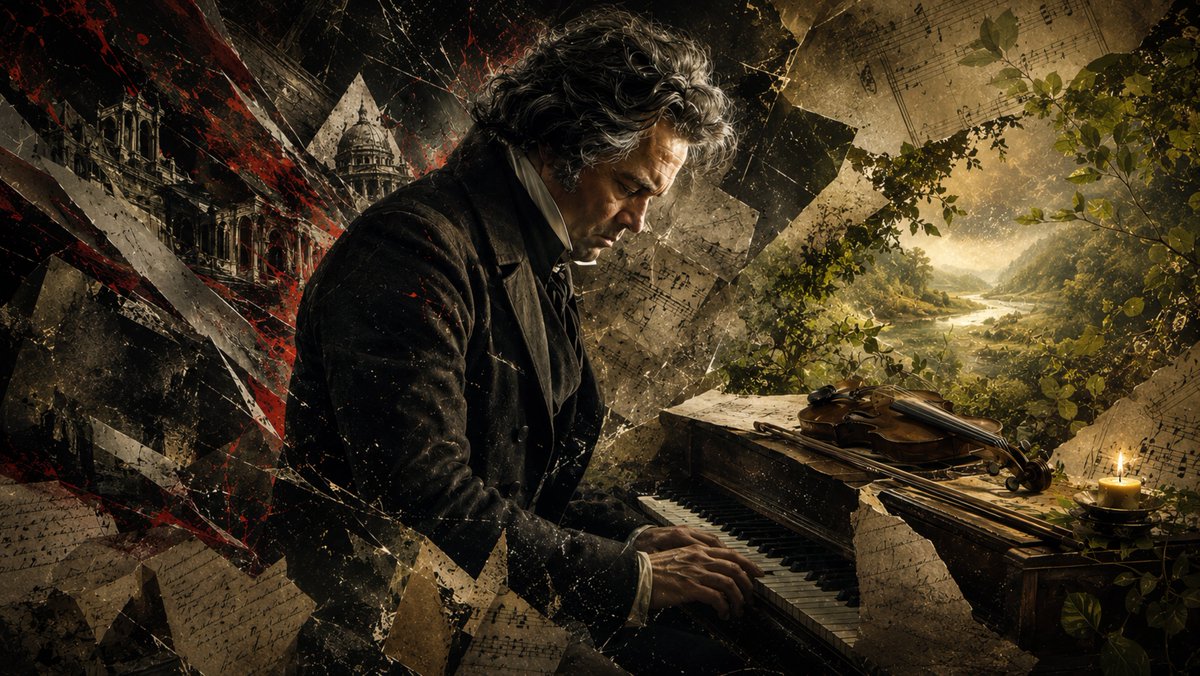
Beethoven Tragic Sonata Collage
A cinematic Romantic-era portrait of Beethoven playing piano amid shattered manuscripts, a violin, candlelight, and a peaceful landscape for classical music storytelling.
This is a GPT Image 2 prompt case for Portrait & Character. Use the copy-ready prompt below to generate similar visuals, and review Awesome GPT Image 2 Prompts attribution plus commercial-use rights before reuse.
Free 1K preview
Generate one preview image instantly, no sign-up required.
Prompt
Copy-ready prompt
Create a dramatic cinematic historical collage of {argument name="composer name" default="Ludwig van Beethoven"} seated in profile at an old wooden piano, playing with both hands while looking downward in grief and concentration. The scene is a wide 16:9 composition with the composer occupying the left-center, wearing a dark early-19th-century coat, white shirt collar, and black cravat, with wild gray-brown curly hair and a weathered face lit by warm side light. Use a fractured mixed-media aesthetic: torn parchment, cracked glass shards, diagonal black-and-red abstract slashes, dust, scratches, and layered fragments of handwritten sheet music surrounding him. Include exactly 1 grand/fortepiano-like keyboard instrument in the foreground, exactly 1 violin resting on top of the piano, exactly 1 lit candle on the far right, exactly 1 distant classical cathedral or monumental building fragment on the left, and exactly 1 serene golden landscape visible through foliage on the right, with a river or lake winding between mountains under hazy sunlight. The mood should contrast collapse and serenity: dark, chaotic, and blood-red on the left; warm, green, and peaceful on the right. Add leafy branches around the right edge and music manuscript fragments floating across the entire image. No readable modern text, no watermark, no logo. Render in ultra-detailed photorealistic digital art with painterly texture, high contrast chiaroscuro, sepia-gold grading, cinematic lighting, dramatic atmosphere, and a tragic Romantic-era tone inspired by {argument name="musical theme" default="late Beethoven sonata melancholy"}.Prompt variables
Editable argument placeholders found in the prompt, with their default values.
Best for
- - Portrait & Character visual exploration
- - Image generation and reference-image edits
- - Reusable briefs that keep source attribution visible
Change these parts
- - Subject, product, character, or scene
- - Aspect ratio, camera, lighting, and background
- - Brand, text, color, and output constraints
Recommended model and settings
- - Model: gpt-image-2
- - Input mode: Text to Image
- - Aspect ratio: source
- - Commercial status: review original source
How to use this prompt
- 1. Copy the prompt and preserve its structure for the first test.
- 2. Replace the subject, context, and publishing channel.
- 3. Change one camera, lighting, or style variable per iteration.
- 4. Inspect the output, source, text, and rights before reuse.
Limitations, source, and reuse cautions
- - Generated output is an editable draft, not factual, legal, or rights evidence.
- - Review the linked source, people, brands, logos, text, and third-party media before commercial use.
More cases in this category
Prioritized by category, input mode compatibility, quality, and lower risk.

Reuse and source notes
Use this prompt safely after previewing the case.
- 1.Copy the prompt or open it directly in Dovoo with the generation button.
- 2.Adjust variables, aspect ratio, and reference images for your own use case.
- 3.Before publishing or paid usage, verify source rights, attribution requirements, and brand or likeness risks.
Can I use this prompt commercially?
Commercial-use status is allowed. Review the original source, license, brand constraints, and legal requirements before paid usage.
Where does this case come from?
This case is imported from Awesome GPT Image 2 Prompts; keep attribution visible and check the source URL before reuse.