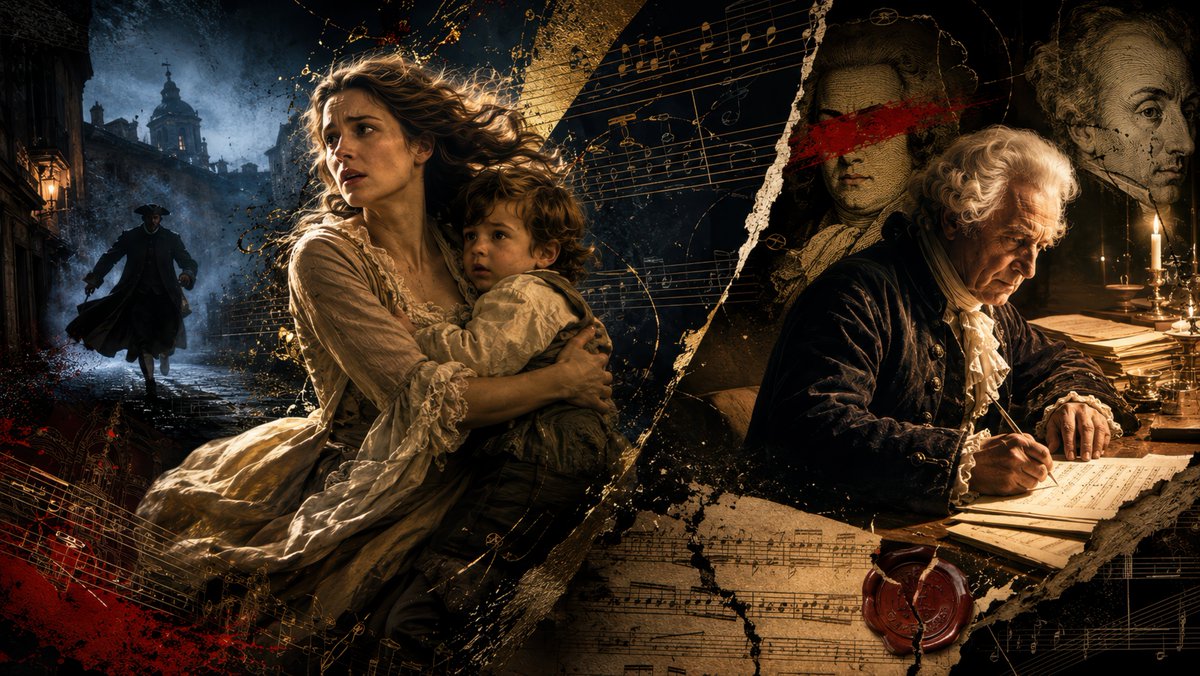
Baroque Composer Mystery Collage
A cinematic historical collage showing a fleeing mother and child alongside an elderly composer writing a mysterious classical score.
This is a GPT Image 2 prompt case for Illustration & Art. Use the copy-ready prompt below to generate similar visuals, and review Awesome GPT Image 2 Prompts attribution plus commercial-use rights before reuse.
Free 1K preview
Generate one preview image instantly, no sign-up required.
Prompt
Copy-ready prompt
Create a dramatic cinematic historical collage in a wide 16:9 format about a lost classical music masterpiece. The scene is split diagonally by torn parchment and black-gold paint textures. On the left, show a terrified young mother in an 18th-century cream linen dress fleeing through a dark rain-slick European city street while clutching her small curly-haired son in her arms; behind them, a shadowy armed husband pursues them through blue fog near baroque church silhouettes and old street lanterns. On the right, show an elderly 18th-century composer, about {argument name="composer age" default="84"} years old, with white powdered hair and a black velvet coat, seated at a candlelit wooden desk writing musical notation with a quill on manuscript paper. Behind him, include two sepia portrait busts or painted composer portraits, one with a rough red brushstroke across the eyes to suggest misattribution and historical mystery. Overlay the entire image with exactly three prominent manuscript-music elements: one sweeping golden staff of notes across the upper center, one torn sheet of musical score across the lower center, and one smaller red-and-gold notation fragment in the lower left. Add scattered gold ink splashes, black soot textures, torn paper edges, a red wax seal near the lower right, stacks of old papers, brass candlesticks with lit candles, and deep chiaroscuro lighting. Use a baroque thriller aesthetic, ultra-detailed painterly photorealism, moody blue shadows on the fleeing figures, warm amber candlelight on the composer, high contrast, textured parchment background, no modern objects, no readable text, no watermark.Prompt variables
Editable argument placeholders found in the prompt, with their default values.
Best for
- - Illustration & Art visual exploration
- - Image generation and reference-image edits
- - Reusable briefs that keep source attribution visible
Change these parts
- - Subject, product, character, or scene
- - Aspect ratio, camera, lighting, and background
- - Brand, text, color, and output constraints
Recommended model and settings
- - Model: gpt-image-2
- - Input mode: Text to Image
- - Aspect ratio: source
- - Commercial status: review original source
How to use this prompt
- 1. Copy the prompt and preserve its structure for the first test.
- 2. Replace the subject, context, and publishing channel.
- 3. Change one camera, lighting, or style variable per iteration.
- 4. Inspect the output, source, text, and rights before reuse.
Limitations, source, and reuse cautions
- - Generated output is an editable draft, not factual, legal, or rights evidence.
- - Review the linked source, people, brands, logos, text, and third-party media before commercial use.
More cases in this category
Prioritized by category, input mode compatibility, quality, and lower risk.

Reuse and source notes
Use this prompt safely after previewing the case.
- 1.Copy the prompt or open it directly in Dovoo with the generation button.
- 2.Adjust variables, aspect ratio, and reference images for your own use case.
- 3.Before publishing or paid usage, verify source rights, attribution requirements, and brand or likeness risks.
Can I use this prompt commercially?
Commercial-use status is allowed. Review the original source, license, brand constraints, and legal requirements before paid usage.
Where does this case come from?
This case is imported from Awesome GPT Image 2 Prompts; keep attribution visible and check the source URL before reuse.