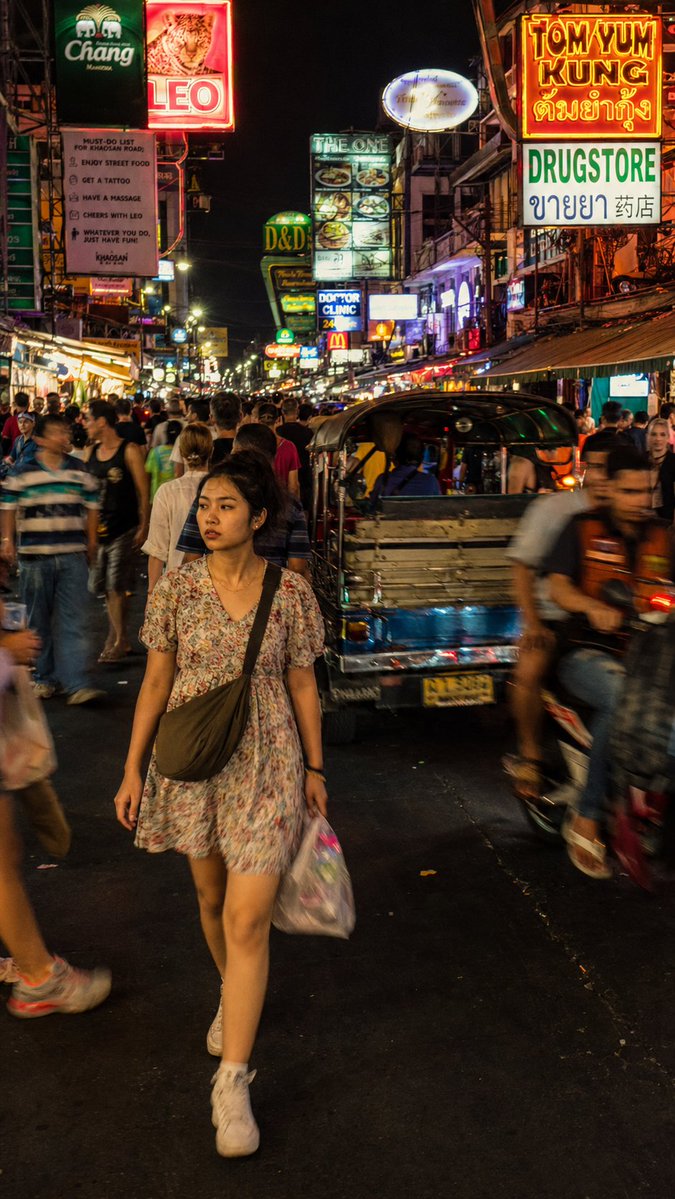
Bangkok Night Street Photography
A documentary-style street photography prompt capturing a young woman in the chaotic neon atmosphere of Khao San Road.
This is a GPT Image 2 prompt case for Portrait & Character. Use the copy-ready prompt below to generate similar visuals, and review Awesome GPT Image 2 Prompts attribution plus commercial-use rights before reuse.
Free 1K preview
Generate one preview image instantly, no sign-up required.
Prompt
Copy-ready prompt
A street photograph capturing a {argument name="subject" default="young Thai woman"} cutting through the dense nighttime crowd on {argument name="location" default="Khao San Road, Bangkok"}. The subject is caught mid-stride wearing a {argument name="clothing" default="loose floral dress"}, expression distracted and completely natural, not performing for the camera, small crossbody bag across her shoulder. The environment is dense and chaotic: bar signs in Thai and English stacked vertically, tuk-tuks and motorbikes pressing through foot traffic, tourists and locals blending in the moving crowd around her. Lighting is messy and authentic: uneven bar fluorescent spill, LED signage scatter, occasional reflected flash from the crowd, no clean single source. Composition: full-body medium shot from slightly above eye level, subject in sharp focus in left center, surrounding crowd in natural motion blur, neon signs stretching tall in the vertical frame above. Color palette: acidic yellow, electric pink, deep orange — intense but documentary-accurate neon saturation, not stylized. Render with photographic realism: subtle film grain, avoid over-smoothed CG textures. Skin: subsurface scattering and micro-texture. Preserve authentic motion blur on background crowd, not artificial bokeh. Photorealistic rendering, no watermark.Prompt variables
Editable argument placeholders found in the prompt, with their default values.
Best for
- - Portrait & Character visual exploration
- - Image generation and reference-image edits
- - Reusable briefs that keep source attribution visible
Change these parts
- - Subject, product, character, or scene
- - Aspect ratio, camera, lighting, and background
- - Brand, text, color, and output constraints
Recommended model and settings
- - Model: gpt-image-2
- - Input mode: Text to Image
- - Aspect ratio: source
- - Commercial status: review original source
How to use this prompt
- 1. Copy the prompt and preserve its structure for the first test.
- 2. Replace the subject, context, and publishing channel.
- 3. Change one camera, lighting, or style variable per iteration.
- 4. Inspect the output, source, text, and rights before reuse.
Limitations, source, and reuse cautions
- - Generated output is an editable draft, not factual, legal, or rights evidence.
- - Review the linked source, people, brands, logos, text, and third-party media before commercial use.
More cases in this category
Prioritized by category, input mode compatibility, quality, and lower risk.


Reuse and source notes
Use this prompt safely after previewing the case.
- 1.Copy the prompt or open it directly in Dovoo with the generation button.
- 2.Adjust variables, aspect ratio, and reference images for your own use case.
- 3.Before publishing or paid usage, verify source rights, attribution requirements, and brand or likeness risks.
Can I use this prompt commercially?
Commercial-use status is allowed. Review the original source, license, brand constraints, and legal requirements before paid usage.
Where does this case come from?
This case is imported from Awesome GPT Image 2 Prompts; keep attribution visible and check the source URL before reuse.