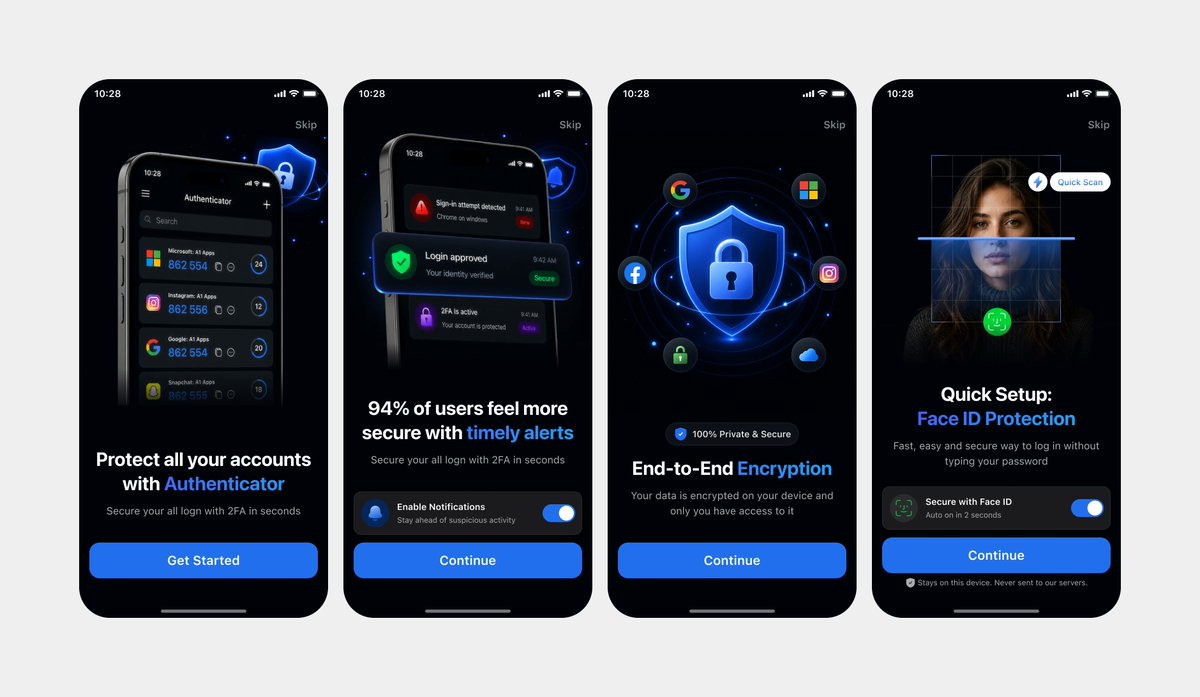
Clean Authenticator Onboarding UI Mockups
Generates a polished four-screen dark-mode mobile onboarding presentation from photographed UI references, useful for app landing pages or design showcases.
This is a GPT Image 2 prompt case for Product & Commercial. Use the copy-ready prompt below to generate similar visuals, and review Awesome GPT Image 2 Prompts attribution plus commercial-use rights before reuse.
Free 1K preview
Generate one preview image instantly, no sign-up required.
Prompt
Copy-ready prompt
Using REFERENCE_0 and REFERENCE_1 as the design references, recreate the same 4 mobile onboarding screens as clean, high-fidelity UI mockups instead of a photographed laptop screen. Remove all perspective distortion, laptop/browser surroundings, glare, and camera artifacts. Present the four iPhone-style screens front-facing, evenly spaced in one horizontal row on a light gray canvas, preserving the dark-mode version from REFERENCE_0 and the same screen order, typography hierarchy, blue security visual style, rounded phone frames, status bars, skip links, bottom home indicators, and CTA structure. Keep exactly 4 screens: 1) authenticator account protection with “Get Started”, 2) timely alerts with notification toggle and “Continue”, 3) end-to-end encryption with shield/lock and social icons plus “Continue”, 4) Face ID protection quick setup with scan overlay, toggle, and “Continue”. Make the UI crisp, polished, app-store-presentation ready, with sharp readable text and consistent spacing.
Best for
- - Product & Commercial visual exploration
- - Image generation and reference-image edits
- - Reusable briefs that keep source attribution visible
Change these parts
- - Subject, product, character, or scene
- - Aspect ratio, camera, lighting, and background
- - Brand, text, color, and output constraints
Recommended model and settings
- - Model: gpt-image-2
- - Input mode: Text to Image
- - Aspect ratio: source
- - Commercial status: review original source
How to use this prompt
- 1. Copy the prompt and preserve its structure for the first test.
- 2. Replace the subject, context, and publishing channel.
- 3. Change one camera, lighting, or style variable per iteration.
- 4. Inspect the output, source, text, and rights before reuse.
Limitations, source, and reuse cautions
- - Generated output is an editable draft, not factual, legal, or rights evidence.
- - Review the linked source, people, brands, logos, text, and third-party media before commercial use.
More cases in this category
Prioritized by category, input mode compatibility, quality, and lower risk.


Reuse and source notes
Use this prompt safely after previewing the case.
- 1.Copy the prompt or open it directly in Dovoo with the generation button.
- 2.Adjust variables, aspect ratio, and reference images for your own use case.
- 3.Before publishing or paid usage, verify source rights, attribution requirements, and brand or likeness risks.
Can I use this prompt commercially?
Commercial-use status is allowed. Review the original source, license, brand constraints, and legal requirements before paid usage.
Where does this case come from?
This case is imported from Awesome GPT Image 2 Prompts; keep attribution visible and check the source URL before reuse.