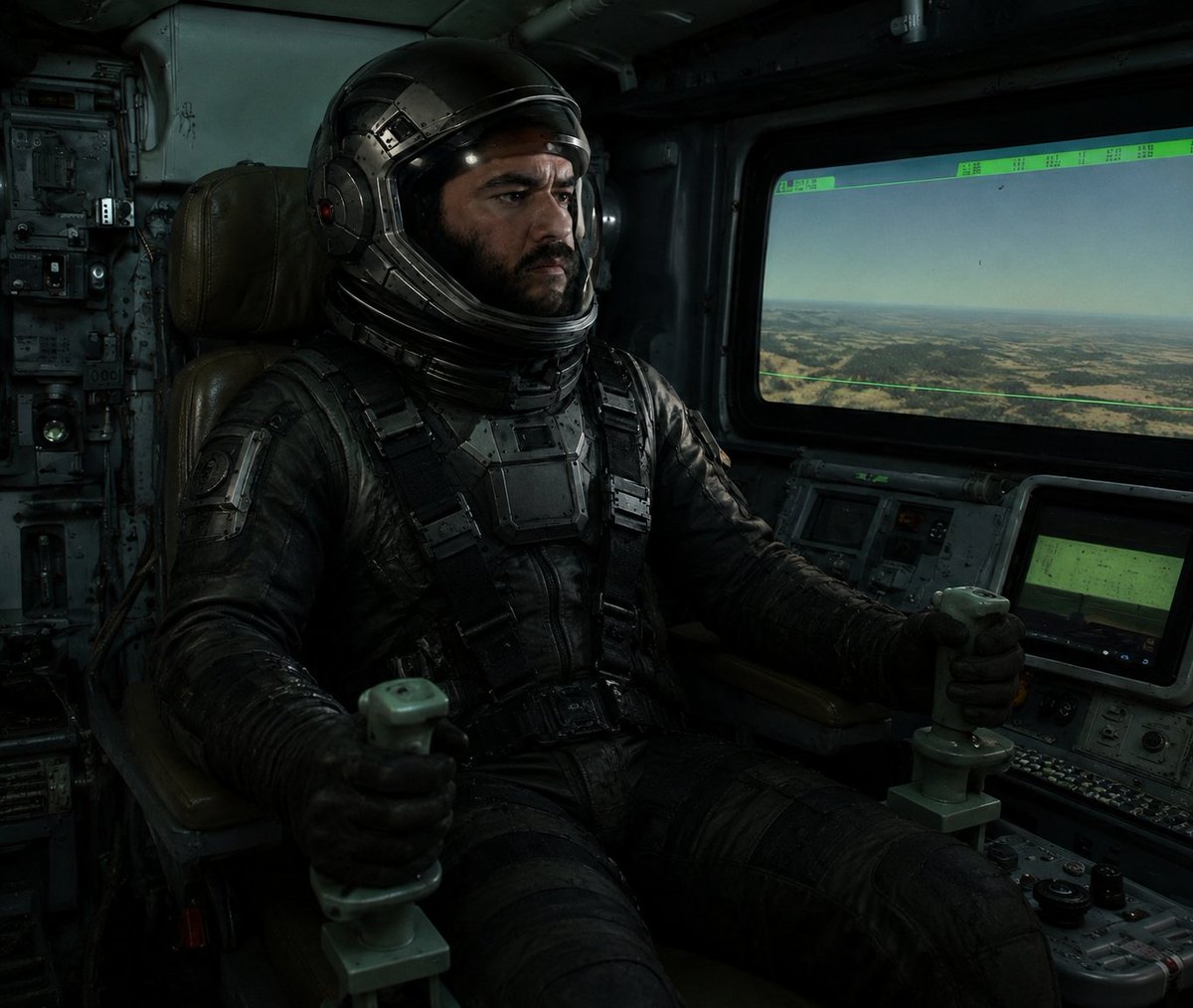
Cinematic Astronaut Cockpit Scene
Generates a gritty realistic sci-fi pilot seated in a dark spacecraft cockpit with control sticks, HUD screens, and a censored visor.
This is a GPT Image 2 prompt case for 人像角色. Use the copy-ready prompt below to generate similar visuals, and review Awesome GPT Image 2 Prompts attribution plus commercial-use rights before reuse.
Prompt
Copy-ready prompt
创作一个昏暗的电影级科幻驾驶舱场景,风格硬核写实:一名宇航员飞行员,{argument name="pilot type" default="装甲宇航员飞行员"},坐在旧式军用航天器或飞行器驾驶舱内,位置偏左,坐在一张磨损的棕色皮革指挥椅上。飞行员身穿厚重的黑色战术增压服,配有绑带、胸甲、手套,以及带有金属分段细节的亮黑色头盔。头盔面罩区域被一个实心的深色方形遮挡块故意遮盖,挡住了脸部和前部面罩。飞行员双手各握住一个淡绿色操纵杆,双臂向前伸展。飞行员周围环绕着密集的模拟控制面板、开关、旋钮、线缆、磨损的金属墙壁以及昏暗的绿色仪表显示屏。在右侧,包含一个大型矩形驾驶舱窗户,展示出淡色天空下荒漠平原和低矮丘陵的朦胧航拍景观,窗户上覆盖着一层薄薄的绿色 HUD 叠加层,顶部边缘带有难以辨认的小型数据标记。窗户下方设有两块较小的控制台屏幕,在按钮和表盘间发出柔和的绿光。采用低调的情绪化照明,带有青蓝色阴影、尘土飞扬的体积感氛围、高对比度、写实纹理、磨损的金属、黑色皮革以及电影级的重打光效果。构图应呈现出反乌托邦太空电影剧照的质感,4:3 纵横比,中近景室内镜头,无可见文字,无额外角色,无 Logo,无水印。Prompt variables
Editable argument placeholders found in the prompt, with their default values.
More cases in this category
Prioritized by category, input mode compatibility, quality, and lower risk.

Reuse and source notes
Use this prompt safely after previewing the case.
- 1.Copy the prompt or open it directly in Dovoo with the generation button.
- 2.Adjust variables, aspect ratio, and reference images for your own use case.
- 3.Before publishing or paid usage, verify source rights, attribution requirements, and brand or likeness risks.
Can I use this prompt commercially?
Commercial-use status is allowed. Review the original source, license, brand constraints, and legal requirements before paid usage.
Where does this case come from?
This case is imported from Awesome GPT Image 2 Prompts; keep attribution visible and check the source URL before reuse.