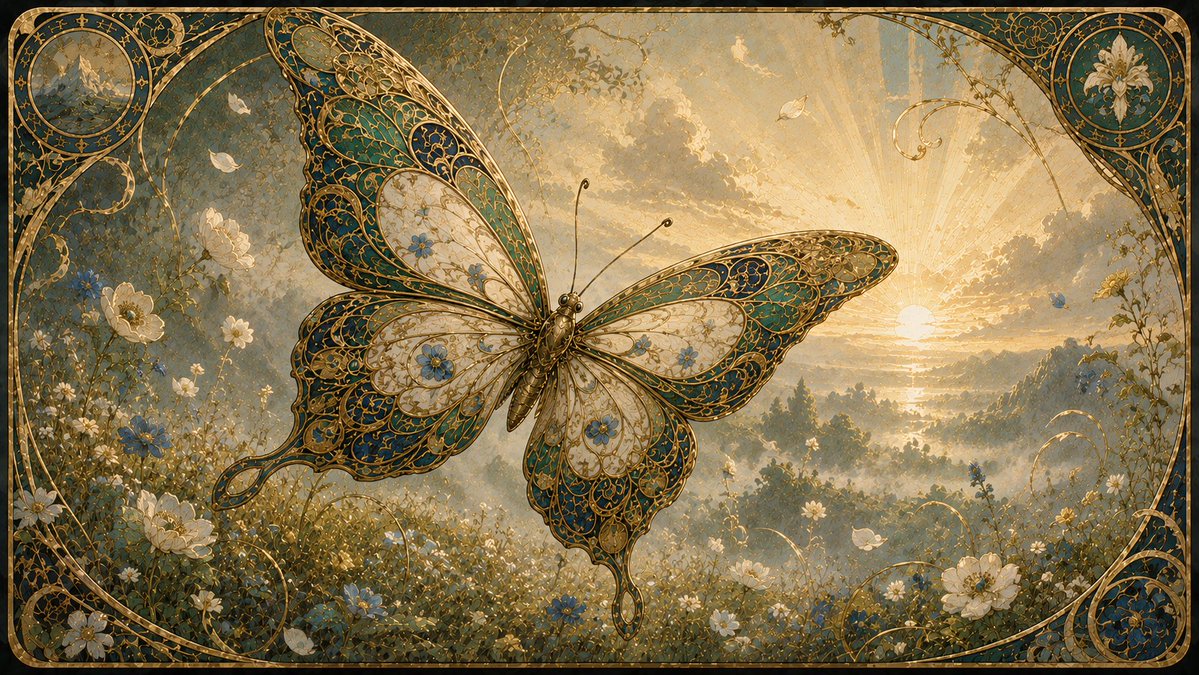
Art Nouveau Jeweled Butterfly
Generates a richly detailed Art Nouveau fantasy butterfly scene with golden filigree, wildflowers, sunrise mist, and an ornate decorative frame.
This is a GPT Image 2 prompt case for Illustration & Art. Use the copy-ready prompt below to generate similar visuals, and review Awesome GPT Image 2 Prompts attribution plus commercial-use rights before reuse.
Free 1K preview
Generate one preview image instantly, no sign-up required.
Prompt
Copy-ready prompt
Create an ornate Art Nouveau fantasy illustration of a single enormous jeweled butterfly hovering over a misty wildflower meadow at sunrise. The butterfly is centered slightly left, wings fully spread, with four visible wings and a slender bronze-gold body with two long antennae; its wings are filigreed like stained glass or enamel jewelry, filled with intricate curling gold lines, teal and deep blue panels, ivory translucent sections, tiny blue flowers, and scalloped lace-like edges. The background is a dreamy golden landscape with a low sun near the right horizon, radiant sunbeams through glowing clouds, distant hazy hills and trees, and soft atmospheric mist. The foreground meadow is dense with delicate white daisies, white blossoms, small blue flowers, grasses, vines, and a few pale petals or butterflies drifting in the air. Frame the entire scene with an elaborate rounded-rectangle Art Nouveau border in aged gold and dark teal, including curling botanical scrollwork and exactly two circular corner medallions: the top-left medallion contains a tiny mountain landscape, and the top-right medallion contains a white lily flower. Add additional golden vine arcs and decorative flourishes around the edges and lower corners, but no text. Use a luxurious antique storybook aesthetic, highly detailed painterly rendering, warm gold and muted teal palette, soft luminous haze, fine engraved linework, symmetrical elegance, cinematic wide composition, 16:9 aspect ratio.
Best for
- - Illustration & Art visual exploration
- - Image generation and reference-image edits
- - Reusable briefs that keep source attribution visible
Change these parts
- - Subject, product, character, or scene
- - Aspect ratio, camera, lighting, and background
- - Brand, text, color, and output constraints
Recommended model and settings
- - Model: gpt-image-2
- - Input mode: Text to Image
- - Aspect ratio: source
- - Commercial status: review original source
How to use this prompt
- 1. Copy the prompt and preserve its structure for the first test.
- 2. Replace the subject, context, and publishing channel.
- 3. Change one camera, lighting, or style variable per iteration.
- 4. Inspect the output, source, text, and rights before reuse.
Limitations, source, and reuse cautions
- - Generated output is an editable draft, not factual, legal, or rights evidence.
- - Review the linked source, people, brands, logos, text, and third-party media before commercial use.
More cases in this category
Prioritized by category, input mode compatibility, quality, and lower risk.



Reuse and source notes
Use this prompt safely after previewing the case.
- 1.Copy the prompt or open it directly in Dovoo with the generation button.
- 2.Adjust variables, aspect ratio, and reference images for your own use case.
- 3.Before publishing or paid usage, verify source rights, attribution requirements, and brand or likeness risks.
Can I use this prompt commercially?
Commercial-use status is allowed. Review the original source, license, brand constraints, and legal requirements before paid usage.
Where does this case come from?
This case is imported from Awesome GPT Image 2 Prompts; keep attribution visible and check the source URL before reuse.