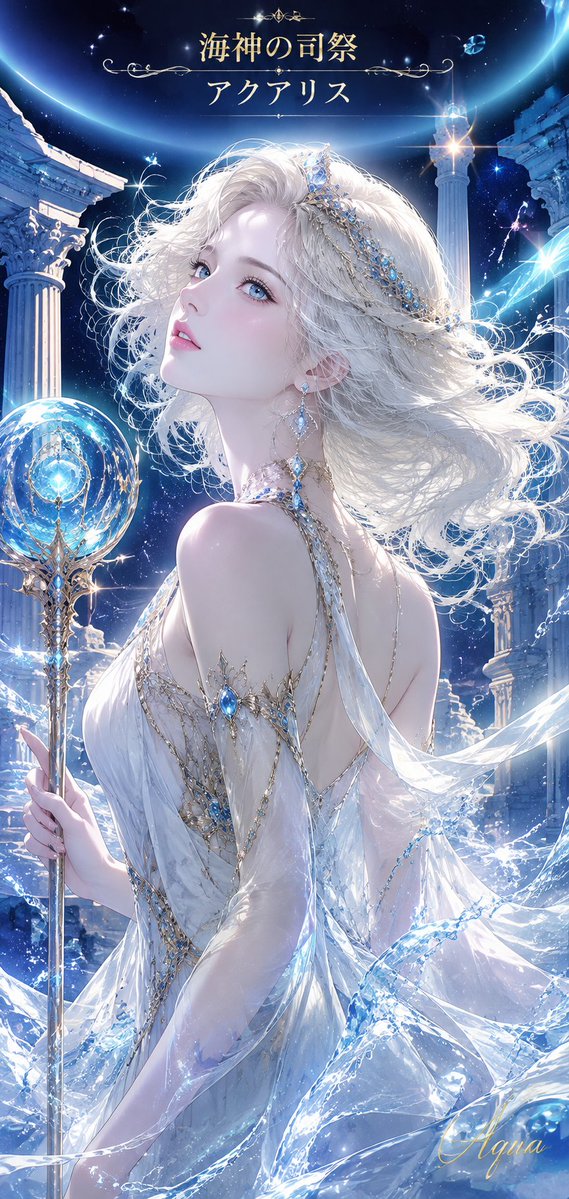
Aquarius Sea Priestess Poster
Creates a luminous anime fantasy poster by transforming a reference portrait into a celestial water-temple priestess scene with Japanese title text.
This is a GPT Image 2 prompt case for Anime & Game. Use the copy-ready prompt below to generate similar visuals, and review Awesome GPT Image 2 Prompts attribution plus commercial-use rights before reuse.
Free 1K preview
Generate one preview image instantly, no sign-up required.
Free text preview doesn’t preserve reference-image consistency.
Prompt
Copy-ready prompt
Using the provided reference image as the character base, transform the portrait into a vertical fantasy poster of {argument name="character name" default="Aquarius"}, an elegant sea-god priestess. Keep the same ethereal pale-haired woman and upward over-the-shoulder gaze, but change her into a full-body/three-quarter composition in an ancient celestial water temple.

Add exactly these new elements: 1 ornate crystal-and-gold staff topped with a glowing blue orb, 2 tall ruined classical columns framing the scene, 1 large luminous crescent/ring arc across the night sky, flowing water and ice-like translucent fabric swirling around her, blue gemstone jewelry and chains in her hair and dress, and sparkling star effects throughout.

Outfit transformation: replace the dark ruffled dress with a sheer white goddess gown decorated with gold filigree and blue gemstones, with flowing translucent sleeves and fabric ribbons. Give her long windblown platinum-white hair with jeweled head chains, and change the earrings to dangling blue crystal earrings.

Text: add a refined gold Japanese title at the top in two centered lines: {argument name="top title line" default="Priest of the Sea God"} and {argument name="bottom title line" default="アクアリス"}, with delicate ornamental divider flourishes. Add a small elegant gold signature at the lower right reading {argument name="signature" default="Aqua"}.

Style: luminous high-detail anime fantasy illustration, icy blue and silver palette, celestial ocean magic, glossy highlights, soft divine backlight, dramatic vertical poster composition. Avoid modern objects, extra characters, or cluttered text.
Prompt variables
Editable argument placeholders found in the prompt, with their default values.
Best for
- - Anime & Game visual exploration
- - Image generation and reference-image edits
- - Reusable briefs that keep source attribution visible
Change these parts
- - Subject, product, character, or scene
- - Aspect ratio, camera, lighting, and background
- - Brand, text, color, and output constraints
Recommended model and settings
- - Model: gpt-image-2
- - Input mode: Image to Image
- - Aspect ratio: source
- - Commercial status: review original source
How to use this prompt
- 1. Copy the prompt and preserve its structure for the first test.
- 2. Replace the subject, context, and publishing channel.
- 3. Change one camera, lighting, or style variable per iteration.
- 4. Inspect the output, source, text, and rights before reuse.
Limitations, source, and reuse cautions
- - Generated output is an editable draft, not factual, legal, or rights evidence.
- - Review the linked source, people, brands, logos, text, and third-party media before commercial use.
More cases in this category
Prioritized by category, input mode compatibility, quality, and lower risk.



Reuse and source notes
Use this prompt safely after previewing the case.
- 1.Copy the prompt or open it directly in Dovoo with the generation button.
- 2.Adjust variables, aspect ratio, and reference images for your own use case.
- 3.Before publishing or paid usage, verify source rights, attribution requirements, and brand or likeness risks.
Can I use this prompt commercially?
Commercial-use status is allowed. Review the original source, license, brand constraints, and legal requirements before paid usage.
Where does this case come from?
This case is imported from Awesome GPT Image 2 Prompts; keep attribution visible and check the source URL before reuse.