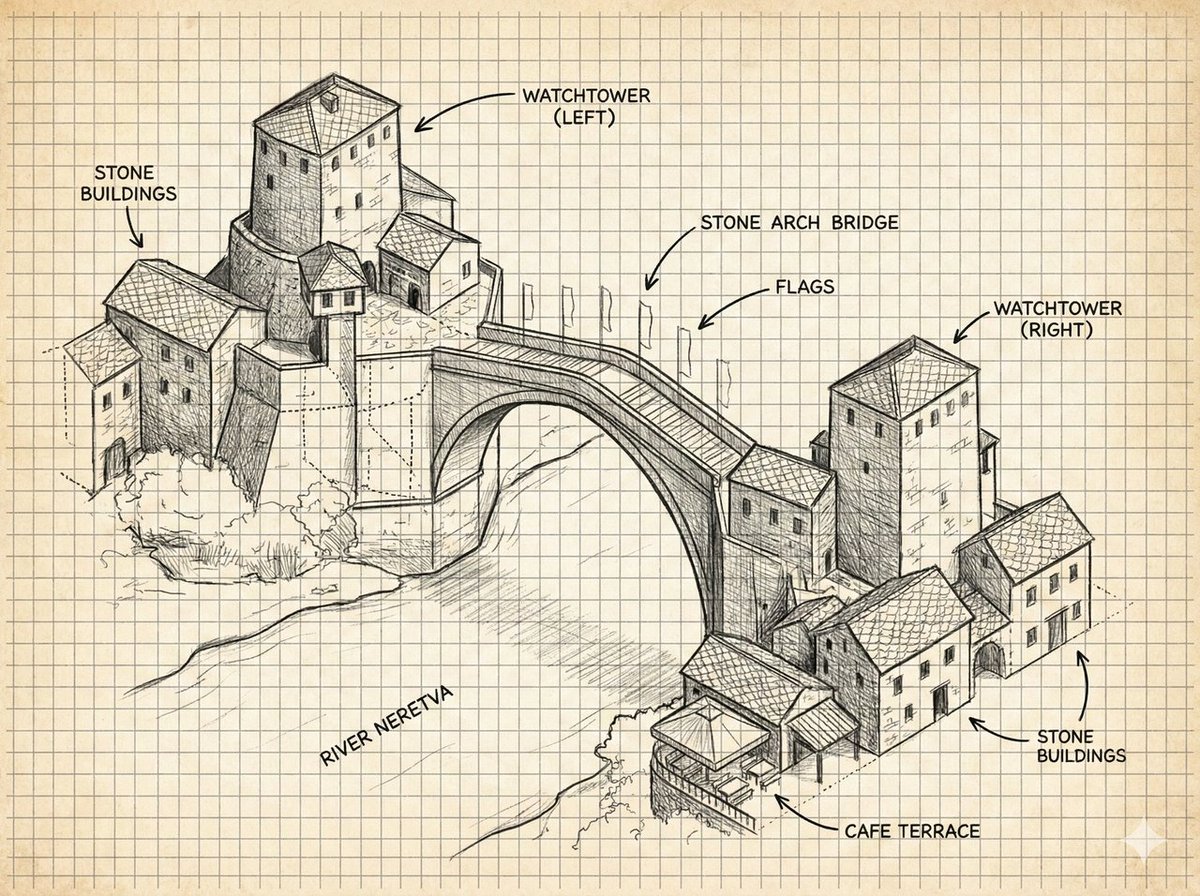
Annotated Stone Arch Bridge Sketch
Creates a labeled architectural notebook illustration of a historic stone arch bridge, useful for concept art, travel diagrams, or educational visual references.
This is a GPT Image 2 prompt case for Illustration & Art. Use the copy-ready prompt below to generate similar visuals, and review Awesome GPT Image 2 Prompts attribution plus commercial-use rights before reuse.
Free 1K preview
Generate one preview image instantly, no sign-up required.
Prompt
Copy-ready prompt
{
  "type": "annotated architectural concept sketch",
  "subject": "a hand-drawn isometric ink illustration of the historic Mostar-style stone arch bridge spanning a river, with clustered medieval stone buildings on both banks and two square watchtowers",
  "style": {
    "medium": "black graphite and technical pen linework",
    "look": "architectural field notebook, concept art, detailed hatching, crosshatching, visible construction lines, rough perspective guide marks",
    "paper": "aged cream graph paper with evenly spaced square grid, slightly yellowed background",
    "color": "monochrome black and gray ink only, no watercolor except subtle paper tone"
  },
  "scene": {
    "main landmark": "{argument name=\"bridge name\" default=\"stone arch bridge\"}",
    "river": "{argument name=\"river name\" default=\"River Neretva\"}",
    "architecture": "Balkan Ottoman-era stone buildings with tiled roofs, small rectangular windows, arched doorways, stacked hillside masonry, one cafe terrace at the lower right riverbank",
    "composition": "wide landscape canvas, three-quarter aerial isometric view, left village cluster higher on the page, right village cluster lower on the page, large single-span arch bridge centered diagonally across the river",
    "details": "arched bridge deck with parapets, flagpoles with small flags along the bridge, stone textures, roof tile patterns, riverbank vegetation scribbles, light shadows beneath the bridge"
  },
  "layout": {
    "labels": {
      "count": 8,
      "items": [
        {
          "text": "STONE BUILDINGS",
          "position": "top left",
          "points_to": "left cluster of stone houses"
        },
        {
          "text": "WATCHTOWER (LEFT)",
          "position": "top center-left",
          "points_to": "tall square tower above the left bank"
        },
        {
          "text": "stone arch bridge",
          "position": "upper center-right",
          "points_to": "main bridge span"
        },
        {
          "text": "FLAGS",
          "position": "upper right of bridge",
          "points_to": "row of flagpoles on bridge"
        },
        {
          "text": "WATCHTOWER (RIGHT)",
          "position": "top right",
          "points_to": "tall square tower on the right bank"
        },
        {
          "text": "STONE BUILDINGS",
          "position": "right middle",
          "points_to": "right cluster of stone houses"
        },
        {
          "text": "CAFE TERRACE",
          "position": "bottom right",
          "points_to": "small covered terrace by the river"
        },
        {
          "text": "River Neretva",
          "position": "lower left river area",
          "points_to": "river flowing under the bridge"
        }
      ]
    },
    "annotation_style": "uppercase sans-serif handwritten labels with curved arrow callouts, clean black lettering",
    "grid": "full-page visible square grid behind all drawing elements"
  },
  "text_parameters": {
    "left watchtower label": "{argument name=\"left tower label\" default=\"WATCHTOWER (LEFT)\"}",
    "right watchtower label": "{argument name=\"right tower label\" default=\"WATCHTOWER (RIGHT)\"}",
    "cafe label": "{argument name=\"cafe label\" default=\"CAFE TERRACE\"}"
  },
  "rendering_instructions": "Generate a precise but hand-sketched architectural diagram, not a photorealistic image. Keep the background clean and uncluttered, preserve the graph-paper notebook aesthetic, use strong line hierarchy for the bridge and buildings, lighter sketch lines for terrain and river flow, and make every label legible in English."
}
Prompt variables
Editable argument placeholders found in the prompt, with their default values.
Best for
- - Illustration & Art visual exploration
- - Image generation and reference-image edits
- - Reusable briefs that keep source attribution visible
Change these parts
- - Subject, product, character, or scene
- - Aspect ratio, camera, lighting, and background
- - Brand, text, color, and output constraints
Recommended model and settings
- - Model: gpt-image-2
- - Input mode: Text to Image
- - Aspect ratio: source
- - Commercial status: review original source
How to use this prompt
- 1. Copy the prompt and preserve its structure for the first test.
- 2. Replace the subject, context, and publishing channel.
- 3. Change one camera, lighting, or style variable per iteration.
- 4. Inspect the output, source, text, and rights before reuse.
Limitations, source, and reuse cautions
- - Generated output is an editable draft, not factual, legal, or rights evidence.
- - Review the linked source, people, brands, logos, text, and third-party media before commercial use.
More cases in this category
Prioritized by category, input mode compatibility, quality, and lower risk.
Reuse and source notes
Use this prompt safely after previewing the case.
- 1.Copy the prompt or open it directly in Dovoo with the generation button.
- 2.Adjust variables, aspect ratio, and reference images for your own use case.
- 3.Before publishing or paid usage, verify source rights, attribution requirements, and brand or likeness risks.
Can I use this prompt commercially?
Commercial-use status is allowed. Review the original source, license, brand constraints, and legal requirements before paid usage.
Where does this case come from?
This case is imported from Awesome GPT Image 2 Prompts; keep attribution visible and check the source URL before reuse.