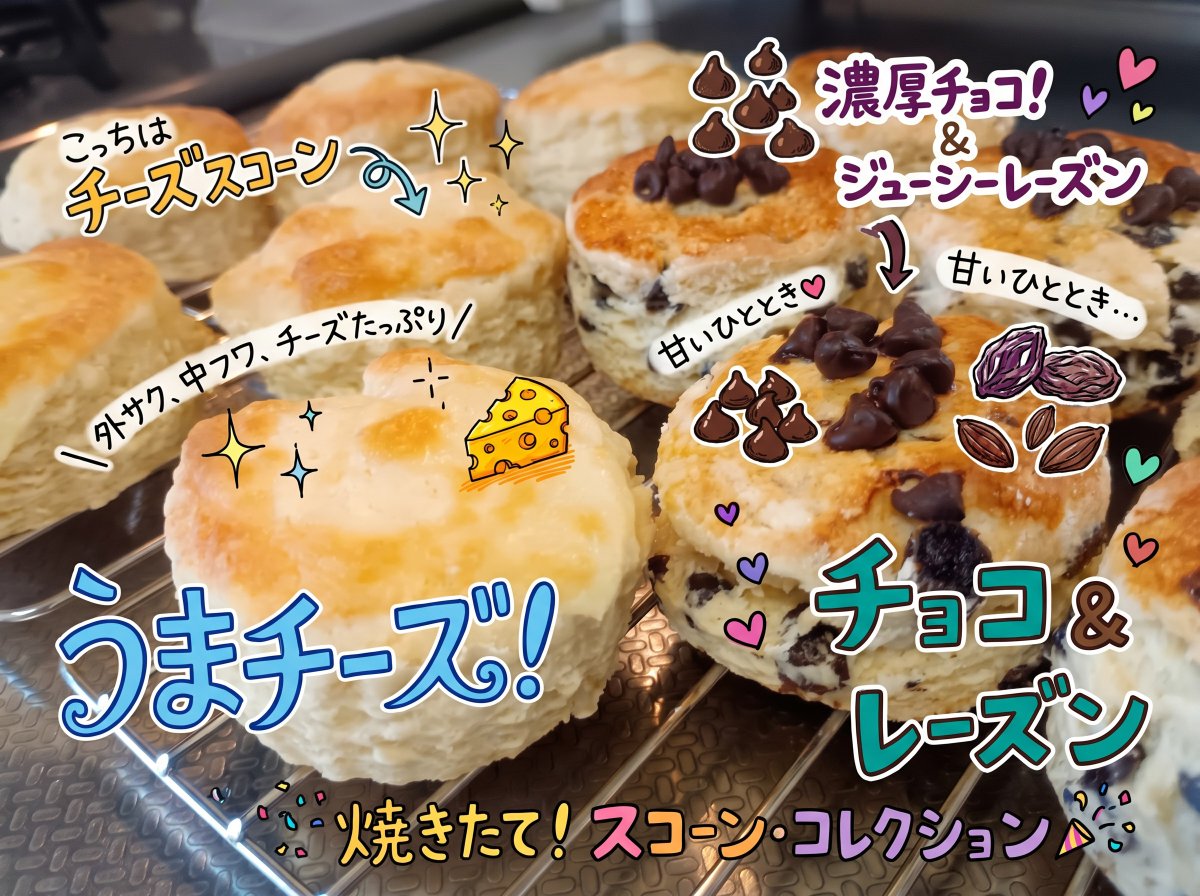
Colorful Annotated Scone Photo
Transforms a homemade scone photo into a bright social-media food post with handwritten Japanese labels and playful ingredient doodles.
This is a GPT Image 2 prompt case for 食物饮品. Use the copy-ready prompt below to generate similar visuals, and review Awesome GPT Image 2 Prompts attribution plus commercial-use rights before reuse.
Prompt
Copy-ready prompt
使用提供的参考图片,保持原有的司康饼照片和构图,但重新设计叠加的标注,使其看起来更精致、色彩更丰富,更具社交媒体分享价值,就像用明亮的马克笔和贴纸风格的涂鸦绘制的一样。清晰地标明左侧的司康饼为芝士司康,右侧的为巧克力葡萄干司康。将之前的手写内容替换为 8 个清晰可见的日语文本标注:{argument name="left scone label" default="こっちはチーズスコーン"}、“外サク、中フワ、チーズたっぷり”、{argument name="cheese headline" default="うまチーズ!"}、{argument name="bottom headline" default="焼きたて!スコーン・コレクション"}、{argument name="right scone label" default="濃厚チョコ!&ジューシーレーズン"}、“チョコ&レーズン”,以及在巧克力葡萄干司康附近添加两个小的“甘いひととき”注释。添加原图中没有的可爱插图元素:芝士司康上的一小块芝士、两簇巧克力豆涂鸦、葡萄干/坚果涂鸦、指向每种司康饼的弯曲箭头、闪光、爱心、五彩纸屑和礼花筒装饰。文字周围使用粗白描边和投影,使标注更加突出,同时保持烘焙好的司康饼真实且不被遮挡。Prompt variables
Editable argument placeholders found in the prompt, with their default values.
More cases in this category
Prioritized by category, input mode compatibility, quality, and lower risk.

Reuse and source notes
Use this prompt safely after previewing the case.
- 1.Copy the prompt or open it directly in Dovoo with the generation button.
- 2.Adjust variables, aspect ratio, and reference images for your own use case.
- 3.Before publishing or paid usage, verify source rights, attribution requirements, and brand or likeness risks.
Can I use this prompt commercially?
Commercial-use status is allowed. Review the original source, license, brand constraints, and legal requirements before paid usage.
Where does this case come from?
This case is imported from Awesome GPT Image 2 Prompts; keep attribution visible and check the source URL before reuse.