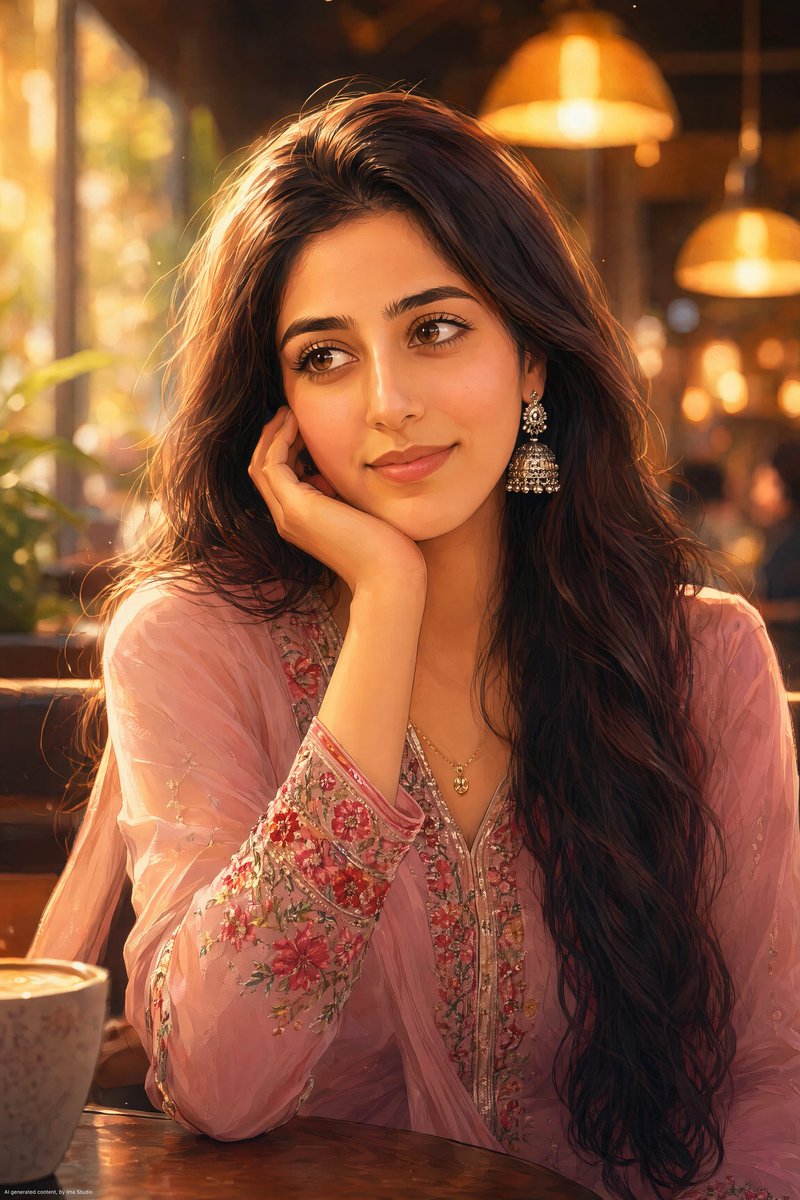
Anime Portrait of South Asian Woman
A detailed anime-style prompt for a young South Asian woman in a modern cafe, focusing on intricate clothing details and golden hour lighting.
This is a GPT Image 2 prompt case for Portrait & Character. Use the copy-ready prompt below to generate similar visuals, and review Awesome GPT Image 2 Prompts attribution plus commercial-use rights before reuse.
Free 1K preview
Generate one preview image instantly, no sign-up required.
Prompt
Copy-ready prompt
Ultra-detailed anime-style portrait of a beautiful young {argument name="ethnicity" default="South Asian woman"} sitting in a {argument name="location" default="cozy modern café"} during golden hour. She rests her face gently on her right hand while gazing thoughtfully to the side, not looking at the camera. Large expressive hazel-brown eyes with detailed eyelashes and glossy reflections, soft rosy cheeks, delicate nose, natural pink lips with a subtle smile. Long wavy dark chestnut-brown hair cascading over her shoulders with loose strands framing her face. She wears an {argument name="outfit" default="elegant pastel pink embroidered traditional kurta"} with sheer sleeves, intricate floral embroidery in vivid red, coral, pink, and green along the cuffs and front panel, detailed threadwork, luxurious fabric texture. Silver jhumka earrings and a delicate gold necklace. Warm cinematic café lighting, glowing hanging lamps in the background, rich golden bokeh, shallow depth of field, dreamy atmosphere, soft amber highlights on the hair, realistic skin shading, highly polished anime illustration, masterpiece quality, ultra-sharp focus on the face, smooth gradients, vibrant colors, premium digital art, 8k resolution. Composition: vertical portrait, close-up framing from waist up, subject centered slightly right of frame, elbow resting on table, relaxed posture, blurred café interior behind her. Soft warm color palette, romantic ambiance, detailed eyes, detailed hair strands, professional character illustration, trending anime artwork. Negative Prompt: low quality, Show every face clearly with natural, detailed facial features, extra fingers, distorted hands, asymmetrical eyes, crossed eyes, bad anatomy, cropped head, duplicate earrings, flat lighting, harsh shadows, oversaturated skin, text, watermark, logo, frame, noise, artifacts, deformed features, unrealistic proportions, expressionless face.Prompt variables
Editable argument placeholders found in the prompt, with their default values.
Best for
- - Portrait & Character visual exploration
- - Image generation and reference-image edits
- - Reusable briefs that keep source attribution visible
Change these parts
- - Subject, product, character, or scene
- - Aspect ratio, camera, lighting, and background
- - Brand, text, color, and output constraints
Recommended model and settings
- - Model: gpt-image-2
- - Input mode: Text to Image
- - Aspect ratio: source
- - Commercial status: review original source
How to use this prompt
- 1. Copy the prompt and preserve its structure for the first test.
- 2. Replace the subject, context, and publishing channel.
- 3. Change one camera, lighting, or style variable per iteration.
- 4. Inspect the output, source, text, and rights before reuse.
Limitations, source, and reuse cautions
- - Generated output is an editable draft, not factual, legal, or rights evidence.
- - Review the linked source, people, brands, logos, text, and third-party media before commercial use.
More cases in this category
Prioritized by category, input mode compatibility, quality, and lower risk.





Reuse and source notes
Use this prompt safely after previewing the case.
- 1.Copy the prompt or open it directly in Dovoo with the generation button.
- 2.Adjust variables, aspect ratio, and reference images for your own use case.
- 3.Before publishing or paid usage, verify source rights, attribution requirements, and brand or likeness risks.
Can I use this prompt commercially?
Commercial-use status is allowed. Review the original source, license, brand constraints, and legal requirements before paid usage.
Where does this case come from?
This case is imported from Awesome GPT Image 2 Prompts; keep attribution visible and check the source URL before reuse.