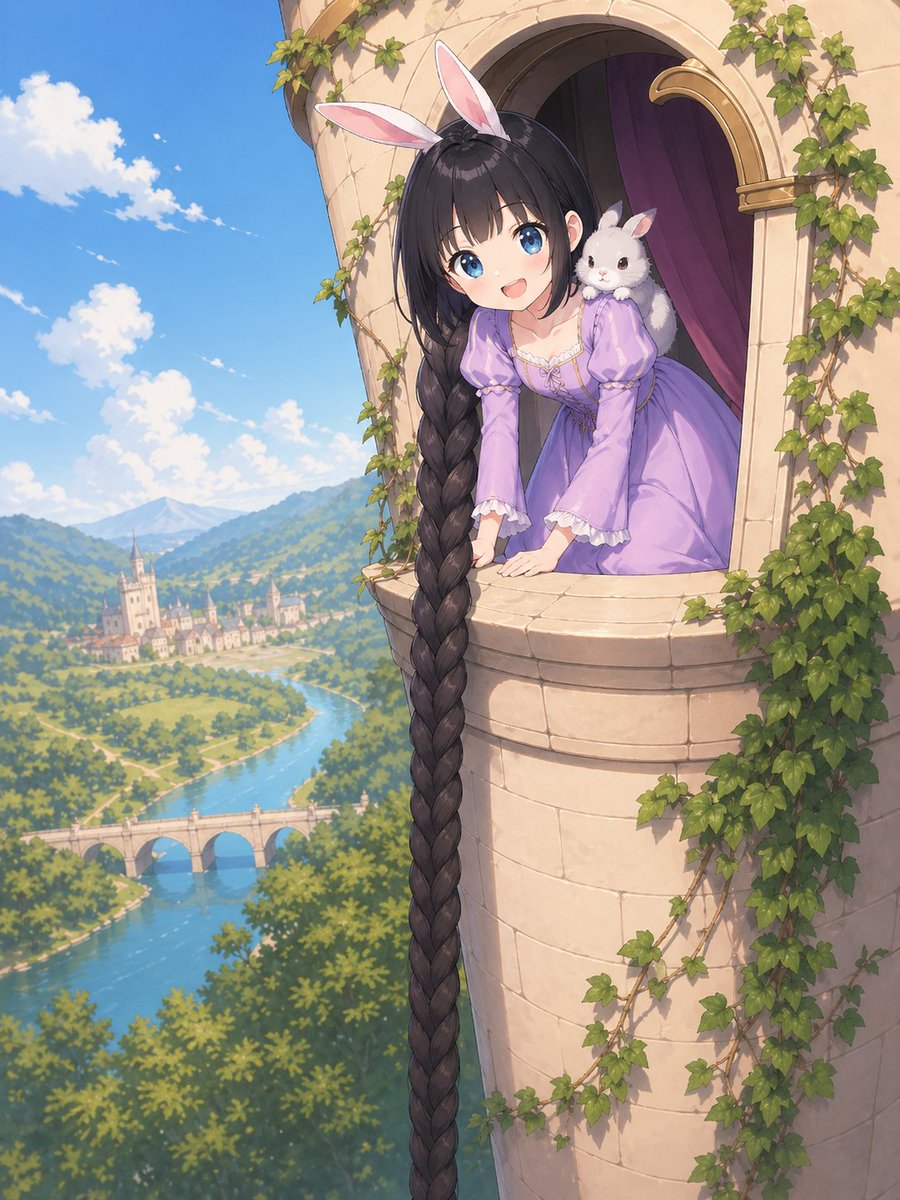
Anime Rapunzel Tower Scene
A polished fantasy anime illustration of a Rapunzel-like princess with an extremely long braid leaning from an ivy-covered tower above a scenic river valley, ideal for fairytale-themed character art or storybook visuals.
This is a GPT Image 2 prompt case for Portrait & Character. Use the copy-ready prompt below to generate similar visuals, and review Awesome GPT Image 2 Prompts attribution plus commercial-use rights before reuse.
Free 1K preview
Generate one preview image instantly, no sign-up required.
Prompt
Copy-ready prompt
A whimsical anime fairytale illustration of {argument name="character name" default="Rapunzel"} leaning out from a high stone tower window, viewed from outside at a slightly elevated angle. She wears a soft lavender medieval-inspired princess dress with puff sleeves, white lace trim, and a fitted bodice, plus a pink-and-white bunny ear headband. Her extremely long {argument name="hair color" default="dark brown"} hair is styled into a single enormous thick braid that spills over the windowsill and drops straight down the full height of the image. A small fluffy white rabbit sits on her right shoulder, adding a cute fantasy touch. The tower is pale beige stone with a rounded balcony-like window ledge, an arched opening, deep purple interior curtains, and green ivy climbing around the walls and window frame. In the background, show a bright sunlit storybook landscape with a vivid blue sky, scattered white clouds, rolling green hills, a winding river, a stone bridge with 3 arches, and a distant European-style town with a castle or cathedral. The mood is triumphant, charming, and magical, like a polished high-end fantasy anime key visual. Detailed painterly rendering, soft natural daylight, clean linework, gentle atmospheric perspective, lush foliage, elegant composition, vertical format.Prompt variables
Editable argument placeholders found in the prompt, with their default values.
Best for
- - Portrait & Character visual exploration
- - Image generation and reference-image edits
- - Reusable briefs that keep source attribution visible
Change these parts
- - Subject, product, character, or scene
- - Aspect ratio, camera, lighting, and background
- - Brand, text, color, and output constraints
Recommended model and settings
- - Model: gpt-image-2
- - Input mode: Text to Image
- - Aspect ratio: source
- - Commercial status: review original source
How to use this prompt
- 1. Copy the prompt and preserve its structure for the first test.
- 2. Replace the subject, context, and publishing channel.
- 3. Change one camera, lighting, or style variable per iteration.
- 4. Inspect the output, source, text, and rights before reuse.
Limitations, source, and reuse cautions
- - Generated output is an editable draft, not factual, legal, or rights evidence.
- - Review the linked source, people, brands, logos, text, and third-party media before commercial use.
More cases in this category
Prioritized by category, input mode compatibility, quality, and lower risk.


Reuse and source notes
Use this prompt safely after previewing the case.
- 1.Copy the prompt or open it directly in Dovoo with the generation button.
- 2.Adjust variables, aspect ratio, and reference images for your own use case.
- 3.Before publishing or paid usage, verify source rights, attribution requirements, and brand or likeness risks.
Can I use this prompt commercially?
Commercial-use status is allowed. Review the original source, license, brand constraints, and legal requirements before paid usage.
Where does this case come from?
This case is imported from Awesome GPT Image 2 Prompts; keep attribution visible and check the source URL before reuse.