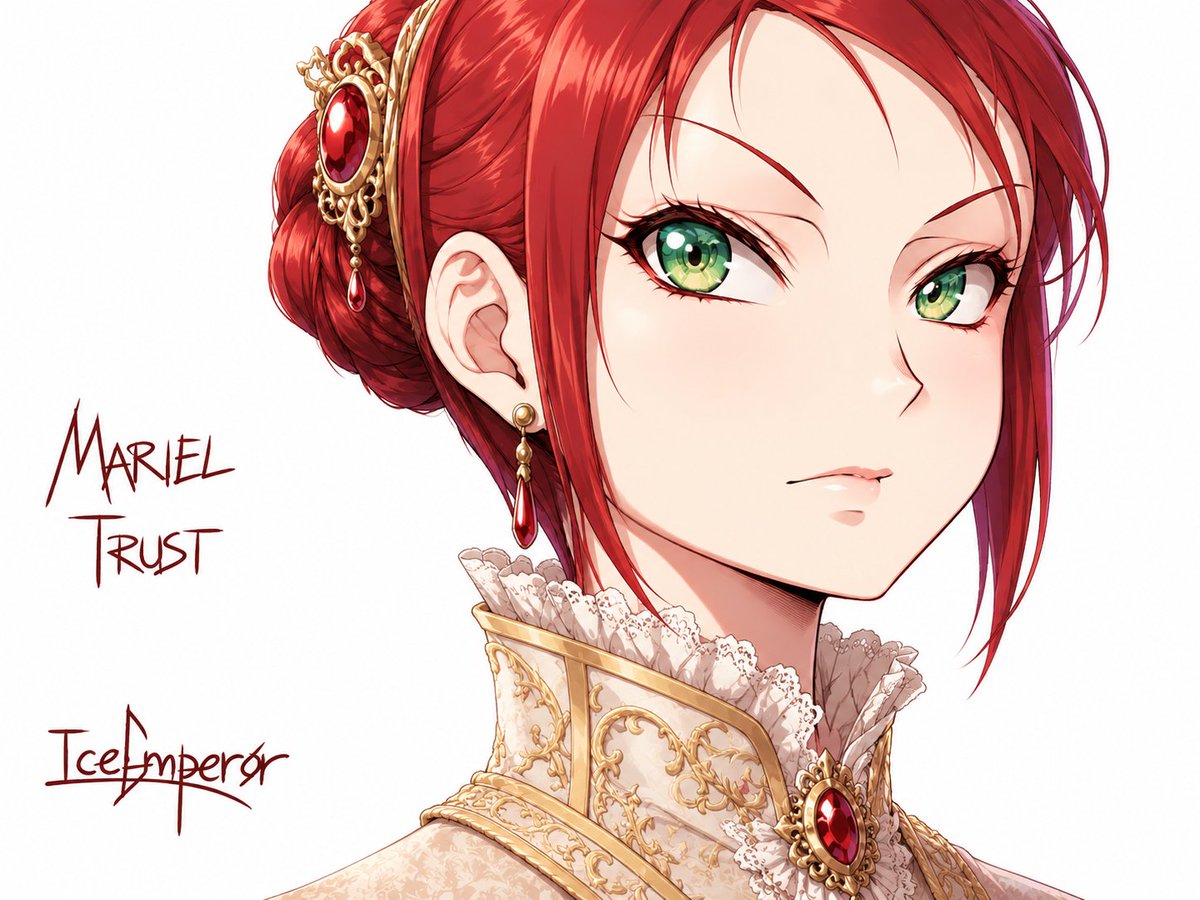
Polished Anime Noble Portrait
Transforms a rough character sketch into a finished regal anime bust portrait with ornate jewelry, costume details, and preserved handwritten name/title text.
This is a GPT Image 2 prompt case for Anime & Game. Use the copy-ready prompt below to generate similar visuals, and review Awesome GPT Image 2 Prompts attribution plus commercial-use rights before reuse.
Free 1K preview
Generate one preview image instantly, no sign-up required.
Free text preview doesn’t preserve reference-image consistency.
Prompt
Copy-ready prompt
Using the provided reference image as the character base, convert the rough sketch into a fully rendered, clean anime-style character illustration while preserving the same head angle, bust portrait framing, facial direction, and general silhouette. Keep the white background and the handwritten name/signature placement on the left.

Transformation: Replace the loose pencil lines with polished line art, smooth cel-shading, glossy highlights, and high-detail coloring. Give the character {argument name="hair color" default="deep red"} hair styled into the same swept-back bun shape, with loose front strands, and make the eyes {argument name="eye color" default="bright green"}. Refine the expression into a calm, elegant, slightly aloof look.

Costume and added details: Add an ornate aristocratic fantasy outfit with a tall cream-and-gold embroidered collar, lace ruffles around the neck, and rich metallic trim. Add exactly 3 prominent jewelry/accessory elements: 1 large gold-and-red jeweled hair ornament on the bun, 1 dangling gold earring with a red teardrop gem, and 1 oval red gemstone brooch at the front of the collar.

Text: Preserve the handwritten sketchbook feel of the left-side annotations, but make them cleaner and dark red. Include exactly 2 visible text blocks: {argument name="character name" default="Mariel Trust"} near the upper left, and {argument name="artist signature" default="IceEmperor"} near the lower left.

Style constraints: High-resolution polished anime illustration, crisp facial features, luminous eyes, detailed hair shine, refined fantasy noble design, no extra background objects, no additional text, no watermark.
Prompt variables
Editable argument placeholders found in the prompt, with their default values.
Best for
- - Anime & Game visual exploration
- - Image generation and reference-image edits
- - Reusable briefs that keep source attribution visible
Change these parts
- - Subject, product, character, or scene
- - Aspect ratio, camera, lighting, and background
- - Brand, text, color, and output constraints
Recommended model and settings
- - Model: gpt-image-2
- - Input mode: Image to Image
- - Aspect ratio: source
- - Commercial status: review original source
How to use this prompt
- 1. Copy the prompt and preserve its structure for the first test.
- 2. Replace the subject, context, and publishing channel.
- 3. Change one camera, lighting, or style variable per iteration.
- 4. Inspect the output, source, text, and rights before reuse.
Limitations, source, and reuse cautions
- - Generated output is an editable draft, not factual, legal, or rights evidence.
- - Review the linked source, people, brands, logos, text, and third-party media before commercial use.
More cases in this category
Prioritized by category, input mode compatibility, quality, and lower risk.

Reuse and source notes
Use this prompt safely after previewing the case.
- 1.Copy the prompt or open it directly in Dovoo with the generation button.
- 2.Adjust variables, aspect ratio, and reference images for your own use case.
- 3.Before publishing or paid usage, verify source rights, attribution requirements, and brand or likeness risks.
Can I use this prompt commercially?
Commercial-use status is allowed. Review the original source, license, brand constraints, and legal requirements before paid usage.
Where does this case come from?
This case is imported from Awesome GPT Image 2 Prompts; keep attribution visible and check the source URL before reuse.