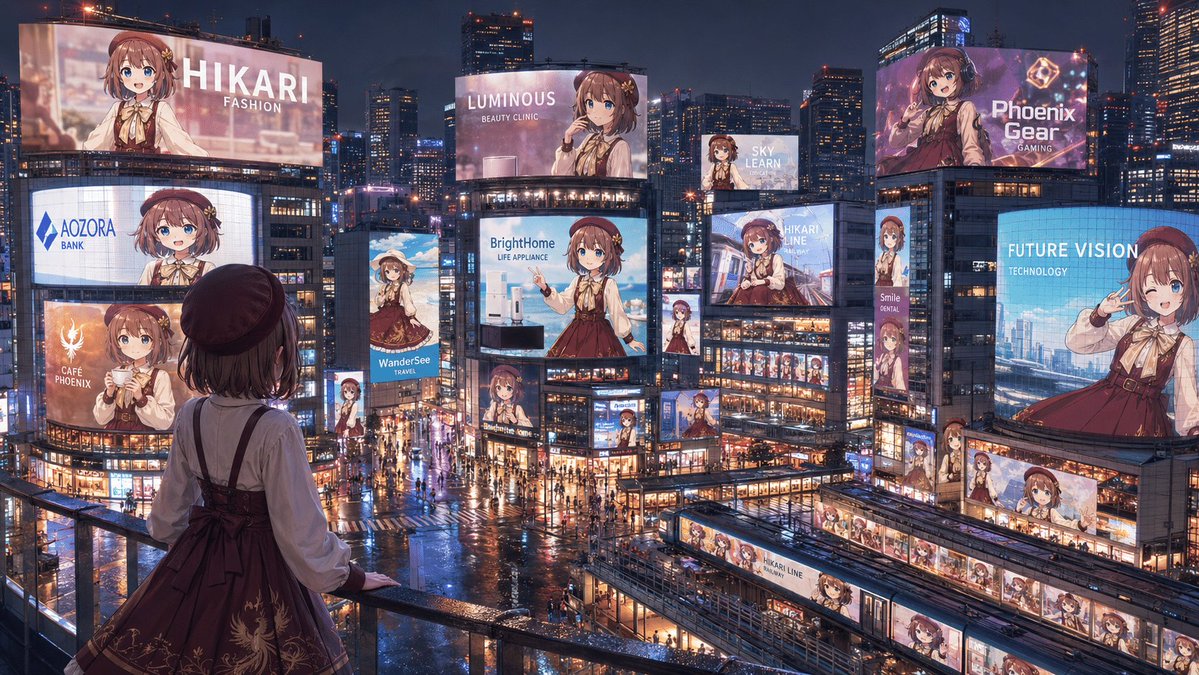
Anime Idol Advertising Takeover City
A wide cinematic prompt for generating a rainy neon city filled with coordinated billboard ads of one anime idol character.
This is a GPT Image 2 prompt case for Anime & Game. Use the copy-ready prompt below to generate similar visuals, and review Awesome GPT Image 2 Prompts attribution plus commercial-use rights before reuse.
Free 1K preview
Generate one preview image instantly, no sign-up required.
Prompt
Copy-ready prompt
Create a cinematic wide 16:9 anime-style nighttime cityscape showing a full “advertising takeover” of a futuristic Tokyo-like entertainment district by one idol character, {argument name="character name" default="Hikari"}. View from a high pedestrian balcony in the foreground, looking down over a rainy neon plaza packed with tiny pedestrians, wet reflective streets, glass buildings, trains, skybridges, and dense skyscrapers under a dark blue evening sky. In the foreground, place the same character seen from behind at the railing: a young anime girl with short brown hair, a dark beret, cream blouse, burgundy jumper dress with ribbon bow and subtle gold embroidery, looking out at the city. Fill the city with exactly 18 visible advertisements featuring the same girl in different poses and crops: 1) giant top-left billboard reading “HIKARI / FASHION,” 2) curved mid-left screen reading “AOZORA / BANK,” 3) lower-left orange cafe ad reading “CAFÉ PHOENIX,” 4) slim vertical travel ad reading “WanderSee / TRAVEL,” 5) large central billboard reading “LUMINOUS / BEAUTY CLINIC,” 6) central appliance billboard reading “BrightHome / LIFE APPLIANCE,” 7) small high billboard reading “SKY LEARN,” 8) large upper-right purple gaming ad reading “Phoenix Gear / GAMING,” 9) right-side blue technology billboard reading “FUTURE VISION / TECHNOLOGY,” 10) center-right transit ad reading “HIKARI LINE,” 11) narrow vertical sign reading “Smile / DENTAL,” 12) small vertical character sign beneath the central screens, 13) small character billboard near the lower center intersection, 14) small character sign on a mid-right building corner, 15) long horizontal station-front banner with repeated Hikari portraits, 16) train-side wrap ad labeled “HIKARI LINE,” 17) another train or platform wrap with repeated portraits in the lower-right transit area, and 18) small rooftop or facade screen near the center-right showing her portrait. Make every ad visually consistent but branded differently, with clean white sans-serif English text, glossy LED glow, and no extra unreadable copy. Use rich cyberpunk-commercial lighting, rain reflections, warm shop windows, blue and pink neon, highly detailed architecture, and a grand sense of scale. Some distant character faces on billboards may be softly blurred by glow and distance, but the overall impression must be clear: one beloved character has taken over the entire city’s advertising landscape. Use {argument name="primary outfit color" default="burgundy"}, {argument name="hair color" default="brown"}, {argument name="city mood" default="rainy neon night"}, and {argument name="main brand theme" default="idol fashion and lifestyle"}.Prompt variables
Editable argument placeholders found in the prompt, with their default values.
Best for
- - Anime & Game visual exploration
- - Image generation and reference-image edits
- - Reusable briefs that keep source attribution visible
Change these parts
- - Subject, product, character, or scene
- - Aspect ratio, camera, lighting, and background
- - Brand, text, color, and output constraints
Recommended model and settings
- - Model: gpt-image-2
- - Input mode: Text to Image
- - Aspect ratio: source
- - Commercial status: review original source
How to use this prompt
- 1. Copy the prompt and preserve its structure for the first test.
- 2. Replace the subject, context, and publishing channel.
- 3. Change one camera, lighting, or style variable per iteration.
- 4. Inspect the output, source, text, and rights before reuse.
Limitations, source, and reuse cautions
- - Generated output is an editable draft, not factual, legal, or rights evidence.
- - Review the linked source, people, brands, logos, text, and third-party media before commercial use.
More cases in this category
Prioritized by category, input mode compatibility, quality, and lower risk.



Reuse and source notes
Use this prompt safely after previewing the case.
- 1.Copy the prompt or open it directly in Dovoo with the generation button.
- 2.Adjust variables, aspect ratio, and reference images for your own use case.
- 3.Before publishing or paid usage, verify source rights, attribution requirements, and brand or likeness risks.
Can I use this prompt commercially?
Commercial-use status is allowed. Review the original source, license, brand constraints, and legal requirements before paid usage.
Where does this case come from?
This case is imported from Awesome GPT Image 2 Prompts; keep attribution visible and check the source URL before reuse.