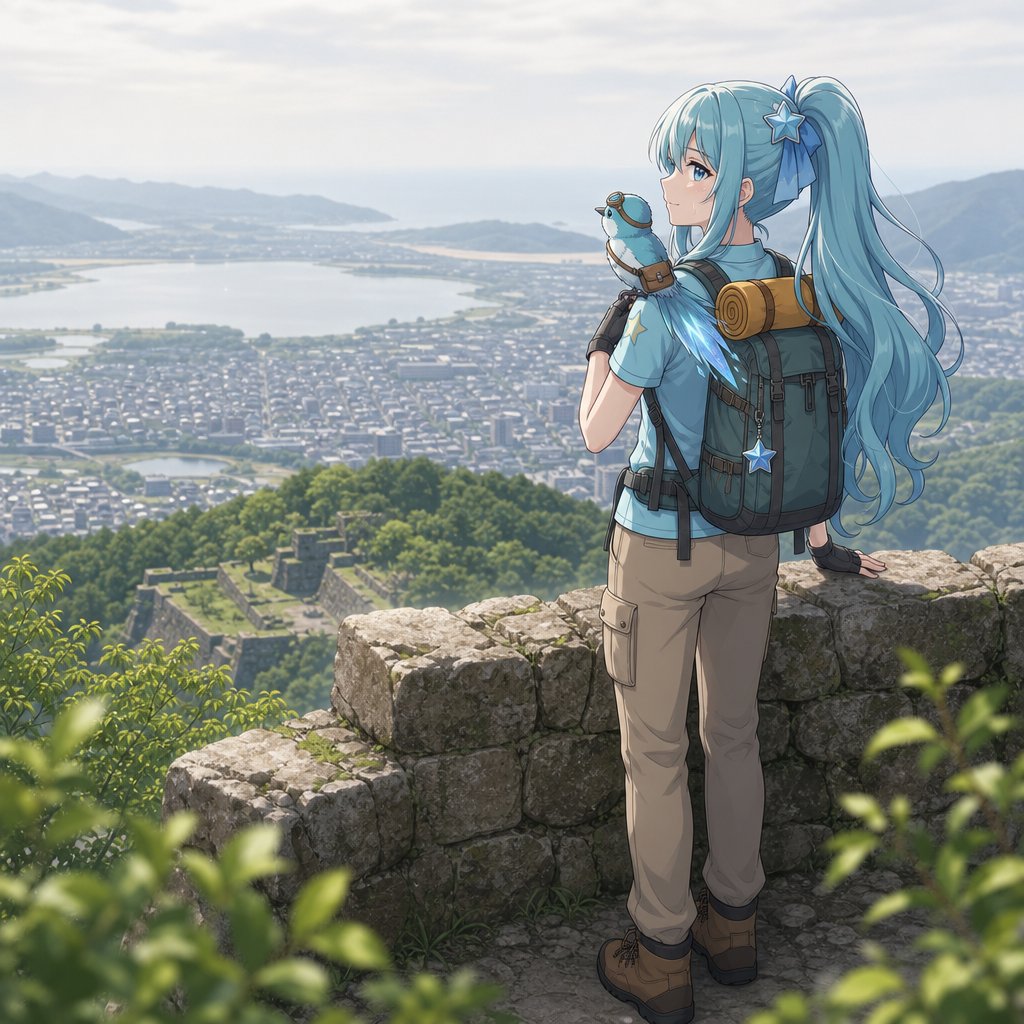
Anime Hiker Over Scenic Mountain View
Transforms a mountain-view travel photo into a clean anime hiking illustration with a foreground character and no app overlays.
This is a GPT Image 2 prompt case for Anime & Game. Use the copy-ready prompt below to generate similar visuals, and review Awesome GPT Image 2 Prompts attribution plus commercial-use rights before reuse.
Free 1K preview
Generate one preview image instantly, no sign-up required.
Free text preview doesn’t preserve reference-image consistency.
Prompt
Copy-ready prompt
Using REFERENCE_0 as the base landscape, remove all YAMAP branding, date, route, and metric overlay text, then transform the scene into a polished anime-style travel illustration while preserving the mountaintop viewpoint over the city, lake, distant mountains, hazy sky, and green forested foreground. Add one foreground character: a young anime hiker viewed from behind/three-quarter back, standing on an old stone castle-wall lookout and gazing over the scenery. Give the character {argument name="hair color" default="long aqua-blue hair"} in a high ponytail with a blue ribbon and star hair ornament, a light blue hiking shirt, beige cargo hiking pants, brown hiking boots, fingerless gloves, and a large dark hiking backpack. Add exactly 4 visible gear/accessory elements on or near the character: 1 rolled sleeping mat strapped to the backpack, 1 dangling blue star charm, 1 small blue bird-like companion perched near the shoulder, and 1 small hiking pouch/strap detail. Add weathered stone blocks under the character and soft blurred green leaves in the lower foreground for depth. Keep the composition scenic and peaceful, with bright morning light, gentle atmospheric haze, crisp anime linework on the character, and a softly detailed semi-realistic background. Do not include any text, logos, UI, or watermark.Prompt variables
Editable argument placeholders found in the prompt, with their default values.
Best for
- - Anime & Game visual exploration
- - Image generation and reference-image edits
- - Reusable briefs that keep source attribution visible
Change these parts
- - Subject, product, character, or scene
- - Aspect ratio, camera, lighting, and background
- - Brand, text, color, and output constraints
Recommended model and settings
- - Model: gpt-image-2
- - Input mode: Image to Image
- - Aspect ratio: source
- - Commercial status: review original source
How to use this prompt
- 1. Copy the prompt and preserve its structure for the first test.
- 2. Replace the subject, context, and publishing channel.
- 3. Change one camera, lighting, or style variable per iteration.
- 4. Inspect the output, source, text, and rights before reuse.
Limitations, source, and reuse cautions
- - Generated output is an editable draft, not factual, legal, or rights evidence.
- - Review the linked source, people, brands, logos, text, and third-party media before commercial use.
More cases in this category
Prioritized by category, input mode compatibility, quality, and lower risk.
Reuse and source notes
Use this prompt safely after previewing the case.
- 1.Copy the prompt or open it directly in Dovoo with the generation button.
- 2.Adjust variables, aspect ratio, and reference images for your own use case.
- 3.Before publishing or paid usage, verify source rights, attribution requirements, and brand or likeness risks.
Can I use this prompt commercially?
Commercial-use status is allowed. Review the original source, license, brand constraints, and legal requirements before paid usage.
Where does this case come from?
This case is imported from Awesome GPT Image 2 Prompts; keep attribution visible and check the source URL before reuse.