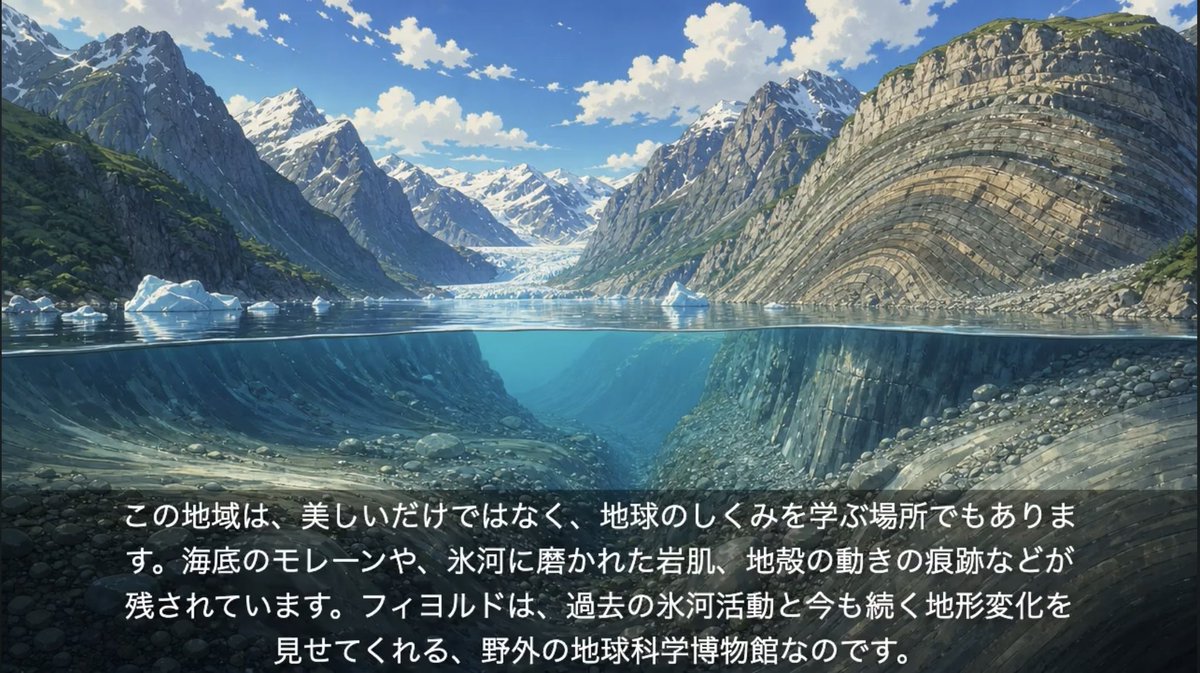
Anime Glacial Fjord Geology Slide
Generates a cinematic anime-style fjord cross-section with Japanese educational caption text for a geology or Earth science explainer slide.
This is a GPT Image 2 prompt case for Illustration & Art. Use the copy-ready prompt below to generate similar visuals, and review Awesome GPT Image 2 Prompts attribution plus commercial-use rights before reuse.
Free 1K preview
Generate one preview image instantly, no sign-up required.
Prompt
Copy-ready prompt
Create a cinematic anime-style educational landscape illustration of a glacial fjord, designed as a widescreen 16:9 slide. Show a dramatic split-level cross-section where the upper half is above the waterline and the lower half is underwater, with the water surface forming a crisp horizontal line across the middle. Above water: towering steep mountains on both sides of the fjord, snow-capped peaks in the distance, a bright blue sky with scattered white clouds, small floating icebergs, and a glacier visible at the far end of the inlet. On the right side, emphasize a massive curved cliff face with clear layered sedimentary rock strata bending in broad arcs; on the left, darker rugged mountains with patches of green vegetation and snow. Below water: transparent turquoise-blue fjord water revealing submerged valley walls, rounded stones, rocky slopes, glacially carved terrain, and continued layered rock formations, with soft underwater light rays and depth haze. Add a subtle dark translucent gradient panel across the bottom third for readability. Place exactly one centered Japanese educational text block in large white sans-serif characters with a slight shadow, broken into four lines, using this text: {argument name="caption text" default="この地域は、美しいだけではなく、地球のしくみを学ぶ場所でもあります。海底のモレーンや、氷河に磨かれた岩肌、地殻の動きの痕跡などが残されています。フィヨルドは、過去の氷河活動と今も続く地形変化を見せてくれる、野外の地球科学博物館なのです。"} Visual style: high-quality Japanese anime background art, painterly but detailed, naturalistic lighting, crisp geology, serene atmosphere, vibrant blues and greens, no people, no boats, no logos, no watermark.Prompt variables
Editable argument placeholders found in the prompt, with their default values.
Best for
- - Illustration & Art visual exploration
- - Image generation and reference-image edits
- - Reusable briefs that keep source attribution visible
Change these parts
- - Subject, product, character, or scene
- - Aspect ratio, camera, lighting, and background
- - Brand, text, color, and output constraints
Recommended model and settings
- - Model: gpt-image-2
- - Input mode: Text to Image
- - Aspect ratio: source
- - Commercial status: review original source
How to use this prompt
- 1. Copy the prompt and preserve its structure for the first test.
- 2. Replace the subject, context, and publishing channel.
- 3. Change one camera, lighting, or style variable per iteration.
- 4. Inspect the output, source, text, and rights before reuse.
Limitations, source, and reuse cautions
- - Generated output is an editable draft, not factual, legal, or rights evidence.
- - Review the linked source, people, brands, logos, text, and third-party media before commercial use.
More cases in this category
Prioritized by category, input mode compatibility, quality, and lower risk.
Reuse and source notes
Use this prompt safely after previewing the case.
- 1.Copy the prompt or open it directly in Dovoo with the generation button.
- 2.Adjust variables, aspect ratio, and reference images for your own use case.
- 3.Before publishing or paid usage, verify source rights, attribution requirements, and brand or likeness risks.
Can I use this prompt commercially?
Commercial-use status is allowed. Review the original source, license, brand constraints, and legal requirements before paid usage.
Where does this case come from?
This case is imported from Awesome GPT Image 2 Prompts; keep attribution visible and check the source URL before reuse.