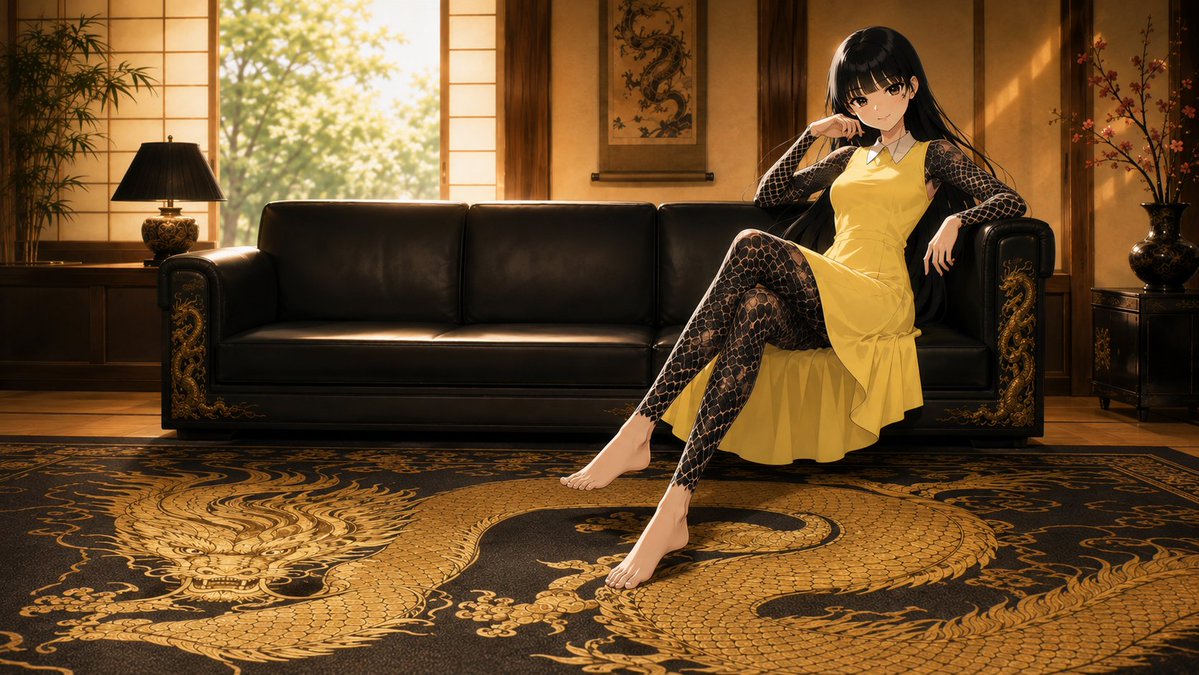
Anime Dragon Lounge Wallpaper
A cinematic anime desktop wallpaper of an elegant black-haired woman reclining on a black leather sofa in a warm Japanese luxury lounge with gold dragon decor.
This is a GPT Image 2 prompt case for Portrait & Character. Use the copy-ready prompt below to generate similar visuals, and review Awesome GPT Image 2 Prompts attribution plus commercial-use rights before reuse.
Free 1K preview
Generate one preview image instantly, no sign-up required.
Prompt
Copy-ready prompt
Create a cinematic 16:9 desktop wallpaper in polished anime style featuring {argument name="character name" default="Kirara"}, a beautiful young woman with long glossy {argument name="hair color" default="black"} hair and soft bangs, sitting confidently on the right side of a luxurious black leather sofa. She wears a sleeveless {argument name="dress color" default="yellow"} knee-length dress with a small white collar, layered over a sheer black full-body lace/net-pattern garment covering her arms and legs. Pose her with one leg crossed and extended forward, bare feet visible, one elbow resting on the sofa arm, one hand near her face, smiling calmly with a cool, elegant expression. Set the scene in an opulent Japanese-inspired lounge at golden hour: warm wooden wall panels, shoji-style windows glowing with sunlight, leafy trees visible outside, a hanging dragon scroll centered behind the sofa, a potted bamboo plant and black table lamp on the left, and a decorative vase with flowering branches on the right. The sofa is black leather with ornate gold dragon carvings on both armrests. In the foreground, place a large black rug with an enormous intricate {argument name="rug motif" default="gold dragon"} design spanning the floor, highly detailed scales, claws, whiskers, and swirling ornamental patterns. Use dramatic warm backlighting, soft sunbeams, rich amber shadows, high-detail textures, elegant composition, shallow depth of field, and a premium desktop wallpaper finish. No text, no watermark, no extra characters.Prompt variables
Editable argument placeholders found in the prompt, with their default values.
Best for
- - Portrait & Character visual exploration
- - Image generation and reference-image edits
- - Reusable briefs that keep source attribution visible
Change these parts
- - Subject, product, character, or scene
- - Aspect ratio, camera, lighting, and background
- - Brand, text, color, and output constraints
Recommended model and settings
- - Model: gpt-image-2
- - Input mode: Text to Image
- - Aspect ratio: source
- - Commercial status: review original source
How to use this prompt
- 1. Copy the prompt and preserve its structure for the first test.
- 2. Replace the subject, context, and publishing channel.
- 3. Change one camera, lighting, or style variable per iteration.
- 4. Inspect the output, source, text, and rights before reuse.
Limitations, source, and reuse cautions
- - Generated output is an editable draft, not factual, legal, or rights evidence.
- - Review the linked source, people, brands, logos, text, and third-party media before commercial use.
More cases in this category
Prioritized by category, input mode compatibility, quality, and lower risk.


Reuse and source notes
Use this prompt safely after previewing the case.
- 1.Copy the prompt or open it directly in Dovoo with the generation button.
- 2.Adjust variables, aspect ratio, and reference images for your own use case.
- 3.Before publishing or paid usage, verify source rights, attribution requirements, and brand or likeness risks.
Can I use this prompt commercially?
Commercial-use status is allowed. Review the original source, license, brand constraints, and legal requirements before paid usage.
Where does this case come from?
This case is imported from Awesome GPT Image 2 Prompts; keep attribution visible and check the source URL before reuse.