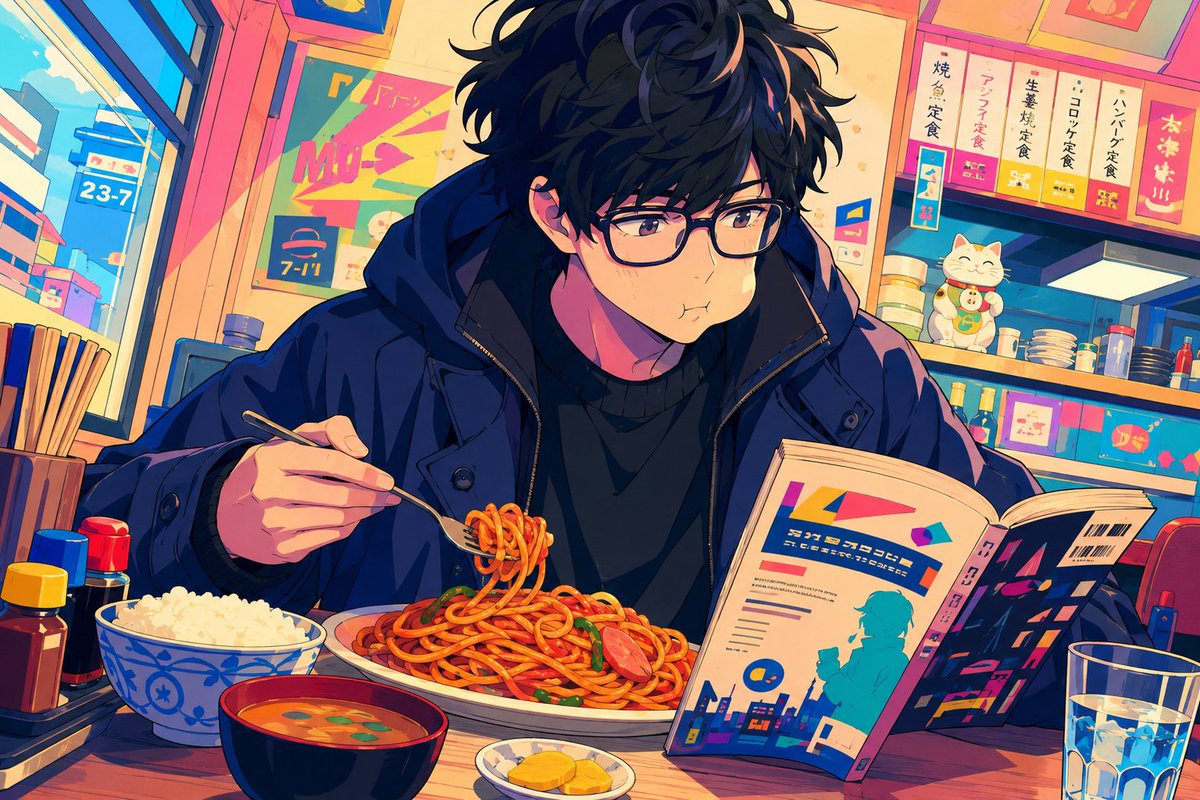
Anime Diner Munching Scene
A colorful anime illustration prompt for creating a cozy Japanese diner scene with a glasses-wearing young man eating spaghetti while reading.
This is a GPT Image 2 prompt case for Anime & Game. Use the copy-ready prompt below to generate similar visuals, and review Awesome GPT Image 2 Prompts attribution plus commercial-use rights before reuse.
Free 1K preview
Generate one preview image instantly, no sign-up required.
Prompt
Copy-ready prompt
Create a vibrant anime-style illustration of {argument name="character name" default="a young man"} eating in a cozy Japanese diner, shown in a medium close-up at a wooden counter. The character is a slim young adult with messy wavy {argument name="hair color" default="black hair"}, pale skin, rectangular black glasses, soft brown eyes, and a slightly puffed cheek expression as if chewing. He wears a dark navy oversized winter jacket over a black sweater. He holds a fork in his left hand, lifting a small coil of spaghetti from a large plate of red-sauce pasta with sausage slices and green garnish, while his right hand holds open a colorful magazine or manga with abstract city graphics and pseudo-Japanese typography. Place exactly 5 main food and drink items on the counter: 1 large plate of spaghetti, 1 blue-and-white bowl of white rice, 1 black bowl of orange miso soup with green garnish, 1 small plate of yellow pickles, and 1 clear glass of ice water. Add exactly 4 condiment bottles clustered on the left side: a yellow-capped sauce bottle, a red-capped sauce bottle, a blue-capped sauce bottle, and a dark soy-sauce-style bottle. The background is a lively small restaurant or convenience-diner interior with warm sunset lighting, large windows on the left showing a bright city street and a blue sign reading “23-7,” shelves and counters on the right with stacked bowls, bottles, boxed goods, and a smiling lucky cat figurine. Include colorful menu placards above the counter with Japanese-inspired vertical lettering, one sign resembling “7-11,” and bright pink, teal, orange, and deep blue accents. Use a cinematic manga composition, detailed line art, expressive face, saturated colors, strong rim lighting, cozy clutter, shallow depth of field, and a cute “munching while reading” mood. Do not add extra characters, photorealism, watermark, or English explanatory captions.Prompt variables
Editable argument placeholders found in the prompt, with their default values.
Best for
- - Anime & Game visual exploration
- - Image generation and reference-image edits
- - Reusable briefs that keep source attribution visible
Change these parts
- - Subject, product, character, or scene
- - Aspect ratio, camera, lighting, and background
- - Brand, text, color, and output constraints
Recommended model and settings
- - Model: gpt-image-2
- - Input mode: Text to Image
- - Aspect ratio: source
- - Commercial status: review original source
How to use this prompt
- 1. Copy the prompt and preserve its structure for the first test.
- 2. Replace the subject, context, and publishing channel.
- 3. Change one camera, lighting, or style variable per iteration.
- 4. Inspect the output, source, text, and rights before reuse.
Limitations, source, and reuse cautions
- - Generated output is an editable draft, not factual, legal, or rights evidence.
- - Review the linked source, people, brands, logos, text, and third-party media before commercial use.
More cases in this category
Prioritized by category, input mode compatibility, quality, and lower risk.

Reuse and source notes
Use this prompt safely after previewing the case.
- 1.Copy the prompt or open it directly in Dovoo with the generation button.
- 2.Adjust variables, aspect ratio, and reference images for your own use case.
- 3.Before publishing or paid usage, verify source rights, attribution requirements, and brand or likeness risks.
Can I use this prompt commercially?
Commercial-use status is allowed. Review the original source, license, brand constraints, and legal requirements before paid usage.
Where does this case come from?
This case is imported from Awesome GPT Image 2 Prompts; keep attribution visible and check the source URL before reuse.