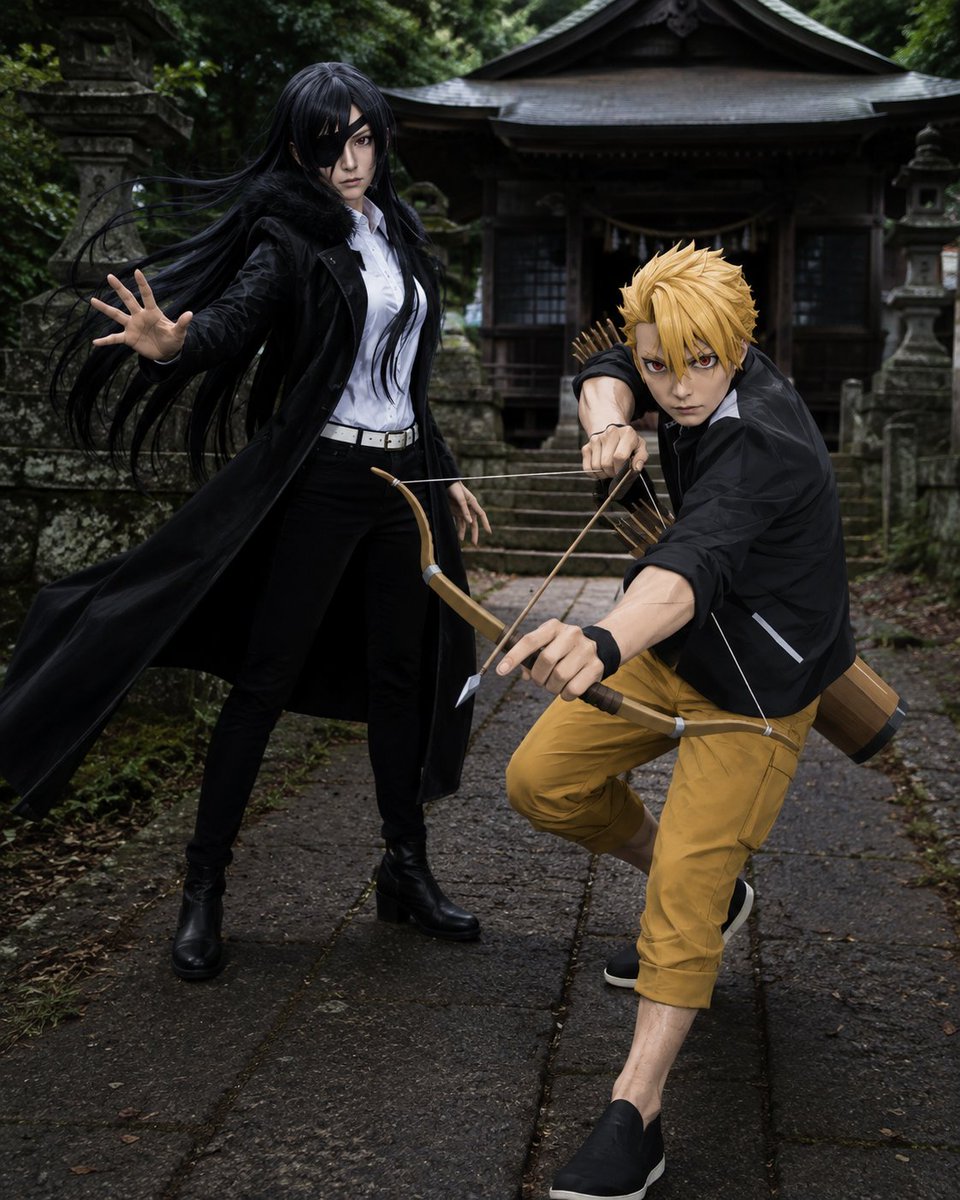
Anime Cosplay Duo at Forest Shrine
A cinematic realistic cosplay scene featuring a black-haired eyepatch woman and a blond archer posing at an atmospheric Japanese shrine.
This is a GPT Image 2 prompt case for Portrait & Character. Use the copy-ready prompt below to generate similar visuals, and review Awesome GPT Image 2 Prompts attribution plus commercial-use rights before reuse.
Free 1K preview
Generate one preview image instantly, no sign-up required.
Prompt
Copy-ready prompt
Create a realistic full-body cosplay photo of two anime-inspired characters posing dramatically on a mossy stone path in front of an old Japanese forest shrine. On the left stands {argument name="female character name" default="Asa"}, a tall slender young woman with very long windblown black hair, pale skin, a black eyepatch over one eye, an intense expression, a white button-up shirt tucked into black pants, a white belt, black boots, and a long black coat flaring outward; she extends one open hand toward the camera as if using supernatural power. On the right crouches {argument name="male character name" default="Yuru"}, a lean blond young man with spiky golden hair and sharp red-brown eyes, wearing a black jacket over a white shirt, mustard-yellow cropped pants, black slip-on shoes, and a black wristband; he aims a wooden bow directly toward the viewer with one arrow drawn, with a quiver of arrows and a cylindrical wooden gear case on his back. Include exactly two human subjects: one black-haired eyepatch woman and one blond archer man. The setting should be a damp, atmospheric Shinto shrine approach with stone lanterns, worn steps, dark wooden shrine architecture, dense green forest, moss, wet stone slabs, and soft overcast light. Use cinematic realism, high-detail fabric and wig texture, dynamic action posing, shallow depth of field, moody contrast, natural colors, and a slightly low wide-angle perspective that makes the bow and outstretched hand feel close to the viewer. Avoid text, logos, extra characters, cartoon rendering, and modern urban elements.Prompt variables
Editable argument placeholders found in the prompt, with their default values.
Best for
- - Portrait & Character visual exploration
- - Image generation and reference-image edits
- - Reusable briefs that keep source attribution visible
Change these parts
- - Subject, product, character, or scene
- - Aspect ratio, camera, lighting, and background
- - Brand, text, color, and output constraints
Recommended model and settings
- - Model: gpt-image-2
- - Input mode: Text to Image
- - Aspect ratio: source
- - Commercial status: review original source
How to use this prompt
- 1. Copy the prompt and preserve its structure for the first test.
- 2. Replace the subject, context, and publishing channel.
- 3. Change one camera, lighting, or style variable per iteration.
- 4. Inspect the output, source, text, and rights before reuse.
Limitations, source, and reuse cautions
- - Generated output is an editable draft, not factual, legal, or rights evidence.
- - Review the linked source, people, brands, logos, text, and third-party media before commercial use.
More cases in this category
Prioritized by category, input mode compatibility, quality, and lower risk.





Reuse and source notes
Use this prompt safely after previewing the case.
- 1.Copy the prompt or open it directly in Dovoo with the generation button.
- 2.Adjust variables, aspect ratio, and reference images for your own use case.
- 3.Before publishing or paid usage, verify source rights, attribution requirements, and brand or likeness risks.
Can I use this prompt commercially?
Commercial-use status is allowed. Review the original source, license, brand constraints, and legal requirements before paid usage.
Where does this case come from?
This case is imported from Awesome GPT Image 2 Prompts; keep attribution visible and check the source URL before reuse.