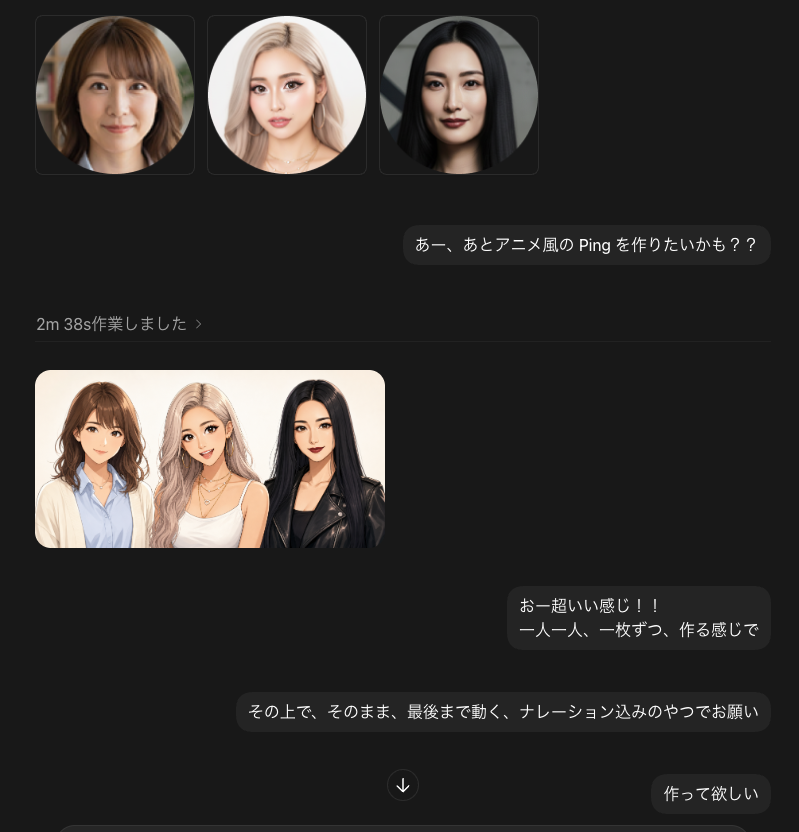
Dark Chat UI Anime Conversion Screenshot
Creates a dark-mode chat screenshot mockup showing three portrait inputs and an anime-style generated group preview with Japanese conversation bubbles.
This is a GPT Image 2 prompt case for 平面海报. Use the copy-ready prompt below to generate similar visuals, and review Awesome GPT Image 2 Prompts attribution plus commercial-use rights before reuse.
Prompt
Copy-ready prompt
目标:创建一个深色模式的聊天界面截图,展示关于将照片转换为动漫风格动画角色的 AI 图像生成对话。

画布:768×768 正方形图像,深炭灰色背景,裁剪为桌面聊天应用样式。使用精致的圆角矩形、柔和的阴影和柔和的灰色分隔线。

布局:在左上方,横向排列显示 3 张正方形缩略图卡片,每张卡片内含一个圆形肖像:1) 一位留着齐肩波浪卷发的棕发女性,2) 一位留着长浅色头发的金发女性,3) 一位留着直长黑发的女性。每张脸部都应刻意模糊,或覆盖一层柔和的矩形隐私模糊遮罩。在缩略图下方的右侧,放置一个圆角深色聊天气泡,其中包含日语消息 {argument name="first message" default="あー、あとアニメ風の Ping を作りたいかも??"}。下方左侧显示一行小巧的灰色状态栏,文字为 {argument name="status text" default="2m 38s作業しました ›"},随后是一条细水平分隔线。

生成图像预览:在分隔线下方的左侧,放置 1 张圆角矩形预览图,展示这 3 位女性被转换为精致的动漫/半写实角色艺术,她们在温暖的灰白色背景下肩并肩站立。准确计算角色数量:3 位女性——棕发女性穿着浅蓝色衬衫外搭米色开衫,金发女性穿着白色上衣并佩戴叠层项链,黑发女性穿着黑色皮夹克。所有脸部均需使用柔和的矩形模糊遮罩进行隐私处理。

聊天气泡:总共包含 4 个可见的发出消息气泡:1 个顶部提示气泡,2 个中下部气泡,以及 1 个右下角气泡。中下部的第一个气泡应显示 {argument name="reaction message" default="おー超いい感じ!!\n一人一人、一枚ずつ、作る感じで"}。中下部的第二个较宽气泡应显示 {argument name="instruction message" default="その上で、そのまま、最後まで動く、ナレーション込みのやつでお願い"}。右下角的气泡应显示 {argument name="final message" default="作って欲しい"}。在气泡之间的下方中间位置,添加一个小的圆形向下箭头按钮。

视觉风格:写实的 UI 截图,日语聊天应用美学,极简且现代,深色主题,圆角,石墨色消息气泡,浅灰色文字,整洁的间距。角色艺术预览应呈现出高质量的动漫照片转换效果,而非扁平的卡通画。

约束条件:顶部使用 3 张肖像缩略图,生成 1 张预览图,预览图中包含 3 位动漫风格女性,共 4 个聊天气泡,以及 1 个向下箭头按钮。请勿添加任何应用图标、水印、额外按钮、额外文字或额外人物。
Prompt variables
Editable argument placeholders found in the prompt, with their default values.
More cases in this category
Prioritized by category, input mode compatibility, quality, and lower risk.



Reuse and source notes
Use this prompt safely after previewing the case.
- 1.Copy the prompt or open it directly in Dovoo with the generation button.
- 2.Adjust variables, aspect ratio, and reference images for your own use case.
- 3.Before publishing or paid usage, verify source rights, attribution requirements, and brand or likeness risks.
Can I use this prompt commercially?
Commercial-use status is allowed. Review the original source, license, brand constraints, and legal requirements before paid usage.
Where does this case come from?
This case is imported from Awesome GPT Image 2 Prompts; keep attribution visible and check the source URL before reuse.