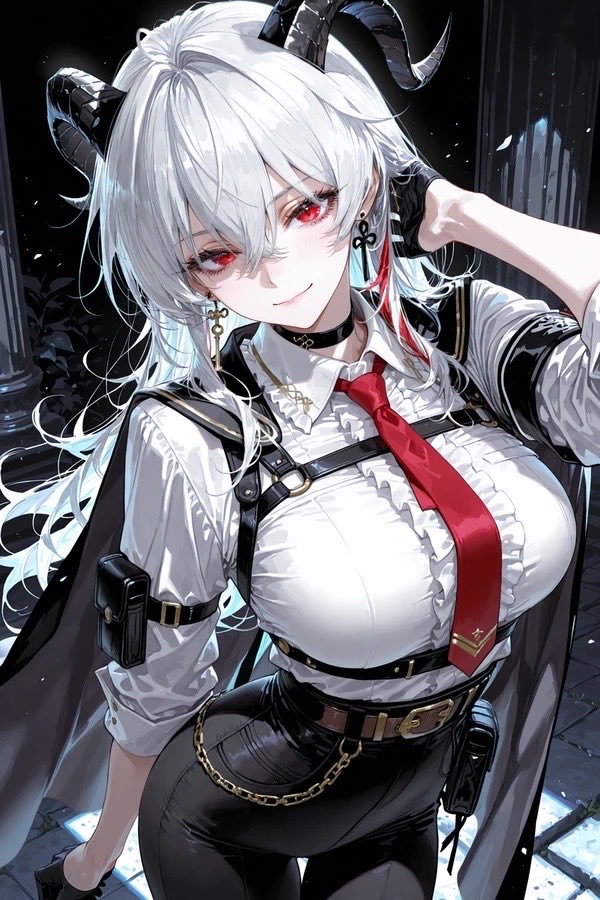
Anime Redraw of Original Horned Character
This prompt repaints a rough original character sketch into a refined, high-detail anime illustration while preserving the core outfit and pose.
This is a GPT Image 2 prompt case for Portrait & Character. Use the copy-ready prompt below to generate similar visuals, and review Awesome GPT Image 2 Prompts attribution plus commercial-use rights before reuse.
Free 1K preview
Generate one preview image instantly, no sign-up required.
Prompt
Copy-ready prompt
Using REFERENCE_0 as the character base, redraw the same original character as a polished modern anime illustration instead of a rough sketch. Keep the core design intact: white hair, black curved horns, red accent strand near the ear, white shirt, red tie with a small gold mark near the tip, black harness straps, brown belt, black pants, gold waist chain, cape-like dark outer panels, choker, dangling cross earring, and the same confident pose with one hand behind the head. Upgrade everything to high-detail, glossy rendering with clean linework, dramatic lighting, rich fabric folds, shiny black leather textures, and a more mature, stylish proportions. Place the character in a dark nighttime stone-column setting with cool rim light and a slightly low-angle, close-up half-body composition. Make it feel like a high-end character repaint of an old original drawing.
Best for
- - Portrait & Character visual exploration
- - Image generation and reference-image edits
- - Reusable briefs that keep source attribution visible
Change these parts
- - Subject, product, character, or scene
- - Aspect ratio, camera, lighting, and background
- - Brand, text, color, and output constraints
Recommended model and settings
- - Model: gpt-image-2
- - Input mode: Text to Image
- - Aspect ratio: source
- - Commercial status: review original source
How to use this prompt
- 1. Copy the prompt and preserve its structure for the first test.
- 2. Replace the subject, context, and publishing channel.
- 3. Change one camera, lighting, or style variable per iteration.
- 4. Inspect the output, source, text, and rights before reuse.
Limitations, source, and reuse cautions
- - Generated output is an editable draft, not factual, legal, or rights evidence.
- - Review the linked source, people, brands, logos, text, and third-party media before commercial use.
More cases in this category
Prioritized by category, input mode compatibility, quality, and lower risk.






Reuse and source notes
Use this prompt safely after previewing the case.
- 1.Copy the prompt or open it directly in Dovoo with the generation button.
- 2.Adjust variables, aspect ratio, and reference images for your own use case.
- 3.Before publishing or paid usage, verify source rights, attribution requirements, and brand or likeness risks.
Can I use this prompt commercially?
Commercial-use status is allowed. Review the original source, license, brand constraints, and legal requirements before paid usage.
Where does this case come from?
This case is imported from Awesome GPT Image 2 Prompts; keep attribution visible and check the source URL before reuse.