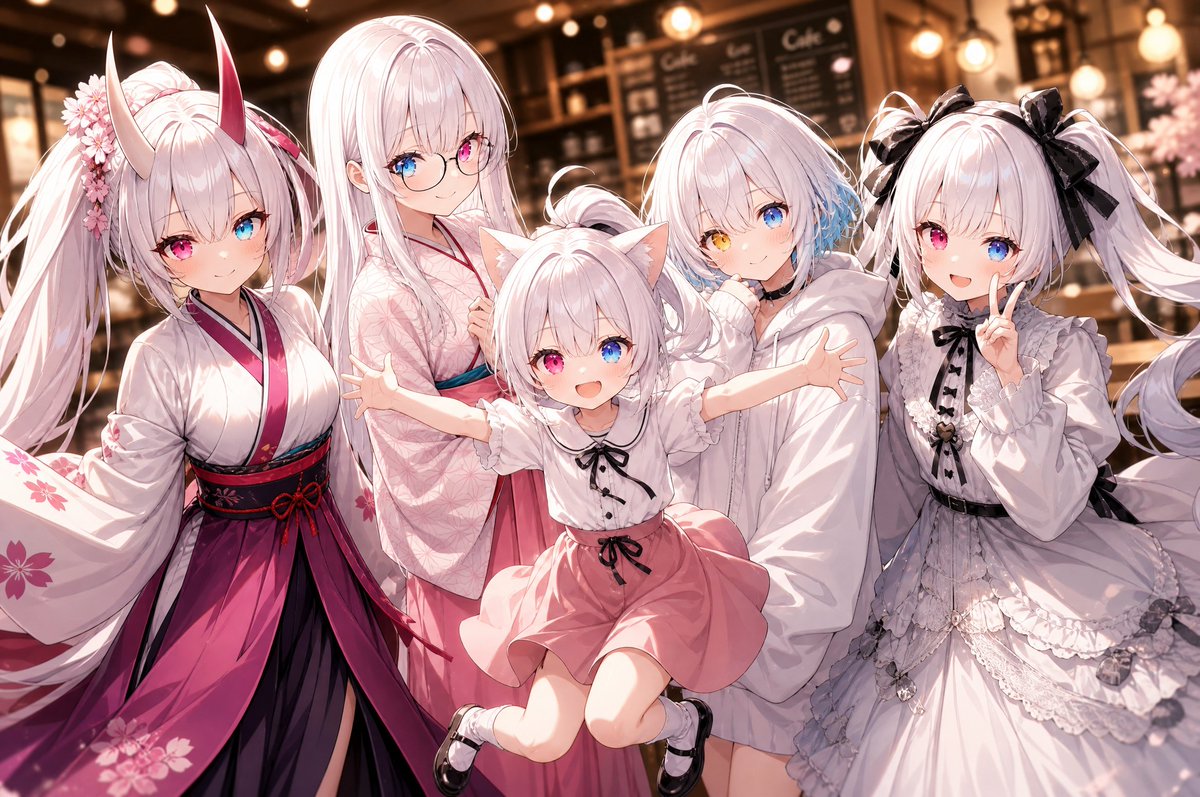
Five-Girl Anime Café Group Portrait
Generates a warm anime café group photo of five pastel original characters with detailed outfits and a cute commemorative pose.
This is a GPT Image 2 prompt case for Anime & Game. Use the copy-ready prompt below to generate similar visuals, and review Awesome GPT Image 2 Prompts attribution plus commercial-use rights before reuse.
Free 1K preview
Generate one preview image instantly, no sign-up required.
Prompt
Copy-ready prompt
Create a polished anime-style group portrait of exactly five original girls posing together inside a warm, softly lit café at night, with blurred chalkboard menus, shelves, pendant lights, and golden bokeh in the background. Use a wide horizontal 3:2 composition, close-up waist-to-knee framing, soft cinematic lighting, detailed glossy hair, delicate line art, pastel pink and white palette, high-detail clothing folds, and a cheerful “group photo” feeling. The five visible characters are, from left to right: 1) a tall fox/oni-inspired girl with very long white twin-tail hair, two tall curved horns fading from ivory to red, foxlike ears, pink-and-blue heterochromia, cherry blossom hair ornaments, and a white kimono with magenta hakama-style skirt, black and red obi, and sakura patterns; 2) a tall elegant girl with long straight pale pink-white hair, round glasses, blue-and-pink heterochromia, wearing a pale pink floral kimono and teal obi, smiling gently; 3) a small cat-eared girl in the front center, jumping or being lifted with arms spread wide, pale pink hair in a small bun, cat ears, white blouse with black ribbon and buttons, salmon-pink skirt, white socks and black Mary Jane shoes, with her face covered by a flat opaque pale pink square censor block; 4) a shy short-haired girl slightly behind center-right with fluffy pale pink-white bob hair, one blue eye and one golden eye, blue hair accent on one side, wearing an oversized white hoodie and holding it close to her face; 5) a frilly gothic-lolita girl on the far right with long white twin tails tied with large black bows, wearing a white lace dress with black ribbon details, ruffles, layered skirt, and delicate accessories, with her face covered by a flat opaque pale pink square censor block. Make everyone lean inward as if taking a cute commemorative photo, with the center child’s outstretched arms overlapping the others. Keep the café background warmly blurred and do not add captions, logos, or extra characters. Customizable details: {argument name="character group theme" default="five pastel white-haired original anime girls"}, {argument name="setting" default="warm cozy café interior at night"}, {argument name="main color palette" default="white, blush pink, magenta, black, and warm amber"}, {argument name="portrait mood" default="cute cheerful group photo"}, Show every face clearly with natural, detailed facial features.Prompt variables
Editable argument placeholders found in the prompt, with their default values.
Best for
- - Anime & Game visual exploration
- - Image generation and reference-image edits
- - Reusable briefs that keep source attribution visible
Change these parts
- - Subject, product, character, or scene
- - Aspect ratio, camera, lighting, and background
- - Brand, text, color, and output constraints
Recommended model and settings
- - Model: gpt-image-2
- - Input mode: Text to Image
- - Aspect ratio: source
- - Commercial status: review original source
How to use this prompt
- 1. Copy the prompt and preserve its structure for the first test.
- 2. Replace the subject, context, and publishing channel.
- 3. Change one camera, lighting, or style variable per iteration.
- 4. Inspect the output, source, text, and rights before reuse.
Limitations, source, and reuse cautions
- - Generated output is an editable draft, not factual, legal, or rights evidence.
- - Review the linked source, people, brands, logos, text, and third-party media before commercial use.
More cases in this category
Prioritized by category, input mode compatibility, quality, and lower risk.

Reuse and source notes
Use this prompt safely after previewing the case.
- 1.Copy the prompt or open it directly in Dovoo with the generation button.
- 2.Adjust variables, aspect ratio, and reference images for your own use case.
- 3.Before publishing or paid usage, verify source rights, attribution requirements, and brand or likeness risks.
Can I use this prompt commercially?
Commercial-use status is allowed. Review the original source, license, brand constraints, and legal requirements before paid usage.
Where does this case come from?
This case is imported from Awesome GPT Image 2 Prompts; keep attribution visible and check the source URL before reuse.