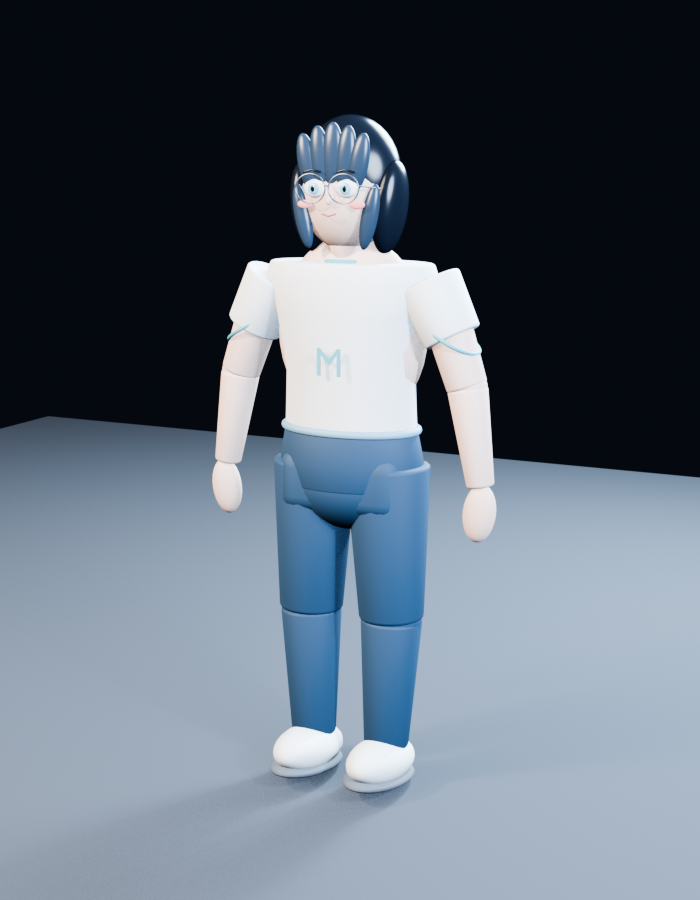
2D Anime to 3D Toy Avatar
Transforms a reference anime character into a simplified glossy 3D toy-style avatar suitable for character model previews.
This is a GPT Image 2 prompt case for Portrait & Character. Use the copy-ready prompt below to generate similar visuals, and review Awesome GPT Image 2 Prompts attribution plus commercial-use rights before reuse.
Free 1K preview
Generate one preview image instantly, no sign-up required.
Free text preview doesn’t preserve reference-image consistency.
Prompt
Copy-ready prompt
Using REFERENCE_0 as the character base, transform the anime character into a simple stylized 3D toy/avatar model while preserving the recognizable face cues, round glasses, short dark bob haircut, and gentle expression. Change the result from a 2D illustration lineup into a single full-body 3D render in a neutral standing pose, viewed slightly from above and slightly three-quarter front.

Style: soft, glossy plastic / clay-like 3D character with simplified anatomy, rounded forms, segmented doll-like limbs, and minimal facial detail. Make the hair into chunky sculpted pieces rather than painted strands.

New outfit and body design: replace the original exposed/censored body with a modest toy outfit made of exactly 5 visible components: 1 oversized white T-shirt, 1 pale blue letter “M” on the shirt front, 1 blue shorts/hip piece, 2 blue leg pieces, and 2 rounded white shoes. Use simple cylindrical arms with mitten-like hands and blocky shoulder pieces.

Scene: place the character alone on a pale blue-gray studio floor plane against a dark nearly black background, with soft overhead lighting, gentle shadows, and a clean 3D preview/render look.

Constraints: do not include the original multi-view lineup, censor mosaic, or reference sheet layout. Do not add text other than the single shirt letter {argument name="shirt letter" default="M"}. Keep the model cute, non-realistic, and clearly toy-like. Use {argument name="character style" default="soft glossy plastic 3D avatar"} and {argument name="background" default="dark studio backdrop with pale blue-gray floor"}.
Prompt variables
Editable argument placeholders found in the prompt, with their default values.
Best for
- - Portrait & Character visual exploration
- - Image generation and reference-image edits
- - Reusable briefs that keep source attribution visible
Change these parts
- - Subject, product, character, or scene
- - Aspect ratio, camera, lighting, and background
- - Brand, text, color, and output constraints
Recommended model and settings
- - Model: gpt-image-2
- - Input mode: Image to Image
- - Aspect ratio: source
- - Commercial status: review original source
How to use this prompt
- 1. Copy the prompt and preserve its structure for the first test.
- 2. Replace the subject, context, and publishing channel.
- 3. Change one camera, lighting, or style variable per iteration.
- 4. Inspect the output, source, text, and rights before reuse.
Limitations, source, and reuse cautions
- - Generated output is an editable draft, not factual, legal, or rights evidence.
- - Review the linked source, people, brands, logos, text, and third-party media before commercial use.
More cases in this category
Prioritized by category, input mode compatibility, quality, and lower risk.


Reuse and source notes
Use this prompt safely after previewing the case.
- 1.Copy the prompt or open it directly in Dovoo with the generation button.
- 2.Adjust variables, aspect ratio, and reference images for your own use case.
- 3.Before publishing or paid usage, verify source rights, attribution requirements, and brand or likeness risks.
Can I use this prompt commercially?
Commercial-use status is allowed. Review the original source, license, brand constraints, and legal requirements before paid usage.
Where does this case come from?
This case is imported from Awesome GPT Image 2 Prompts; keep attribution visible and check the source URL before reuse.