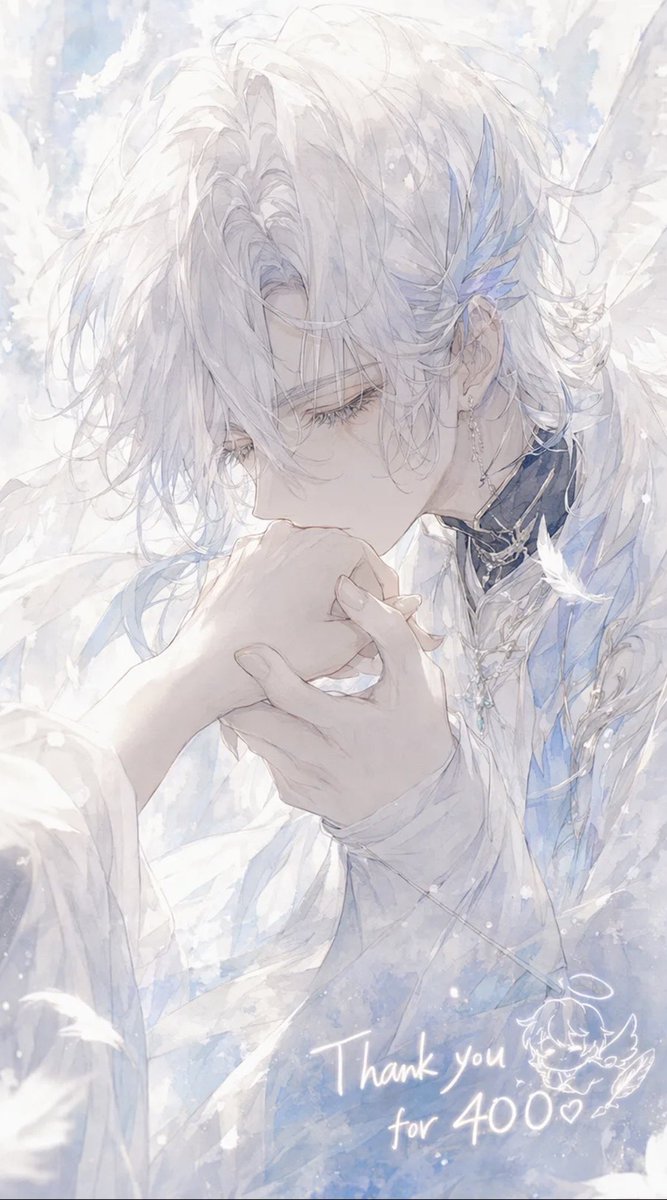
Ethereal Angel Thank You Illustration
A soft pastel anime portrait of an angelic male character kissing a hand, ideal for follower milestone or thank-you artwork.
This is a GPT Image 2 prompt case for Anime & Game. Use the copy-ready prompt below to generate similar visuals, and review Awesome GPT Image 2 Prompts attribution plus commercial-use rights before reuse.
Free 1K preview
Generate one preview image instantly, no sign-up required.
Prompt
Copy-ready prompt
Create a delicate vertical anime-style illustration of {argument name="character name" default="Celestin"}, an ethereal angelic young man with very pale skin and soft, messy {argument name="hair color" default="snow-white"} hair falling over his eyes, shown in close-up three-quarter profile as he gently kisses the back of someone’s hand. His expression is calm, reverent, and slightly melancholic, with long eyelashes and downcast eyes. He wears layered white ceremonial clothing with translucent fabric, pale blue accents, ornate silver jewelry, a dark high collar with metallic trim, dangling earrings, and blue crystal-feather ornaments near one ear. Large soft white wings and drifting feathers surround him, filling the background with a dreamy heavenly atmosphere. Use a luminous watercolor and pencil-sketch aesthetic, very soft pastel whites, icy blues, pearly grays, high-key lighting, airy brush textures, sparkling snow-like particles, and a romantic shoujo manga composition. The foreground hand should be gracefully held in both of his hands as he kisses it, with elegant slender fingers. Add handwritten glowing white text near the lower right reading {argument name="thank you message" default="Thank you for 400♡"}, plus a small cute doodle of a winged chibi face or angel mascot beside it. Canvas should be vertical 9:16, intimate cropped portrait, no hard outlines, no modern objects, no watermark.Prompt variables
Editable argument placeholders found in the prompt, with their default values.
Best for
- - Anime & Game visual exploration
- - Image generation and reference-image edits
- - Reusable briefs that keep source attribution visible
Change these parts
- - Subject, product, character, or scene
- - Aspect ratio, camera, lighting, and background
- - Brand, text, color, and output constraints
Recommended model and settings
- - Model: gpt-image-2
- - Input mode: Text to Image
- - Aspect ratio: source
- - Commercial status: review original source
How to use this prompt
- 1. Copy the prompt and preserve its structure for the first test.
- 2. Replace the subject, context, and publishing channel.
- 3. Change one camera, lighting, or style variable per iteration.
- 4. Inspect the output, source, text, and rights before reuse.
Limitations, source, and reuse cautions
- - Generated output is an editable draft, not factual, legal, or rights evidence.
- - Review the linked source, people, brands, logos, text, and third-party media before commercial use.
More cases in this category
Prioritized by category, input mode compatibility, quality, and lower risk.

Reuse and source notes
Use this prompt safely after previewing the case.
- 1.Copy the prompt or open it directly in Dovoo with the generation button.
- 2.Adjust variables, aspect ratio, and reference images for your own use case.
- 3.Before publishing or paid usage, verify source rights, attribution requirements, and brand or likeness risks.
Can I use this prompt commercially?
Commercial-use status is allowed. Review the original source, license, brand constraints, and legal requirements before paid usage.
Where does this case come from?
This case is imported from Awesome GPT Image 2 Prompts; keep attribution visible and check the source URL before reuse.