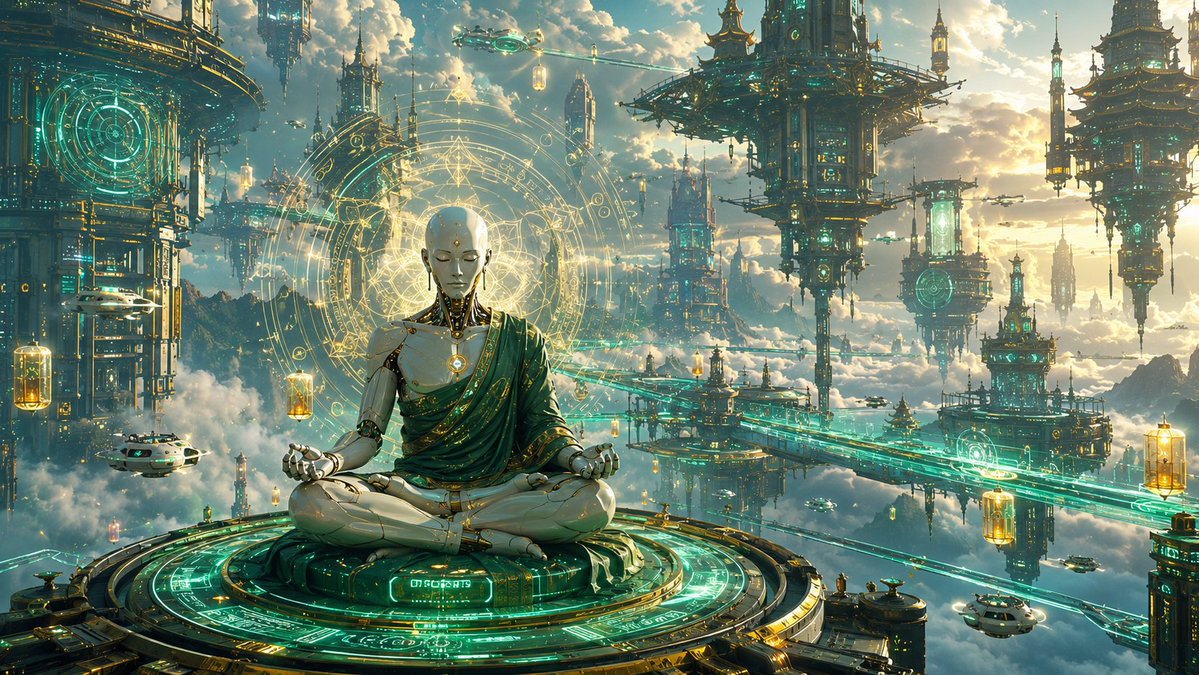
Cyberpunk Android Monk Sky City
A detailed prompt for generating a cinematic sci-fi fantasy scene of a faceless android monk meditating in a luminous floating temple city.
This is a GPT Image 2 prompt case for Anime & Game. Use the copy-ready prompt below to generate similar visuals, and review Awesome GPT Image 2 Prompts attribution plus commercial-use rights before reuse.
Free 1K preview
Generate one preview image instantly, no sign-up required.
Prompt
Copy-ready prompt
Create a cinematic ultra-wide fantasy sci-fi illustration of a serene faceless humanoid android monk meditating in lotus pose on a circular floating platform above the clouds, in a vast sky city that blends ancient Asian temple architecture with high-tech cyberpunk machinery. The central subject is {argument name="character type" default="a faceless white-and-gold humanoid android monk"}, seated cross-legged, wearing a draped emerald-green robe with gold trim over polished ivory mechanical limbs and a glowing circular chest core. The face should be smooth and blank, with no features, like a pale rectangular mask or unfinished faceplate. Behind the figure, place a huge radiant golden sacred-geometry halo made of concentric rings, runes, triangles, orbital lines, and arcane circuit patterns. The monk sits on a large ornate circular platform covered in turquoise holographic glyphs, glowing circuitry, and gold mechanical detailing, viewed from slightly above and facing forward.

Set the scene in a majestic floating city at sunset, with warm clouds, blue sky, and golden sunlight breaking through. Include exactly 7 major floating architectural structures: 1 massive cropped tower on the far left with a cyan circular hologram, 1 tall spired tower behind the monk on the left, 1 large pagoda-like suspended fortress in the upper center-right, 1 pagoda tower in the upper far right, 1 mid-distance tower cluster below the central fortress, 1 tall needle-like tower near the right-center distance, and 1 lower-right platform tower. Add exactly 6 small flying vehicles: 1 white craft near the lower left, 1 tiny craft near the upper center, 1 tiny craft near the central bridge area, 1 tiny craft near the right-center, and 2 white pod-like craft near the lower right. Add exactly 5 glowing hanging lantern capsules suspended in the air: 1 near the left edge, 1 near the monk’s left shoulder, 1 near the upper center, 1 near the lower right edge, and 1 near the right-center bridge. Use luminous turquoise energy bridges and rails crossing the city, with ornate gold accents, suspended platforms, floating spires, atmospheric mist, and clouds below.

Visual style: {argument name="art style" default="epic high-detail cinematic concept art"}, extremely intricate, sharp focus on the monk and platform, atmospheric depth, volumetric lighting, teal and gold color palette, glowing cyan holograms, sacred-tech mysticism, futuristic Buddhist temple mood, no readable text except abstract glowing glyphs. Use a 16:9 panoramic composition, rich detail, dramatic scale, and a peaceful transcendent atmosphere. Emphasize {argument name="color palette" default="emerald teal, antique gold, ivory white, and warm sunset clouds"}.
Prompt variables
Editable argument placeholders found in the prompt, with their default values.
Best for
- - Anime & Game visual exploration
- - Image generation and reference-image edits
- - Reusable briefs that keep source attribution visible
Change these parts
- - Subject, product, character, or scene
- - Aspect ratio, camera, lighting, and background
- - Brand, text, color, and output constraints
Recommended model and settings
- - Model: gpt-image-2
- - Input mode: Text to Image
- - Aspect ratio: source
- - Commercial status: review original source
How to use this prompt
- 1. Copy the prompt and preserve its structure for the first test.
- 2. Replace the subject, context, and publishing channel.
- 3. Change one camera, lighting, or style variable per iteration.
- 4. Inspect the output, source, text, and rights before reuse.
Limitations, source, and reuse cautions
- - Generated output is an editable draft, not factual, legal, or rights evidence.
- - Review the linked source, people, brands, logos, text, and third-party media before commercial use.
More cases in this category
Prioritized by category, input mode compatibility, quality, and lower risk.



Reuse and source notes
Use this prompt safely after previewing the case.
- 1.Copy the prompt or open it directly in Dovoo with the generation button.
- 2.Adjust variables, aspect ratio, and reference images for your own use case.
- 3.Before publishing or paid usage, verify source rights, attribution requirements, and brand or likeness risks.
Can I use this prompt commercially?
Commercial-use status is allowed. Review the original source, license, brand constraints, and legal requirements before paid usage.
Where does this case come from?
This case is imported from Awesome GPT Image 2 Prompts; keep attribution visible and check the source URL before reuse.