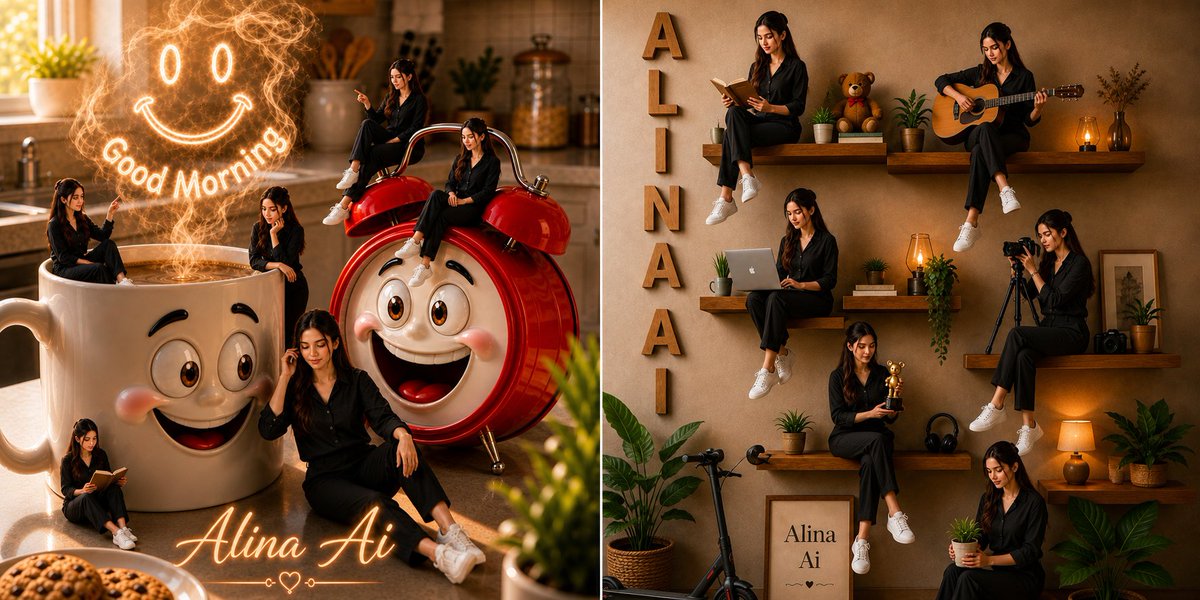
Whimsical Alina Ai Split Scene
A detailed prompt for generating a warm split-screen lifestyle collage with multiple Alina Ai figures in a magical coffee kitchen and cozy shelf wall scene.
This is a GPT Image 2 prompt case for Portrait & Character. Use the copy-ready prompt below to generate similar visuals, and review Awesome GPT Image 2 Prompts attribution plus commercial-use rights before reuse.
Free 1K preview
Generate one preview image instantly, no sign-up required.
Prompt
Copy-ready prompt
Create a split-screen whimsical photorealistic social-media artwork featuring {argument name="character name" default="Alina Ai"}, a young woman with long dark hair wearing a black button-up outfit and white sneakers, shown as multiple tiny versions of herself in cozy lifestyle scenes. Canvas: wide horizontal 2:1 composition divided into two equal panels with warm golden morning light, cinematic depth of field, realistic textures, and a polished editorial look.

Left panel: a cozy modern kitchen at sunrise with a giant white ceramic coffee mug in the foreground and a giant glossy red retro alarm clock beside it. Both oversized objects have cute expressive cartoon faces: large brown eyes, raised brows, rosy cheeks, and big cheerful smiles. The coffee mug is filled with glowing coffee or steam, and above it a magical swirling steam drawing forms a neon-like smiley face with two oval eyes and a curved smile. Add the glowing words "Good Morning" arcing under the steam face. Show exactly 5 miniature versions of the woman in this left panel: 1 sitting on the mug rim and pointing toward the glowing steam, 1 seated on top of the alarm clock bell, 1 sitting on the red alarm clock body, 1 sitting on the floor reading a small book near the mug, and 1 larger foreground version sitting casually on the counter with one hand near her hair. Add warm kitchen details in the background such as a sunlit window, plant, jars, utensils, and soft bokeh. At the bottom center, write the glowing cursive signature {argument name="steam greeting" default="Good Morning"} with a small heart ornament.

Right panel: a warm beige textured interior wall with floating wooden shelves arranged like a lifestyle collage. Place vertical wooden letters spelling {argument name="signature text" default="Alina Ai"} down the left side. Show exactly 7 miniature versions of the same woman on and around the shelves: 1 sitting on the upper left shelf reading an open book, 1 sitting on the upper right shelf playing an acoustic guitar, 1 sitting on the middle left shelf using a laptop, 1 sitting on the middle right shelf operating a camera on a tripod, 1 sitting on the lower middle shelf holding a small golden trophy, 1 sitting near the lower right holding a small potted plant, and 1 seated low near the floor among plants. Surround her with cozy decor: teddy bear, potted plants, stacked books, amber lanterns, headphones, framed print reading {argument name="vertical wall letters" default="ALINAAI"}, small camera, scooter, leafy floor plants, and warm lamp glow. Keep the overall palette amber, beige, cream, red, and black, with soft shadows and realistic lighting.

Constraints: Make all miniature figures resemble the same person and outfit consistently. Use exactly 5 mini-women in the kitchen panel and exactly 7 mini-women in the shelf-wall panel. Keep all visible text legible: "Good Morning", the cursive signature, the vertical wall letters, and the framed print. No watermark, no extra labels, no distorted faces or hands.
Prompt variables
Editable argument placeholders found in the prompt, with their default values.
Best for
- - Portrait & Character visual exploration
- - Image generation and reference-image edits
- - Reusable briefs that keep source attribution visible
Change these parts
- - Subject, product, character, or scene
- - Aspect ratio, camera, lighting, and background
- - Brand, text, color, and output constraints
Recommended model and settings
- - Model: gpt-image-2
- - Input mode: Text to Image
- - Aspect ratio: source
- - Commercial status: review original source
How to use this prompt
- 1. Copy the prompt and preserve its structure for the first test.
- 2. Replace the subject, context, and publishing channel.
- 3. Change one camera, lighting, or style variable per iteration.
- 4. Inspect the output, source, text, and rights before reuse.
Limitations, source, and reuse cautions
- - Generated output is an editable draft, not factual, legal, or rights evidence.
- - Review the linked source, people, brands, logos, text, and third-party media before commercial use.
More cases in this category
Prioritized by category, input mode compatibility, quality, and lower risk.
Reuse and source notes
Use this prompt safely after previewing the case.
- 1.Copy the prompt or open it directly in Dovoo with the generation button.
- 2.Adjust variables, aspect ratio, and reference images for your own use case.
- 3.Before publishing or paid usage, verify source rights, attribution requirements, and brand or likeness risks.
Can I use this prompt commercially?
Commercial-use status is allowed. Review the original source, license, brand constraints, and legal requirements before paid usage.
Where does this case come from?
This case is imported from Awesome GPT Image 2 Prompts; keep attribution visible and check the source URL before reuse.