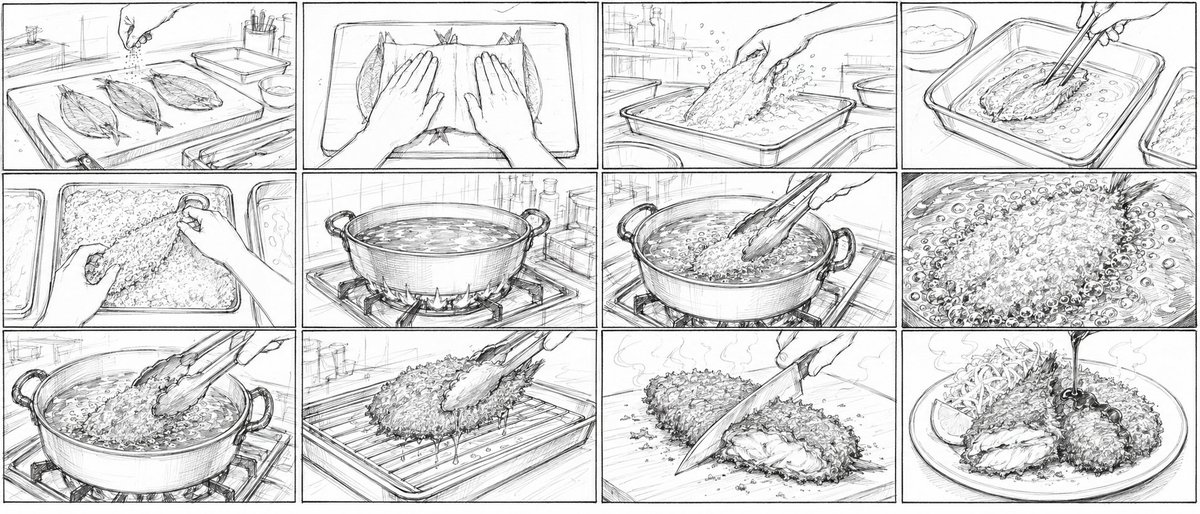
Aji Fry Anime Cooking Storyboard
Creates a 12-panel rough pencil storyboard for a Japanese 2D anime cooking short showing golden aji fry preparation from raw fish to plated dish.
This is a GPT Image 2 prompt case for Anime & Game. Use the copy-ready prompt below to generate similar visuals, and review Awesome GPT Image 2 Prompts attribution plus commercial-use rights before reuse.
Free 1K preview
Generate one preview image instantly, no sign-up required.
Free text preview doesn’t preserve reference-image consistency.
Prompt
Copy-ready prompt
Goal: Create a very rough pencil storyboard sheet for a 15-second Japanese 2D anime cooking short about {argument name="dish name" default="golden aji fry"}, showing the full cooking process from raw fish to plated fried cutlet.

Canvas: Ultra-wide 21:9 horizontal aspect ratio, black-and-white pencil sketch on white paper, divided into exactly 12 rectangular panels in a 3-row by 4-column grid. Use thin black panel borders, hand-drawn construction lines, loose animation-layout perspective, energetic hatching, and no color.

Visual style: Japanese anime storyboard / rough keyframe layout, realistic kitchen props, cinematic close-ups, dynamic hands-in-frame action, visible sketch strokes, light shading, steam, bubbles, splashes, crumbs, and motion lines. Keep everything monochrome graphite, like a production storyboard before cleanup.

Panel count and contents: Include exactly 12 discrete storyboard panels, read left to right, top to bottom. Panel 1: kitchen prep counter in perspective with three opened horse mackerel fillets on a cutting board, a hand sprinkling seasoning from above, sink and small bottles in the background. Panel 2: top-down close-up of both hands pressing or flattening the opened fish fillets on a tray, emphasizing preparation before breading. Panel 3: hand dropping or coating a fish fillet in a shallow tray of flour or breadcrumbs, powder and crumbs flying upward. Panel 4: chopsticks lifting a breaded fish fillet in a shallow egg or wet batter tray, another tray nearby, liquid ripples around it. Panel 5: close-up of hands burying and pressing the fish into a mound of coarse panko breadcrumbs in a rectangular tray. Panel 6: large pot of hot oil on a gas stove, flames visible underneath, oil surface shimmering, kitchen shelves and bottles behind. Panel 7: long cooking chopsticks lowering a breaded fish fillet into the bubbling oil, the pot handles visible, intense frying action beginning. Panel 8: extreme close-up of the frying surface packed with bubbles and crispy crumb texture around the fish. Panel 9: chopsticks lifting the fully fried crispy fish from the pot, oil dripping back down, strong steam and bubbling oil. Panel 10: the fried fish resting on a wire rack over a tray, chopsticks releasing it, oil drips beneath the rack. Panel 11: a knife cutting through the fried aji fry on a cutting board, revealing the soft white fish interior under the crunchy crust, steam rising. Panel 12: final plated dish with two crispy aji fry pieces on a round plate, shredded cabbage, a lemon wedge, steam, and a stream of dark sauce pouring from above onto the cutlet.

Text content: Do not add captions, speech bubbles, numbers, logos, or watermarks; the storyboard should be purely visual.

Constraints: Maintain a consistent kitchen setting and continuous cooking sequence. Make the panels feel like rough pre-production art for {argument name="video length" default="15-second"} Japanese 2D animation. Use {argument name="line style" default="loose graphite pencil storyboard lines"} with {argument name="detail level" default="high food texture detail"}. Emphasize the appetizing transformation into {argument name="final dish presentation" default="a crispy golden aji fry plate with cabbage, lemon, and sauce"}, even though the image remains black and white.
Prompt variables
Editable argument placeholders found in the prompt, with their default values.
Best for
- - Anime & Game visual exploration
- - Image generation and reference-image edits
- - Reusable briefs that keep source attribution visible
Change these parts
- - Subject, product, character, or scene
- - Aspect ratio, camera, lighting, and background
- - Brand, text, color, and output constraints
Recommended model and settings
- - Model: gpt-image-2
- - Input mode: Image to Image
- - Aspect ratio: source
- - Commercial status: review original source
How to use this prompt
- 1. Copy the prompt and preserve its structure for the first test.
- 2. Replace the subject, context, and publishing channel.
- 3. Change one camera, lighting, or style variable per iteration.
- 4. Inspect the output, source, text, and rights before reuse.
Limitations, source, and reuse cautions
- - Generated output is an editable draft, not factual, legal, or rights evidence.
- - Review the linked source, people, brands, logos, text, and third-party media before commercial use.
More cases in this category
Prioritized by category, input mode compatibility, quality, and lower risk.

Reuse and source notes
Use this prompt safely after previewing the case.
- 1.Copy the prompt or open it directly in Dovoo with the generation button.
- 2.Adjust variables, aspect ratio, and reference images for your own use case.
- 3.Before publishing or paid usage, verify source rights, attribution requirements, and brand or likeness risks.
Can I use this prompt commercially?
Commercial-use status is allowed. Review the original source, license, brand constraints, and legal requirements before paid usage.
Where does this case come from?
This case is imported from Awesome GPT Image 2 Prompts; keep attribution visible and check the source URL before reuse.