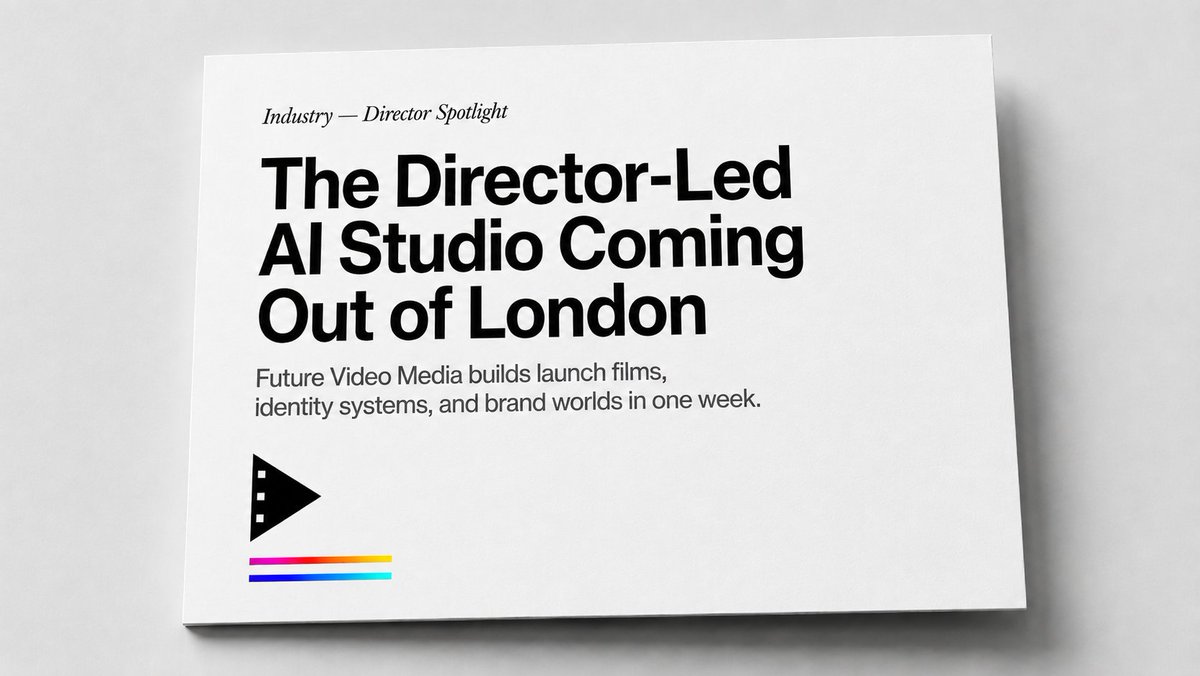
Minimal Director-Led AI Studio Cover
A realistic minimalist editorial card mockup for presenting an agency, studio, or media company announcement.
This is a GPT Image 2 prompt case for Product & Commercial. Use the copy-ready prompt below to generate similar visuals, and review Awesome GPT Image 2 Prompts attribution plus commercial-use rights before reuse.
Free 1K preview
Generate one preview image instantly, no sign-up required.
Prompt
Copy-ready prompt
Create a realistic editorial print mockup photographed from above at a slight angle: a single white landscape-format card or magazine cover lying on a pale gray tabletop, with soft studio lighting, subtle paper texture, a thin shadow under the lower and right edges, and lots of clean negative space. The design is minimalist black-and-white with a small color accent. Place all typography flush left in the upper-left quadrant: a small italic serif kicker reading “{argument name="section label" default="Industry — Director Spotlight"}”, then a very large bold black modern sans-serif headline on three lines reading “{argument name="headline text" default="The Director-Led AI Studio Coming Out of London"}”, followed by a smaller gray-black sans-serif subheading on two lines reading “{argument name="subheading text" default="Future Video Media builds launch films, identity systems, and brand worlds in one week."}”. In the lower-left area beneath the copy, add exactly 1 black geometric film/play icon: a right-pointing triangular play symbol with three small square film perforations along its left edge. Under the icon add exactly 3 thin horizontal color stripes, stacked with small gaps: top stripe magenta fading into red and yellow, middle stripe deep blue, bottom stripe cyan/teal. Keep the card edges crisp, the background neutral, the overall style like a premium magazine feature cover or agency one-sheet, with no extra text, no people, no watermark, and no additional logos.Prompt variables
Editable argument placeholders found in the prompt, with their default values.
Best for
- - Product & Commercial visual exploration
- - Image generation and reference-image edits
- - Reusable briefs that keep source attribution visible
Change these parts
- - Subject, product, character, or scene
- - Aspect ratio, camera, lighting, and background
- - Brand, text, color, and output constraints
Recommended model and settings
- - Model: gpt-image-2
- - Input mode: Text to Image
- - Aspect ratio: source
- - Commercial status: review original source
How to use this prompt
- 1. Copy the prompt and preserve its structure for the first test.
- 2. Replace the subject, context, and publishing channel.
- 3. Change one camera, lighting, or style variable per iteration.
- 4. Inspect the output, source, text, and rights before reuse.
Limitations, source, and reuse cautions
- - Generated output is an editable draft, not factual, legal, or rights evidence.
- - Review the linked source, people, brands, logos, text, and third-party media before commercial use.
More cases in this category
Prioritized by category, input mode compatibility, quality, and lower risk.

Reuse and source notes
Use this prompt safely after previewing the case.
- 1.Copy the prompt or open it directly in Dovoo with the generation button.
- 2.Adjust variables, aspect ratio, and reference images for your own use case.
- 3.Before publishing or paid usage, verify source rights, attribution requirements, and brand or likeness risks.
Can I use this prompt commercially?
Commercial-use status is allowed. Review the original source, license, brand constraints, and legal requirements before paid usage.
Where does this case come from?
This case is imported from Awesome GPT Image 2 Prompts; keep attribution visible and check the source URL before reuse.