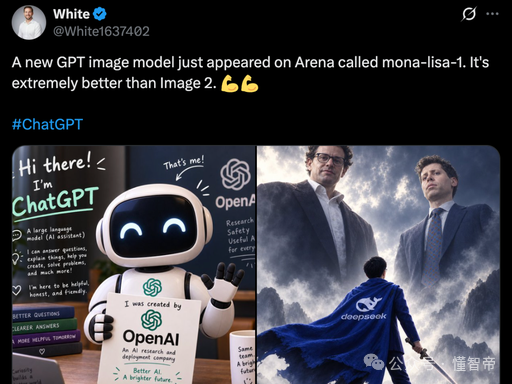
Dark Mode AI Model Leak Tweet
Generates a realistic X/Twitter screenshot announcing a leaked AI image model with two side-by-side embedded example images.
This is a GPT Image 2 prompt case for Graphic & Poster. Use the copy-ready prompt below to generate similar visuals, and review Awesome GPT Image 2 Prompts attribution plus commercial-use rights before reuse.
Free 1K preview
Generate one preview image instantly, no sign-up required.
Prompt
Copy-ready prompt
Goal: Create a realistic dark-mode social media post screenshot about a leaked AI image model, styled like an X/Twitter post.

Canvas: Square 1024×1024 image, black background, with a single tweet occupying the full frame. Use authentic X/Twitter dark mode spacing, white text, blue hashtag/link color, and slightly rounded embedded media corners.

Tweet header: Top left circular profile photo of a light-skinned middle-aged man in a white shirt. Display name is {argument name="display name" default="White"} in bold white text with a blue verified checkmark, and handle {argument name="username" default="@White1637402"} in gray beneath or beside it. Top right has two small UI icons: a stylized X/Twitter action icon and a three-dot menu.

Tweet text: Use the exact visible post copy: “A new GPT image model just appeared on Arena called mona-lisa-1. It's extremely better than Image 2. 💪💪” followed by a blank line and the blue hashtag {argument name="hashtag" default="#ChatGPT"}. Keep line breaks and spacing like a real tweet.

Embedded media layout: Below the tweet text, show exactly 2 side-by-side image cards in one row, separated by a thin black gutter, both with rounded outer corners.

Left media card: A glossy 3D illustration of a cute white-and-black robot mascot in a classroom or chalkboard setting, waving with its right hand and holding a paper sign. The robot has a rounded black face screen with two glowing cyan smiling eyes, white helmet-like head shell, white body panels, black joints, and a friendly pose. Behind it is a chalkboard covered with handwritten educational text and doodles. Large chalk text reads “Hi there! I’m ChatGPT” on the left, and “That’s me!” with an arrow pointing toward an OpenAI swirl logo on the upper right. The robot’s paper sign reads “I was created by OpenAI” with smaller text underneath. Add realistic 3D lighting, slight depth of field, and toy-like materials.

Right media card: A dramatic cinematic poster-like fantasy/business scene showing exactly 3 human figures: two giant suited men looming in the stormy cloudy sky above, and one small caped figure seen from behind in the foreground. The two giant men resemble tech executives, wearing dark business suits and looking down sternly; one has glasses and gray hair, the other has curly hair. The foreground figure wears a bright royal-blue cape with a white logo and the word “claeposeok” or similarly misspelled text on the back, standing on rocky ground and holding a sword at their side. The sky is dark, smoky, and epic with strong rim lighting, blue-gray clouds, and heroic scale.

Visible text count: Include exactly 7 main visible text groups: 1 display name “White”, 2 handle “@White1637402”, 3 tweet body sentence, 4 hashtag “#ChatGPT”, 5 chalkboard phrase “Hi there! I’m ChatGPT”, 6 chalkboard phrase “That’s me!”, 7 paper sign “I was created by OpenAI”. Minor chalk scribbles may be present but should be small and not dominant.

Visual style: Photorealistic screenshot compositing with crisp UI text, realistic embedded image thumbnails, high contrast, and no extra watermark. Keep the overall look like a viral tech leak tweet screenshot discussing {argument name="model name" default="mona-lisa-1"}.
Prompt variables
Editable argument placeholders found in the prompt, with their default values.
Best for
- - Graphic & Poster visual exploration
- - Image generation and reference-image edits
- - Reusable briefs that keep source attribution visible
Change these parts
- - Subject, product, character, or scene
- - Aspect ratio, camera, lighting, and background
- - Brand, text, color, and output constraints
Recommended model and settings
- - Model: gpt-image-2
- - Input mode: Text to Image
- - Aspect ratio: source
- - Commercial status: review original source
How to use this prompt
- 1. Copy the prompt and preserve its structure for the first test.
- 2. Replace the subject, context, and publishing channel.
- 3. Change one camera, lighting, or style variable per iteration.
- 4. Inspect the output, source, text, and rights before reuse.
Limitations, source, and reuse cautions
- - Generated output is an editable draft, not factual, legal, or rights evidence.
- - Review the linked source, people, brands, logos, text, and third-party media before commercial use.
More cases in this category
Prioritized by category, input mode compatibility, quality, and lower risk.




Reuse and source notes
Use this prompt safely after previewing the case.
- 1.Copy the prompt or open it directly in Dovoo with the generation button.
- 2.Adjust variables, aspect ratio, and reference images for your own use case.
- 3.Before publishing or paid usage, verify source rights, attribution requirements, and brand or likeness risks.
Can I use this prompt commercially?
Commercial-use status is allowed. Review the original source, license, brand constraints, and legal requirements before paid usage.
Where does this case come from?
This case is imported from Awesome GPT Image 2 Prompts; keep attribution visible and check the source URL before reuse.