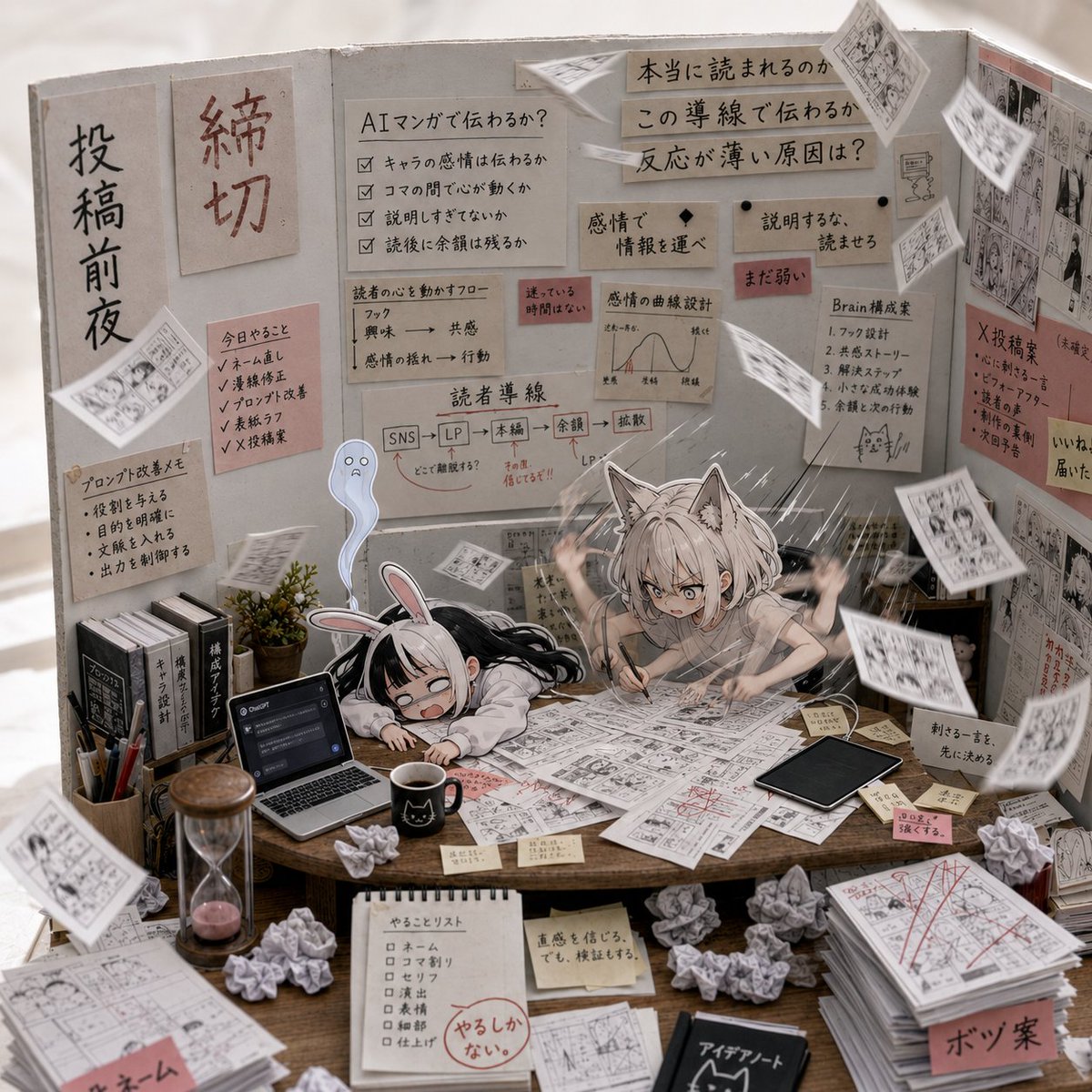
AI Manga Deadline War Room
A dense anime diorama scene showing two exhausted manga-making characters inside a chaotic AI image generation workspace.
This is a GPT Image 2 prompt case for Anime & Game. Use the copy-ready prompt below to generate similar visuals, and review Awesome GPT Image 2 Prompts attribution plus commercial-use rights before reuse.
Free 1K preview
Generate one preview image instantly, no sign-up required.
Prompt
Copy-ready prompt
Goal: Create a highly detailed square anime illustration of the chaotic “inside of GPT image generation” as a manga production war room, halfway between rough imagination and realistic execution. The scene should feel like a frantic deadline night for AI-generated manga art.

Canvas: Square 1:1 composition, dense three-wall diorama perspective, warm indoor lighting, shallow depth of field but with many readable sticky notes and diagrams. The left side should feel more sketchy and conceptual, the right side more polished and realistic.

Main subjects: Show exactly 2 exhausted chibi anime girls at the center table: 1 black-haired bunny-ear girl slumped face-down on the desk, crying and overwhelmed, and 1 silver-haired cat-ear girl frantically drawing manga panels with both hands raised in panic. Add exactly 1 small translucent blue ghost mascot floating behind them, looking worried.

Environment and layout: A wooden worktable fills the foreground and center, covered with manga manuscripts, storyboard sheets, red correction marks, sticky notes, crumpled paper balls, coffee, pens, a laptop, a tablet, books, and a small plant. Behind the desk are three upright gray cardboard partitions covered in planning notes, workflow diagrams, manga references, and pinned sheets. The overall room should look handcrafted, like a miniature cardboard studio set photographed realistically.

Visible repeated elements to include: exactly 2 main anime characters, exactly 1 ghost mascot, exactly 3 vertical backdrop panels, exactly 1 open laptop on the left side of the desk, exactly 1 black tablet on the right side of the desk, exactly 1 black coffee mug near the front center, exactly 1 hourglass at the front left, exactly 1 potted plant near the left wall, exactly 1 tall stack of finished manuscript pages at the front right, exactly 9 crumpled paper balls scattered across the table and floor area, and many loose manga pages flying through the air.

Text and board details: Use Japanese handwritten labels and sticky notes as decorative worldbuilding. Include a large vertical sign on the left panel with {argument name="left wall headline" default="The night before posting"}, a red deadline sign with {argument name="deadline sign" default="Deadline"}, central notes about whether AI manga can communicate emotion, reader guidance lines, emotion selection, and a pipeline diagram from SNS to landing page to final manuscript to review to diffusion. On the right wall, include signs about whether the work is truly readable, why reactions feel weak, and how to make the brain generate emotion. Add small red warning sticky notes, checklist boxes, and manga-panel thumbnails.

Style: Ultra-detailed anime diorama illustration, realistic tabletop materials, paper texture, pencil and ink manga pages, soft beige-gray cardboard walls, warm desk lighting, subtle motion blur on flying papers, expressive chibi faces, high-density visual storytelling, cozy but frantic deadline atmosphere. Use a mix of clean anime character rendering and realistic product-photography lighting.

Constraints: Keep the composition crowded but coherent, with the two characters clearly centered. Do not add extra main characters. Make the Japanese writing look handwritten on paper notes, not digital UI text. Avoid logos, watermarks, or modern interface overlays except for the single open laptop.
Prompt variables
Editable argument placeholders found in the prompt, with their default values.
Best for
- - Anime & Game visual exploration
- - Image generation and reference-image edits
- - Reusable briefs that keep source attribution visible
Change these parts
- - Subject, product, character, or scene
- - Aspect ratio, camera, lighting, and background
- - Brand, text, color, and output constraints
Recommended model and settings
- - Model: gpt-image-2
- - Input mode: Text to Image
- - Aspect ratio: source
- - Commercial status: review original source
How to use this prompt
- 1. Copy the prompt and preserve its structure for the first test.
- 2. Replace the subject, context, and publishing channel.
- 3. Change one camera, lighting, or style variable per iteration.
- 4. Inspect the output, source, text, and rights before reuse.
Limitations, source, and reuse cautions
- - Generated output is an editable draft, not factual, legal, or rights evidence.
- - Review the linked source, people, brands, logos, text, and third-party media before commercial use.
More cases in this category
Prioritized by category, input mode compatibility, quality, and lower risk.

Reuse and source notes
Use this prompt safely after previewing the case.
- 1.Copy the prompt or open it directly in Dovoo with the generation button.
- 2.Adjust variables, aspect ratio, and reference images for your own use case.
- 3.Before publishing or paid usage, verify source rights, attribution requirements, and brand or likeness risks.
Can I use this prompt commercially?
Commercial-use status is allowed. Review the original source, license, brand constraints, and legal requirements before paid usage.
Where does this case come from?
This case is imported from Awesome GPT Image 2 Prompts; keep attribution visible and check the source URL before reuse.