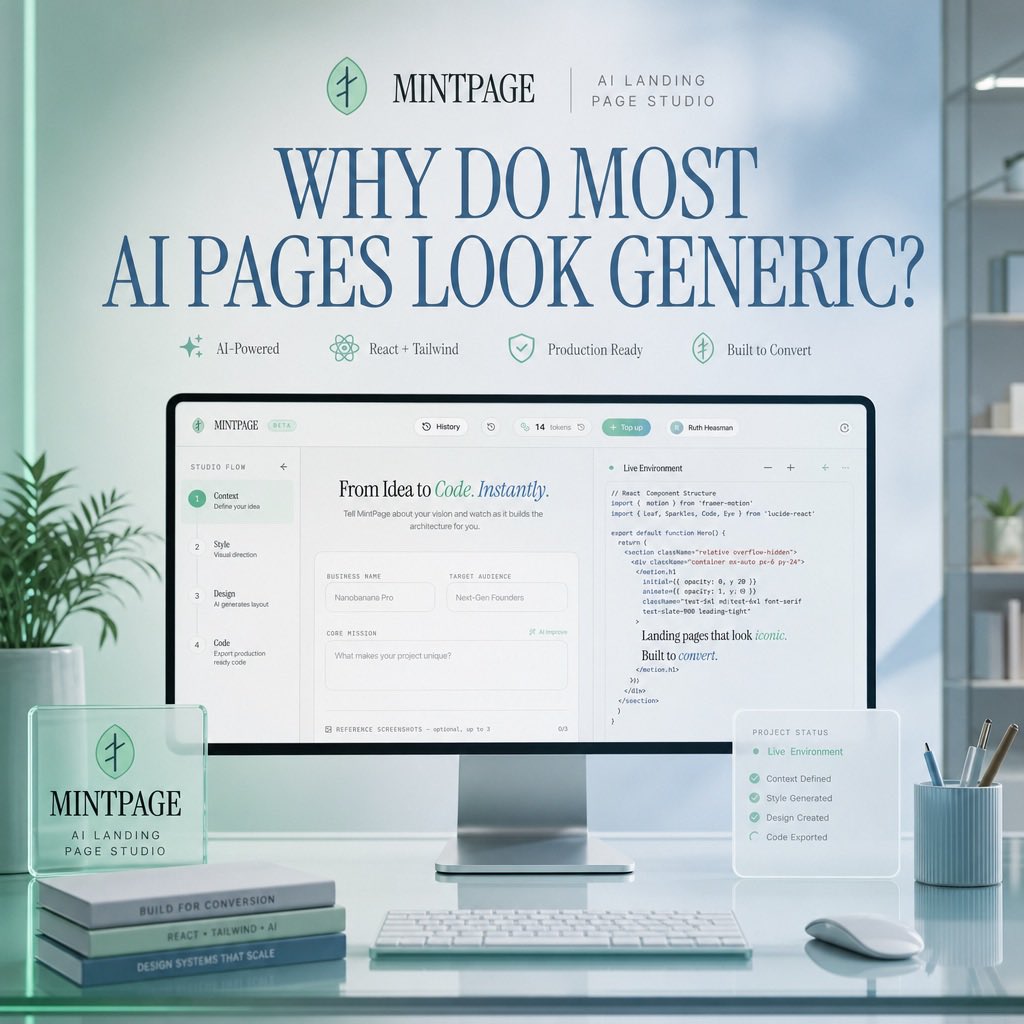
Mintpage AI Landing Page Hero
A polished SaaS hero mockup showing an AI landing page studio interface in a soft mint-blue office scene.
This is a GPT Image 2 prompt case for Product & Commercial. Use the copy-ready prompt below to generate similar visuals, and review Awesome GPT Image 2 Prompts attribution plus commercial-use rights before reuse.
Free 1K preview
Generate one preview image instantly, no sign-up required.
Prompt
Copy-ready prompt
Goal: Create a polished square hero image for a SaaS landing page concept advertising {argument name="product name" default="MINTPAGE"}, an AI landing page studio.

Canvas: 1:1 square composition, soft daylight office setting, pastel mint and pale blue color palette, clean premium tech aesthetic, realistic 3D product mockup mixed with refined editorial typography.

Layout: Center the scene around a large desktop monitor on a glossy glass desk. At the top, place a small brand row with a circular mint leaf-like logo, the word {argument name="product name" default="MINTPAGE"}, a thin divider line, and the subtitle {argument name="brand subtitle" default="AI LANDING PAGE STUDIO"}. Below it, use a very large elegant serif headline in dark blue: {argument name="headline text" default="WHY DO MOST AI PAGES LOOK GENERIC?"}. Under the headline, place exactly 4 small feature badges in one row with delicate mint icons and labels: 1) AI-Powered, 2) React + Tailwind, 3) Production Ready, 4) Built to Convert.

Main subject: The monitor displays a clean web-app builder interface for creating landing pages. The interface should have a top navigation bar and a split workspace. On the left, show a vertical setup flow with exactly 4 numbered steps: 1) Context — Define your idea, 2) Style — Visual direction, 3) Design — AI generates layout, 4) Code — Export production ready code. In the center panel, show the headline “From Idea to Code. Instantly.” with “Code. Instantly.” in mint italic styling, followed by form fields such as Business Name, Target Audience, and Core Mission. On the right panel, show a code editor titled “Live Environment” with readable but small React/Tailwind-style code and a short rendered text snippet saying “Landing pages that look iconic. Built to convert.”

Foreground objects: On the left side of the desk, place a translucent acrylic desk plaque with the circular logo and the text “MINTPAGE” and “AI LANDING PAGE STUDIO.” Beneath or beside it, stack exactly 3 slim books with visible spine labels: 1) BUILT FOR CONVERSION, 2) REACT + TAILWIND + AI, 3) DESIGN SYSTEMS THAT SCALE. In front of the monitor, place a slim white keyboard. On the right side, place a small translucent floating status card titled “PROJECT STATUS” listing exactly 5 checked items: 1) Live Environment, 2) Context Defined, 3) Style Generated, 4) Design Created, 5) Code Exported. Also include a pale blue ribbed pen cup with exactly 4 writing tools and a white mouse.

Environment: Minimal modern office with soft-focus shelves and plants in the background, large window lighting from the right, subtle reflections on the glass desktop, gentle depth of field, no people.

Visual style: Premium startup launch graphic, soft volumetric lighting, realistic product photography, glassmorphism overlays, mint-green accents, dark blue serif typography, crisp UI details, calm high-end studio atmosphere.

Constraints: Use exactly the counted elements listed above, keep the image uncluttered, make the headline the most prominent text, avoid extra logos, watermarks, or unrelated text.
Prompt variables
Editable argument placeholders found in the prompt, with their default values.
Best for
- - Product & Commercial visual exploration
- - Image generation and reference-image edits
- - Reusable briefs that keep source attribution visible
Change these parts
- - Subject, product, character, or scene
- - Aspect ratio, camera, lighting, and background
- - Brand, text, color, and output constraints
Recommended model and settings
- - Model: gpt-image-2
- - Input mode: Text to Image
- - Aspect ratio: source
- - Commercial status: review original source
How to use this prompt
- 1. Copy the prompt and preserve its structure for the first test.
- 2. Replace the subject, context, and publishing channel.
- 3. Change one camera, lighting, or style variable per iteration.
- 4. Inspect the output, source, text, and rights before reuse.
Limitations, source, and reuse cautions
- - Generated output is an editable draft, not factual, legal, or rights evidence.
- - Review the linked source, people, brands, logos, text, and third-party media before commercial use.
More cases in this category
Prioritized by category, input mode compatibility, quality, and lower risk.

Reuse and source notes
Use this prompt safely after previewing the case.
- 1.Copy the prompt or open it directly in Dovoo with the generation button.
- 2.Adjust variables, aspect ratio, and reference images for your own use case.
- 3.Before publishing or paid usage, verify source rights, attribution requirements, and brand or likeness risks.
Can I use this prompt commercially?
Commercial-use status is allowed. Review the original source, license, brand constraints, and legal requirements before paid usage.
Where does this case come from?
This case is imported from Awesome GPT Image 2 Prompts; keep attribution visible and check the source URL before reuse.