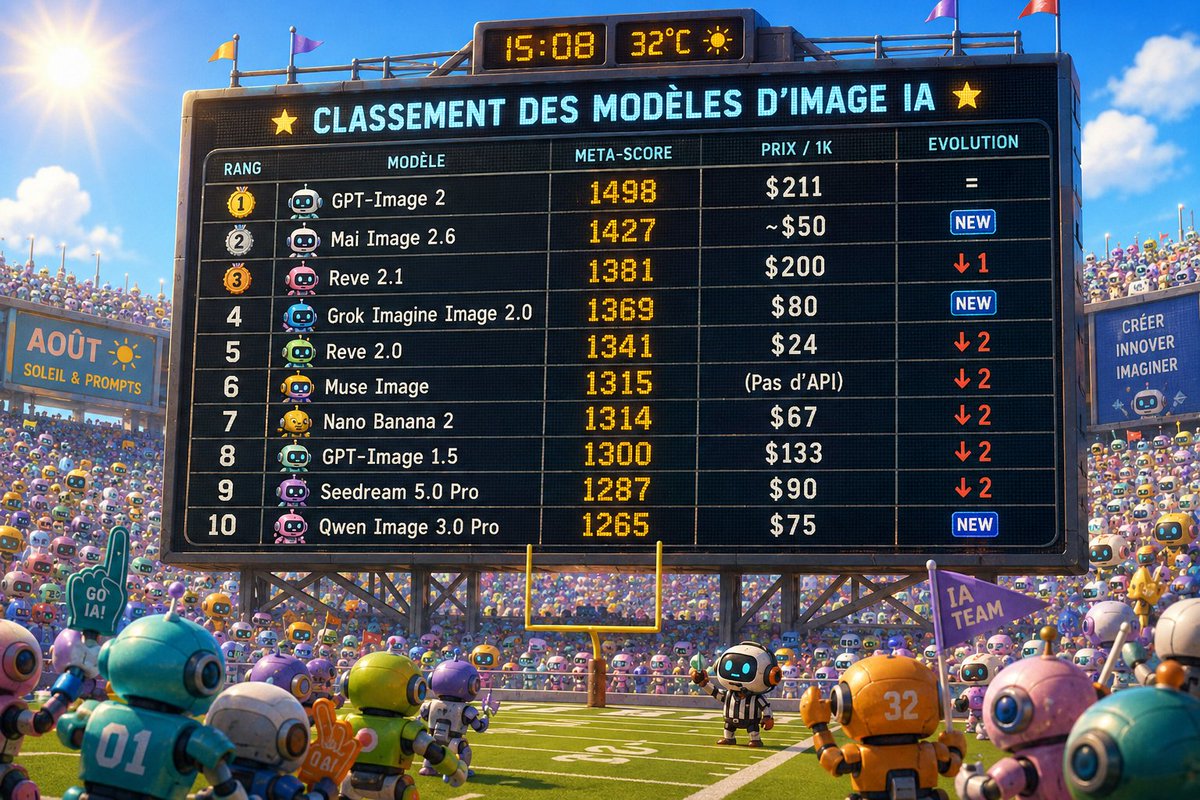
AI Image Model Stadium Ranking
A playful 3D stadium scoreboard scene visualizing a ranked leaderboard of AI image models for social media or tech commentary.
This is a GPT Image 2 prompt case for Illustration & Art. Use the copy-ready prompt below to generate similar visuals, and review Awesome GPT Image 2 Prompts attribution plus commercial-use rights before reuse.
Free 1K preview
Generate one preview image instantly, no sign-up required.
Prompt
Copy-ready prompt
Goal: Create a bright 3D animated stadium scene showing a giant electronic scoreboard ranking AI image models, like a sports league table, with cute robot fans filling the stands.

Canvas: 16:9 wide image, sunny outdoor arena, saturated Pixar-like 3D render, high detail, sharp focus on the scoreboard, warm afternoon light, blue sky with clouds, sun flare in the upper left.

Main scene: A huge black LED stadium scoreboard dominates the center, mounted on metal trusses above a football/soccer field. At the top of the board is a small digital clock and weather panel reading {argument name="clock and weather" default="15:08   32°C"} with a sun icon. The scoreboard headline in glowing cyan French text reads {argument name="headline text" default="CLASSEMENT DES MODÈLES D’IMAGE IA"}, flanked by yellow star icons. The board has a grid table with five columns labeled RANG, MODÈLE, META-SCORE, PRIX / 1K, EVOLUTION.

Table content: Show exactly 10 ranked rows, each with a medal or rank number, a small cute robot avatar, model name, amber LED meta-score, price, and evolution indicator:
1. GPT-Image 2 — 1498 — $211 — =
2. Mai Image 2.6 — 1427 — ~$50 — NEW
3. Reve 2.1 — 1381 — $200 — down 1
4. Grok Imagine Image 2.0 — 1369 — $80 — NEW
5. Reve 2.0 — 1341 — $24 — down 2
6. Muse Image — 1315 — (Pas d’API) — down 2
7. Nano Banana 2 — 1314 — $67 — down 2
8. GPT-Image 1.5 — 1300 — $133 — down 2
9. Seedream 5.0 Pro — 1287 — $90 — down 2
10. Qwen Image 3.0 Pro — 1265 — $75 — NEW
Use orange/yellow LED numerals for the meta-scores, white model names, blue NEW badges, and red downward arrows.

Foreground and crowd: The field is packed with many small rounded robots as spectators and players, but keep individual foreground robots clear: exactly 8 prominent foreground robots are visible near the bottom edge, in teal, white, lime green, purple, orange, pink, and cyan tones, with glossy helmets, antennae, big circular ears, and glowing face screens. One small referee robot stands near the goalpost under the scoreboard. The stands are crowded with hundreds of colorful miniature robots waving flags and signs.

Signs and banners: Include a left stadium banner reading {argument name="left banner text" default="AOÛT — SOLEIL & PROMPTS"}. Include a right vertical banner reading {argument name="right banner text" default="CRÉER INNOVER IMAGINER"}. Include small hand flags reading “GO IA!” and “IA TEAM”.

Style constraints: Make the scoreboard text legible and centered, with slight LED pixel texture. Maintain a playful competition atmosphere, cinematic depth, realistic stadium lighting, and whimsical toy-like robot design. Do not add extra table rows or change the five-column layout.
Prompt variables
Editable argument placeholders found in the prompt, with their default values.
Best for
- - Illustration & Art visual exploration
- - Image generation and reference-image edits
- - Reusable briefs that keep source attribution visible
Change these parts
- - Subject, product, character, or scene
- - Aspect ratio, camera, lighting, and background
- - Brand, text, color, and output constraints
Recommended model and settings
- - Model: gpt-image-2
- - Input mode: Text to Image
- - Aspect ratio: source
- - Commercial status: review original source
How to use this prompt
- 1. Copy the prompt and preserve its structure for the first test.
- 2. Replace the subject, context, and publishing channel.
- 3. Change one camera, lighting, or style variable per iteration.
- 4. Inspect the output, source, text, and rights before reuse.
Limitations, source, and reuse cautions
- - Generated output is an editable draft, not factual, legal, or rights evidence.
- - Review the linked source, people, brands, logos, text, and third-party media before commercial use.
More cases in this category
Prioritized by category, input mode compatibility, quality, and lower risk.
Reuse and source notes
Use this prompt safely after previewing the case.
- 1.Copy the prompt or open it directly in Dovoo with the generation button.
- 2.Adjust variables, aspect ratio, and reference images for your own use case.
- 3.Before publishing or paid usage, verify source rights, attribution requirements, and brand or likeness risks.
Can I use this prompt commercially?
Commercial-use status is allowed. Review the original source, license, brand constraints, and legal requirements before paid usage.
Where does this case come from?
This case is imported from Awesome GPT Image 2 Prompts; keep attribution visible and check the source URL before reuse.