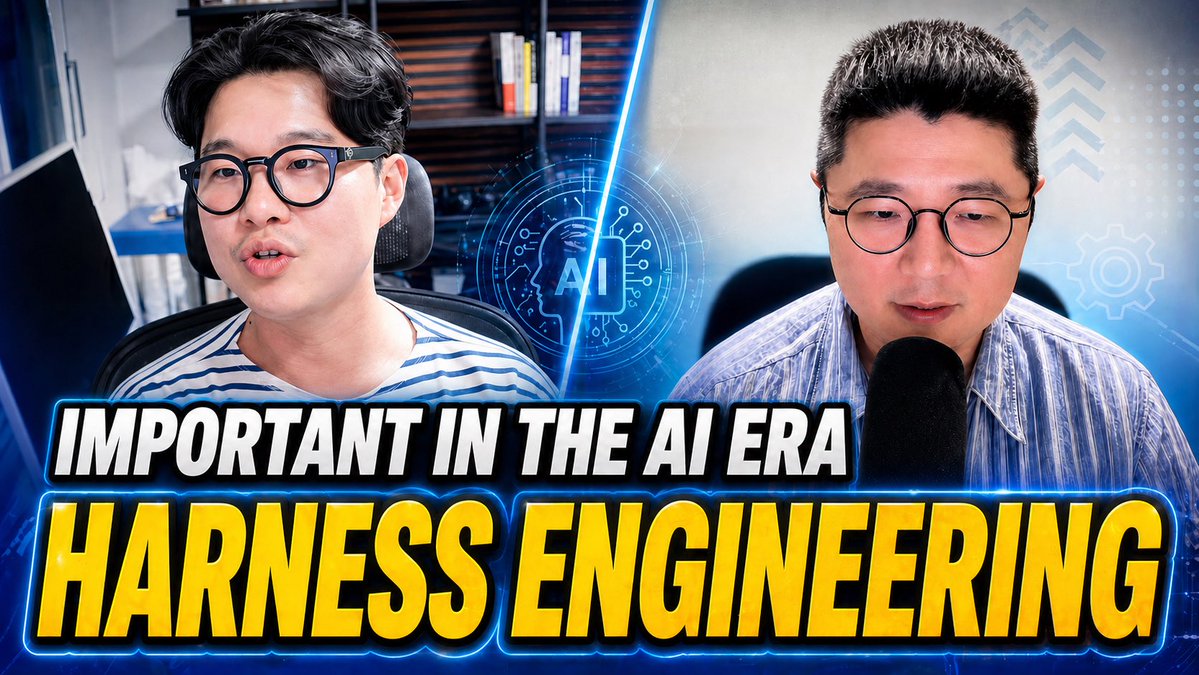
AI Era YouTube Thumbnail
A bold split-screen tech YouTube thumbnail featuring two presenters, glowing AI graphics, and oversized headline text for business or engineering content.
This is a GPT Image 2 prompt case for Graphic & Poster. Use the copy-ready prompt below to generate similar visuals, and review Awesome GPT Image 2 Prompts attribution plus commercial-use rights before reuse.
Free 1K preview
Generate one preview image instantly, no sign-up required.
Prompt
Copy-ready prompt
A high-impact YouTube thumbnail about {argument name="topic text" default="HARNESS ENGINEERING"} in the AI age, 16:9 format, split-screen composition with 2 male presenters shown from the chest up, one on the left and one on the right, both facing forward in office or studio settings. The left presenter has dark hair, wears glasses and a white-and-blue striped shirt, seated in a desk chair with shelves and books blurred in the background. The right presenter has short dark hair, wears glasses and a light blue striped button-up shirt, speaking into a large black microphone, with a softly lit tech-themed background. A glowing electric-blue diagonal slash divides the two halves. In the center, overlay a futuristic circular AI icon with the letters “AI” inside a microchip-like interface, glowing neon blue. Add subtle HUD graphics on the right side: 3 upward chevrons near the top right, 1 gear icon at mid-right, and a faint grid of dots. Across the lower half, place 2 stacked headline lines in huge bold condensed uppercase text with heavy black outline, white outer stroke, and bright blue neon glow: top line smaller, white text reading {argument name="top headline" default="IMPORTANT IN THE AI ERA"}; bottom line much larger, yellow-to-gold gradient text reading {argument name="main headline" default="HARNESS ENGINEERING"}. Use dramatic contrast, cool blue color grading, glossy thumbnail polish, strong rim lighting, mild background blur, and an energetic tech-business aesthetic designed for maximum click-through rate.Prompt variables
Editable argument placeholders found in the prompt, with their default values.
Best for
- - Graphic & Poster visual exploration
- - Image generation and reference-image edits
- - Reusable briefs that keep source attribution visible
Change these parts
- - Subject, product, character, or scene
- - Aspect ratio, camera, lighting, and background
- - Brand, text, color, and output constraints
Recommended model and settings
- - Model: gpt-image-2
- - Input mode: Text to Image
- - Aspect ratio: source
- - Commercial status: review original source
How to use this prompt
- 1. Copy the prompt and preserve its structure for the first test.
- 2. Replace the subject, context, and publishing channel.
- 3. Change one camera, lighting, or style variable per iteration.
- 4. Inspect the output, source, text, and rights before reuse.
Limitations, source, and reuse cautions
- - Generated output is an editable draft, not factual, legal, or rights evidence.
- - Review the linked source, people, brands, logos, text, and third-party media before commercial use.
More cases in this category
Prioritized by category, input mode compatibility, quality, and lower risk.




Reuse and source notes
Use this prompt safely after previewing the case.
- 1.Copy the prompt or open it directly in Dovoo with the generation button.
- 2.Adjust variables, aspect ratio, and reference images for your own use case.
- 3.Before publishing or paid usage, verify source rights, attribution requirements, and brand or likeness risks.
Can I use this prompt commercially?
Commercial-use status is allowed. Review the original source, license, brand constraints, and legal requirements before paid usage.
Where does this case come from?
This case is imported from Awesome GPT Image 2 Prompts; keep attribution visible and check the source URL before reuse.