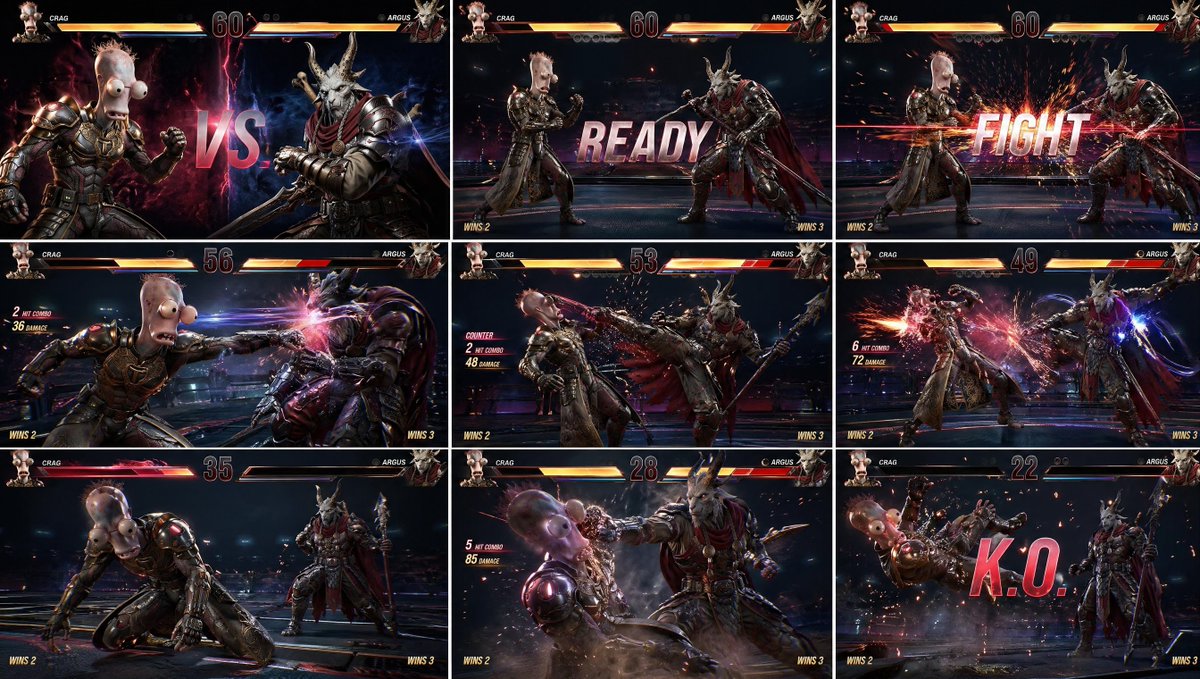
AAA Fighting Game Storyboard Grid
A highly structured prompt for creating a 3x3 storyboard grid of a fighting game, maintaining consistent characters and full game UI elements.
This is a GPT Image 2 prompt case for Anime & Game. Use the copy-ready prompt below to generate similar visuals, and review Awesome GPT Image 2 Prompts attribution plus commercial-use rights before reuse.
Free 1K preview
Generate one preview image instantly, no sign-up required.
Prompt
Copy-ready prompt
{
  "instruction": "Use the provided two character images as exact visual references. Preserve identity, face, outfit, proportions, and details perfectly.",
  "concept": "{argument name="game concept" default="AAA fighting game scene presented as a Tekken-style gameplay grid storyboard"}",
  "layout": {
    "type": "3x3 grid",
    "description": "nine panels showing a continuous fight progression with full game UI visible in each frame"
  },
  "panels": [
    "panel 1: dramatic VS screen — character A vs character B, both facing each other, glowing background, versus text in center",
    "panel 2: round start — both fighters in idle stance, READY text on screen",
    "panel 3: FIGHT moment — cinematic spark explosion as fight begins",
    "panel 4: first attack — character A throws a punch with motion blur",
    "panel 5: counter attack — character B kicks with impact sparks",
    "panel 6: combo sequence — multiple hit sparks, motion trails, dynamic camera",
    "panel 7: low health moment — health bar flashing red, tension moment",
    "panel 8: finishing move — slow motion heavy hit, cinematic angle",
    "panel 9: KO screen — opponent falling back, huge KO text, particles flying"
  ],
  "style": "{argument name="art style" default="ultra realistic AAA Tekken-style fighting game, cinematic gameplay rendering, highly detailed characters, realistic lighting"}",
  "camera": "in-game fighting camera, slightly angled side view, dynamic zoom during impacts",
  "environment": "high-end fighting arena, dark background with neon accents, subtle depth, not distracting",
  "ui_elements": {
    "health_bars": "top left and right, detailed, glowing, decreasing across panels",
    "timer": "center top",
    "player_names": "top left and right",
    "round_indicator": "visible",
    "combo_counter": "appears during hits",
    "hit_effects": "sparks, flashes, light streaks",
    "KO_text": "large, bold, center screen in final panel",
    "READY_FIGHT_text": "arcade-style bold typography"
  },
  "effects": [
    "motion blur on attacks",
    "impact sparks",
    "energy trails",
    "camera shake effect",
    "slow motion feeling in finishing hit",
    "screen glow during hits"
  ],
  "color_grading": "{argument name="color grading" default="high contrast, arcade cinematic, vibrant highlights, deep shadows"}",
  "output": "clean 3x3 grid, perfectly aligned panels, full UI visible, no logos, no watermarks"
}
"reference_style": "Tekken 8 gameplay UI, arcade fighting game interface, modern AAA fighting HUD"
Prompt variables
Editable argument placeholders found in the prompt, with their default values.
Best for
- - Anime & Game visual exploration
- - Image generation and reference-image edits
- - Reusable briefs that keep source attribution visible
Change these parts
- - Subject, product, character, or scene
- - Aspect ratio, camera, lighting, and background
- - Brand, text, color, and output constraints
Recommended model and settings
- - Model: gpt-image-2
- - Input mode: Text to Image
- - Aspect ratio: source
- - Commercial status: review original source
How to use this prompt
- 1. Copy the prompt and preserve its structure for the first test.
- 2. Replace the subject, context, and publishing channel.
- 3. Change one camera, lighting, or style variable per iteration.
- 4. Inspect the output, source, text, and rights before reuse.
Limitations, source, and reuse cautions
- - Generated output is an editable draft, not factual, legal, or rights evidence.
- - Review the linked source, people, brands, logos, text, and third-party media before commercial use.
More cases in this category
Prioritized by category, input mode compatibility, quality, and lower risk.



Reuse and source notes
Use this prompt safely after previewing the case.
- 1.Copy the prompt or open it directly in Dovoo with the generation button.
- 2.Adjust variables, aspect ratio, and reference images for your own use case.
- 3.Before publishing or paid usage, verify source rights, attribution requirements, and brand or likeness risks.
Can I use this prompt commercially?
Commercial-use status is allowed. Review the original source, license, brand constraints, and legal requirements before paid usage.
Where does this case come from?
This case is imported from Awesome GPT Image 2 Prompts; keep attribution visible and check the source URL before reuse.