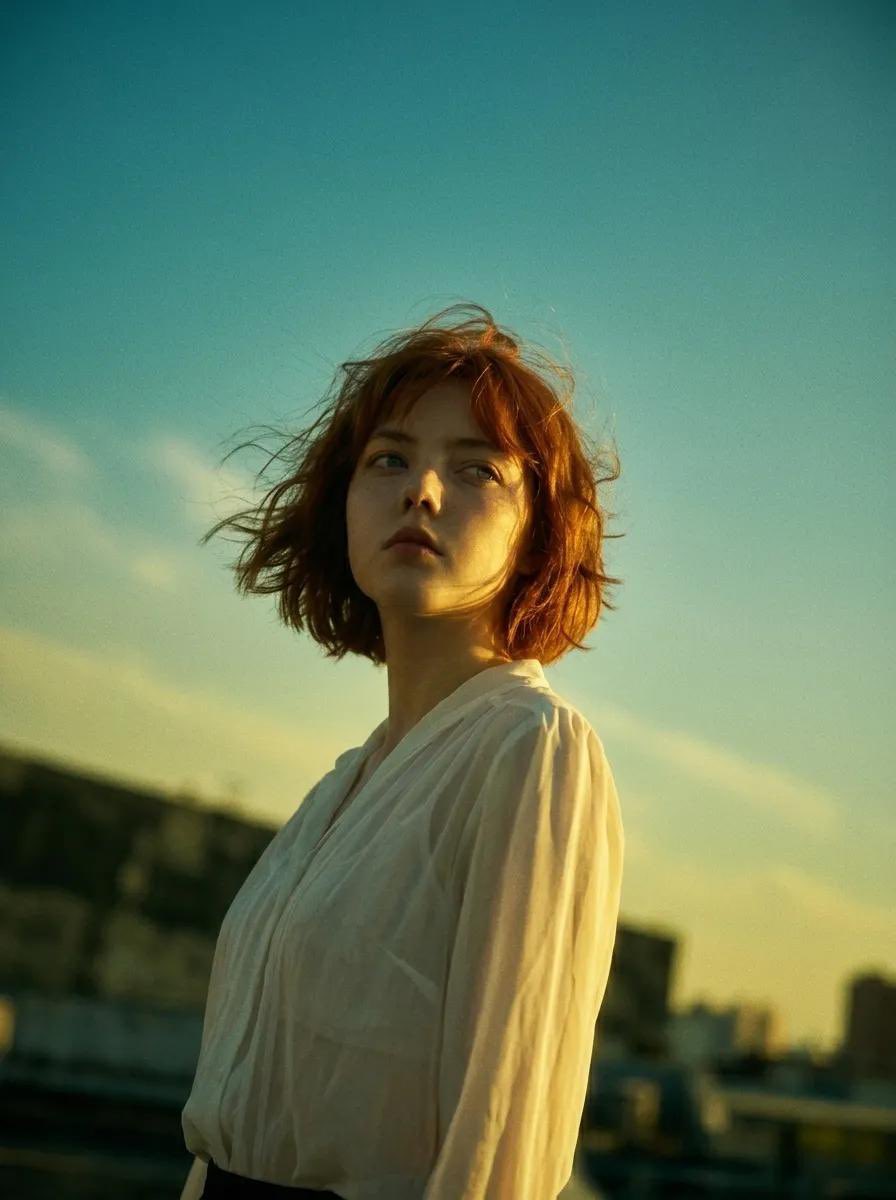
90s Hong Kong Cinema Portrait
Transforms a reference image into a Wong Kar-wai inspired 90s film aesthetic with heavy shadows and yellow-green color grading.
This is a GPT Image 2 prompt case for 人像角色. Use the copy-ready prompt below to generate similar visuals, and review Awesome GPT Image 2 Prompts attribution plus commercial-use rights before reuse.
Prompt
Copy-ready prompt
修改图像:以上传图像中的主体作为基础,保留面部细节和身材轮廓,忽略其他无关元素。在保留主体面部特征和姿势的同时,彻底重构视觉效果。请遵循以下提示词:电影级低角度中景镜头,{argument name="style" default="1990 年代香港电影风格(王家卫)"}。主体:[上传的图像基础],保留其精确的面部特征、身材和沉思的表情。她站在倾斜的地平线前。视觉效果:她穿着 {argument name="outfit" default="白色复古衬衫"},带有梦幻般的迷人光晕。强烈的明暗对比照明;锐利的金光打在她的下颌线上,形成深邃的阴影。她被风吹乱的深色头发有着强烈的轮廓光和柔和的 CCD 晕光。氛围:{argument name="color grading" default="去饱和的中景,病态甜美的黄绿色调"},35mm 胶片颗粒感,青色调天空。低角度镜头使她看起来既孤独又宏大,仿佛在寻找某种幻影。浅景深,色差效果。Prompt variables
Editable argument placeholders found in the prompt, with their default values.
More cases in this category
Prioritized by category, input mode compatibility, quality, and lower risk.




Reuse and source notes
Use this prompt safely after previewing the case.
- 1.Copy the prompt or open it directly in Dovoo with the generation button.
- 2.Adjust variables, aspect ratio, and reference images for your own use case.
- 3.Before publishing or paid usage, verify source rights, attribution requirements, and brand or likeness risks.
Can I use this prompt commercially?
Commercial-use status is allowed. Review the original source, license, brand constraints, and legal requirements before paid usage.
Where does this case come from?
This case is imported from Awesome GPT Image 2 Prompts; keep attribution visible and check the source URL before reuse.