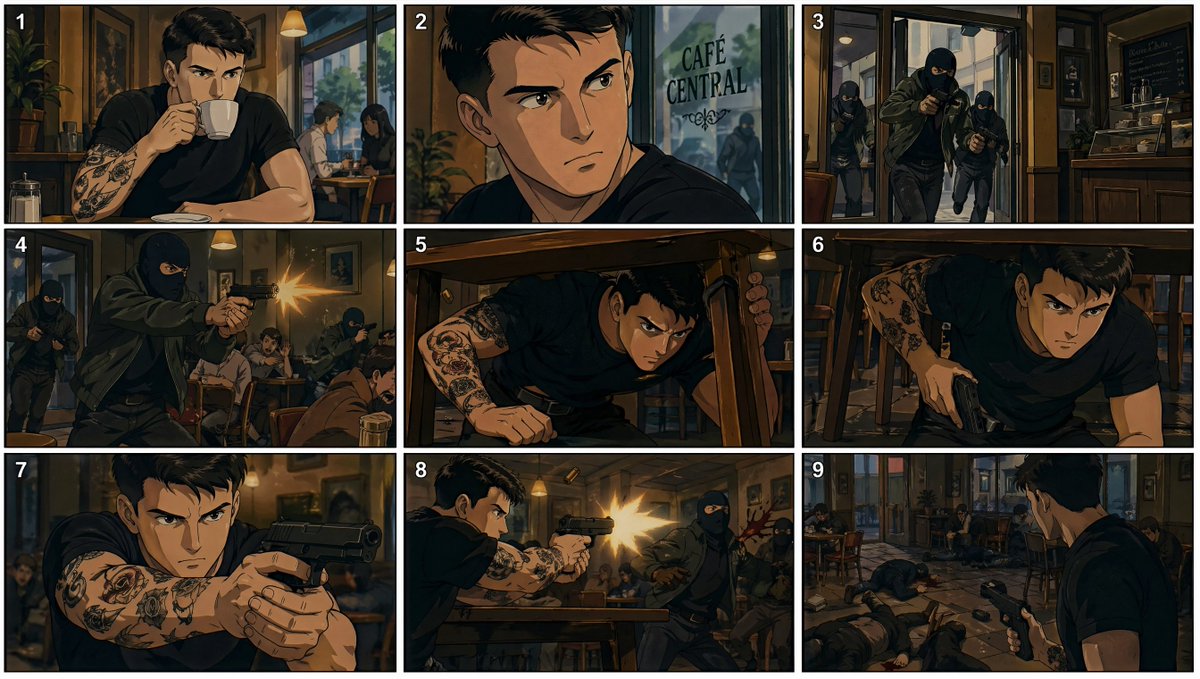
90s Anime Cafe Shootout Storyboard
A nine-panel 1990s-style anime storyboard showing a tattooed man in a café reacting to an armed robbery and fighting back, ideal for action scene visualization or animation planning.
This is a GPT Image 2 prompt case for Anime & Game. Use the copy-ready prompt below to generate similar visuals, and review Awesome GPT Image 2 Prompts attribution plus commercial-use rights before reuse.
Free 1K preview
Generate one preview image instantly, no sign-up required.
Prompt
Copy-ready prompt
{
  "type": "anime storyboard sheet",
  "style": "gritty 1990s anime cinematic stills, hand-painted cel look, dark outlines, moody amber and teal lighting, realistic proportions, tense action-thriller atmosphere",
  "subject": {
    "main character": "{argument name=\"character description\" default=\"young man with short dark hair, black t-shirt, muscular build, heavily tattooed forearms\"}",
    "location": "{argument name=\"location name\" default=\"CAFÉ CENTRAL\"}",
    "setting": "cozy urban café interior with wooden tables, framed wall art, warm pendant lamps, front glass entrance, espresso counter area"
  },
  "layout": {
    "grid": "3x3 storyboard collage with thin white borders",
    "panel count": 9,
    "numbered panels": true,
    "panel labels": [
      "1",
      "2",
      "3",
      "4",
      "5",
      "6",
      "7",
      "8",
      "9"
    ]
  },
  "panels": [
    {
      "panel": 1,
      "composition": "medium shot",
      "action": "the tattooed man sits alone at a café table drinking from a white cup, looking calm and unaware",
      "background details": "sugar dispenser on table, another couple seated by the window behind him"
    },
    {
      "panel": 2,
      "composition": "close-up profile near the window",
      "action": "the man notices movement outside and turns his head toward the glass",
      "background details": "the café window shows the text {argument name=\"window text\" default=\"CAFÉ CENTRAL\"} and a shadowy armed figure approaching outside"
    },
    {
      "panel": 3,
      "composition": "wide entrance shot",
      "action": "3 masked gunmen in dark clothing burst through the café doorway with pistols raised",
      "count": 3,
      "subjects": [
        "front gunman entering aggressively",
        "second gunman behind him",
        "third gunman near the doorway"
      ]
    },
    {
      "panel": 4,
      "composition": "interior action shot",
      "action": "one masked gunman fires a handgun inside the café while patrons duck and panic",
      "count": 3,
      "subjects": [
        "shooting gunman in foreground",
        "2 additional masked gunmen in background",
        "frightened customers taking cover"
      ]
    },
    {
      "panel": 5,
      "composition": "low angle under-table shot",
      "action": "the tattooed man dives under a wooden café table for cover and reaches forward",
      "background details": "chair legs, tense crouched posture, cluttered café floor"
    },
    {
      "panel": 6,
      "composition": "under-table medium shot",
      "action": "the man pulls a compact black pistol from his waistband while staying low",
      "focus": "tattooed arms, determined body language, conceal-and-draw moment"
    },
    {
      "panel": 7,
      "composition": "tight frontal close-up",
      "action": "the man extends both arms and aims the pistol straight ahead from cover",
      "focus": "gun dominating foreground, tattoo sleeves, intense defensive stance"
    },
    {
      "panel": 8,
      "composition": "side action shot",
      "action": "the man fires back across the café, muzzle flash bright and dramatic, striking a masked attacker",
      "count": 2,
      "subjects": [
        "armed protagonist firing",
        "masked gunman recoiling from the hit"
      ]
    },
    {
      "panel": 9,
      "composition": "wide aftermath shot from behind the protagonist",
      "action": "the man stands with pistol lowered slightly, surveying the café after the shootout",
      "background details": "multiple bodies of masked attackers on the floor, overturned chairs, shocked patrons still hiding, open glass entrance visible",
      "count": 3,
      "subjects": [
        "protagonist seen from behind",
        "3 downed gunmen across the café",
        "surviving patrons in the background"
      ]
    }
  ],
  "visual notes": {
    "color palette": "warm browns, dark shadows, muted blue-gray accents, bright gunfire flashes",
    "camera language": "storyboard framing with varied shots: medium, close-up, wide, low angle, over-the-shoulder",
    "mood": "sudden violent interruption of an ordinary café moment, heroic survival response"
  }
}
Prompt variables
Editable argument placeholders found in the prompt, with their default values.
Best for
- - Anime & Game visual exploration
- - Image generation and reference-image edits
- - Reusable briefs that keep source attribution visible
Change these parts
- - Subject, product, character, or scene
- - Aspect ratio, camera, lighting, and background
- - Brand, text, color, and output constraints
Recommended model and settings
- - Model: gpt-image-2
- - Input mode: Text to Image
- - Aspect ratio: source
- - Commercial status: review original source
How to use this prompt
- 1. Copy the prompt and preserve its structure for the first test.
- 2. Replace the subject, context, and publishing channel.
- 3. Change one camera, lighting, or style variable per iteration.
- 4. Inspect the output, source, text, and rights before reuse.
Limitations, source, and reuse cautions
- - Generated output is an editable draft, not factual, legal, or rights evidence.
- - Review the linked source, people, brands, logos, text, and third-party media before commercial use.
More cases in this category
Prioritized by category, input mode compatibility, quality, and lower risk.



Reuse and source notes
Use this prompt safely after previewing the case.
- 1.Copy the prompt or open it directly in Dovoo with the generation button.
- 2.Adjust variables, aspect ratio, and reference images for your own use case.
- 3.Before publishing or paid usage, verify source rights, attribution requirements, and brand or likeness risks.
Can I use this prompt commercially?
Commercial-use status is allowed. Review the original source, license, brand constraints, and legal requirements before paid usage.
Where does this case come from?
This case is imported from Awesome GPT Image 2 Prompts; keep attribution visible and check the source URL before reuse.