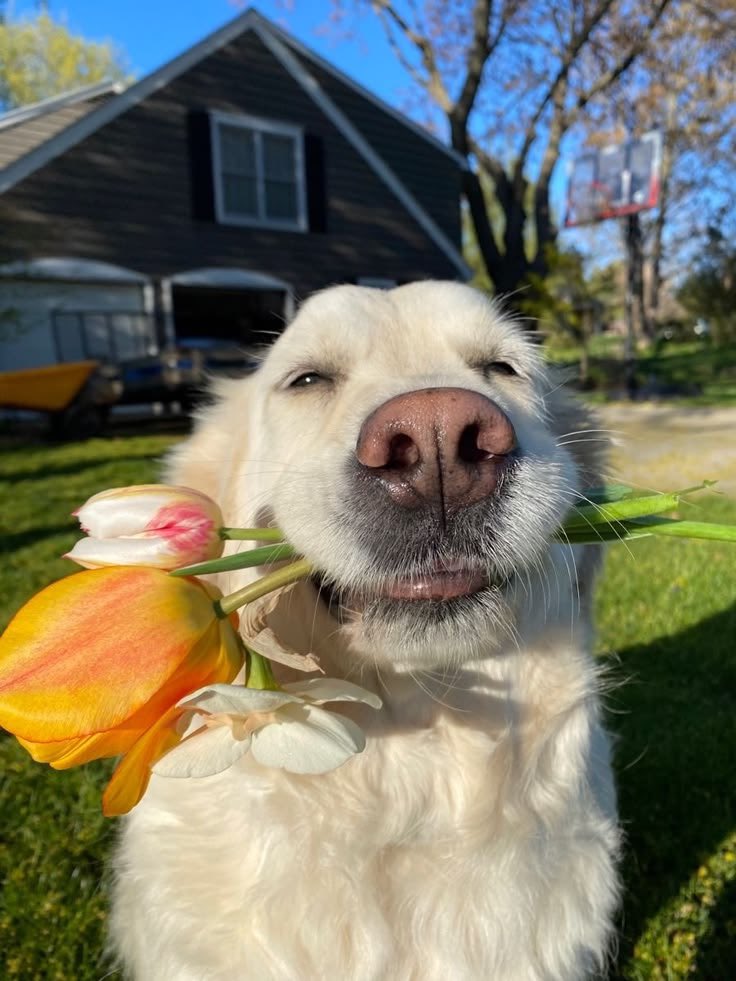
Photorealistic 8K Photo Restoration
Transforms a blurry reference photo into a sharp, cinematic, photorealistic 8K restoration while preserving the original composition and subject identity.
This is a GPT Image 2 prompt case for 人像角色. Use the copy-ready prompt below to generate similar visuals, and review Awesome GPT Image 2 Prompts attribution plus commercial-use rights before reuse.
Prompt
Copy-ready prompt
使用提供的参考图像,将其修复并放大为超高清的 8K 照片级真实感图像。100% 保留原始特征、姿势、取景、视角和构图,不得有任何改变:狗保持在镜头中心位置,嘴里衔着相同的花朵,背景依然是相同的庭院和房屋。去除严重的模糊和像素化,恢复自然的微观细节,如清晰的眼睛、逼真的鼻部纹理、独立的胡须、柔软的毛发、花瓣、草地、房屋边缘和树木细节。使最终结果呈现出高质量的电影级摄影质感,具备自然日光、高对比度、丰富且真实的色彩、清晰的对焦,且无人工重建痕迹。请勿更换主体、添加新物体、改变表情,也不要将其风格化为插画或 CGI。增强强度:{argument name="enhancement strength" default="超高清 8K 电影级修复"}。细节优先级:{argument name="detail priority" default="清晰的眼睛、逼真的毛孔、胡须、毛发和花朵纹理"}。色彩分级:{argument name="color grade" default="自然晴朗的高对比度照片级真实感"}。Prompt variables
Editable argument placeholders found in the prompt, with their default values.
More cases in this category
Prioritized by category, input mode compatibility, quality, and lower risk.




Reuse and source notes
Use this prompt safely after previewing the case.
- 1.Copy the prompt or open it directly in Dovoo with the generation button.
- 2.Adjust variables, aspect ratio, and reference images for your own use case.
- 3.Before publishing or paid usage, verify source rights, attribution requirements, and brand or likeness risks.
Can I use this prompt commercially?
Commercial-use status is allowed. Review the original source, license, brand constraints, and legal requirements before paid usage.
Where does this case come from?
This case is imported from Awesome GPT Image 2 Prompts; keep attribution visible and check the source URL before reuse.