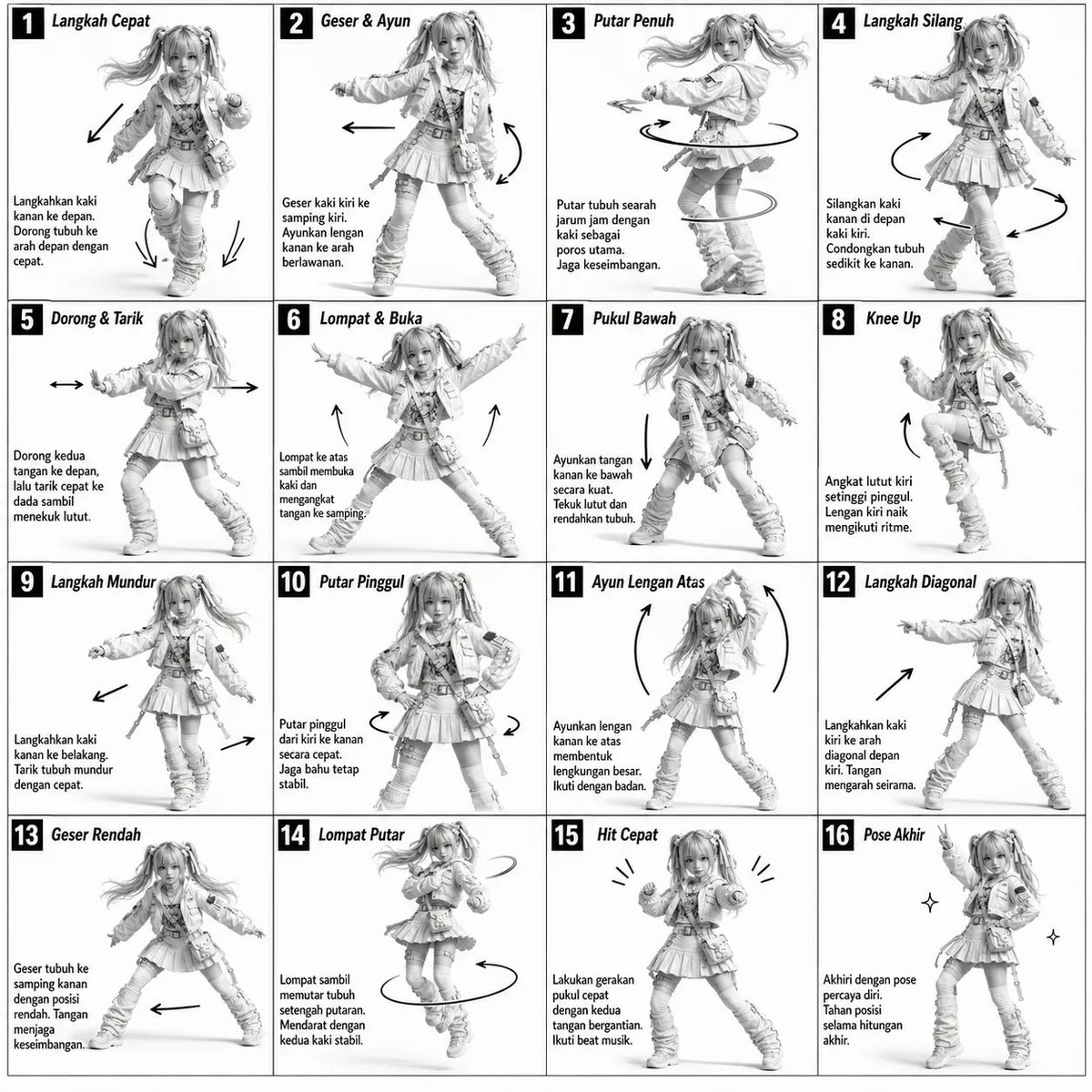
3D Grayscale Dance Reference Sheet
A technical diagram-style prompt for a monochromatic 4x4 movement sheet with instructional text and motion arrows.
This is a GPT Image 2 prompt case for Anime & Game. Use the copy-ready prompt below to generate similar visuals, and review Awesome GPT Image 2 Prompts attribution plus commercial-use rights before reuse.
Free 1K preview
Generate one preview image instantly, no sign-up required.
Prompt
Copy-ready prompt
Monochromatic grayscale illustration, 3D-rendered character, clean instructional reference sheet.
White background, comic-style cell grid layout, technical diagram aesthetic.
[LAYOUT]
4×4 grid layout (16 panels total).
Each panel separated by thin black border lines.
Panels are evenly sized and consistently aligned.
Each cell is clearly numbered from 1 to 16.
[CHARACTER]
{argument name="subject" default="Young female dancer with an athletic build, ponytail hairstyle, wearing a crop top, baggy pants, and sneakers"}.
The same character must appear consistently in all panels.
[PANEL STRUCTURE – per cell]
Top-left: bold number badge + {argument name="language" default="Korean"} title text
Center: full-body character pose illustration
Bottom-left: {argument name="language" default="Korean"} description text (3–4 lines)
Overlay: directional arrows indicating movement flow
[ARROWS / MOTION INDICATORS]
Curved arrows, straight arrows, and circular rotation indicators.
Arrows should be placed around the character to clearly show movement direction and flow.
[RENDERING STYLE]
Highly detailed 3D sculpted style.
Soft studio lighting with subtle shadows.
No color — grayscale only.
Clean linework, polished finish, game concept art quality.
[NEGATIVE PROMPT]
No background scenery.
No color tones.
No additional characters.
No cluttered or complex backgrounds.
Prompt variables
Editable argument placeholders found in the prompt, with their default values.
Best for
- - Anime & Game visual exploration
- - Image generation and reference-image edits
- - Reusable briefs that keep source attribution visible
Change these parts
- - Subject, product, character, or scene
- - Aspect ratio, camera, lighting, and background
- - Brand, text, color, and output constraints
Recommended model and settings
- - Model: gpt-image-2
- - Input mode: Text to Image
- - Aspect ratio: source
- - Commercial status: review original source
How to use this prompt
- 1. Copy the prompt and preserve its structure for the first test.
- 2. Replace the subject, context, and publishing channel.
- 3. Change one camera, lighting, or style variable per iteration.
- 4. Inspect the output, source, text, and rights before reuse.
Limitations, source, and reuse cautions
- - Generated output is an editable draft, not factual, legal, or rights evidence.
- - Review the linked source, people, brands, logos, text, and third-party media before commercial use.
More cases in this category
Prioritized by category, input mode compatibility, quality, and lower risk.
Reuse and source notes
Use this prompt safely after previewing the case.
- 1.Copy the prompt or open it directly in Dovoo with the generation button.
- 2.Adjust variables, aspect ratio, and reference images for your own use case.
- 3.Before publishing or paid usage, verify source rights, attribution requirements, and brand or likeness risks.
Can I use this prompt commercially?
Commercial-use status is allowed. Review the original source, license, brand constraints, and legal requirements before paid usage.
Where does this case come from?
This case is imported from Awesome GPT Image 2 Prompts; keep attribution visible and check the source URL before reuse.