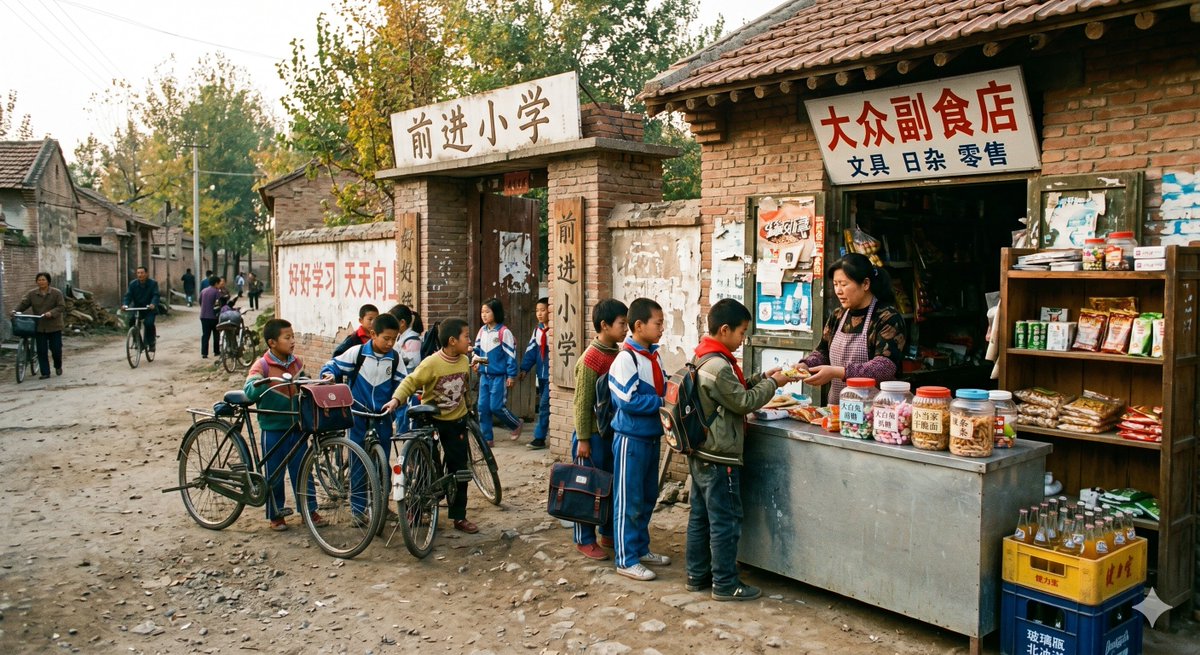
1998 Rural School Gate Shop Photo
This prompt generates a realistic nostalgic photo of a late-1990s rural Chinese primary school entrance with a small snack and stationery shop, useful for historical lifestyle and documentary-style scene creation.
This is a GPT Image 2 prompt case for Landscape & Nature. Use the copy-ready prompt below to generate similar visuals, and review Awesome GPT Image 2 Prompts attribution plus commercial-use rights before reuse.
Free 1K preview
Generate one preview image instantly, no sign-up required.
Prompt
Copy-ready prompt
A realistic documentary-style color photograph set in {argument name="year" default="1998"}, depicting the gate of a rural Chinese primary school and the adjacent convenience store. The scene is viewed from a dusty, uneven dirt road in a northern Chinese village, with a backdrop of old brick houses, weathered walls, utility poles, bicycles, and tall autumn trees. The school gate is constructed of aged bricks and concrete, with a sign reading “Progress Primary School” hanging above it, and the words “Progress Primary School” written vertically on the gateposts. A faded red slogan, “Study hard and make progress every day,” is painted on the long wall next to the school gate. To the right of the school gate is a simple brick and tile storefront with a hand-painted sign reading “General Grocery Store,” with a smaller line of text below reading “Stationery, Sundries, Retail.” In front of the store is a makeshift metal counter where a female shopkeeper is selling snacks to elementary school students. There are a total of 8 elementary school students gathered in the convenience store and school gate area, most wearing blue, red, and green school uniforms common in China in the late 1990s, some carrying old-fashioned schoolbags, with 2 bicycles parked among the crowd. One child is buying snacks at the counter, several are waiting, and others are chatting near the school gate. In the distant left background, 5 villagers and students are walking in an alleyway, with at least 2 pushing bicycles. The store display should appear crowded and realistic: the counter is filled with transparent plastic jars containing candies and snacks, small packaged snacks, exercise books, and stationery, with goods hanging in the dim doorway, and the right side wooden shelf displaying snacks and daily necessities, with boxes of bottled soda stacked on the floor. The faces of the people should be soft and blurred, not overly clear. The lighting is natural afternoon sunlight, with warm tones, a slight nostalgic feel but not overly polished, a realistic texture, soft colors, and a slight film grain, as if shot with a consumer camera in the late 1990s. Emphasize historical authenticity, ordinary rural life, and a natural, casual everyday atmosphere.Prompt variables
Editable argument placeholders found in the prompt, with their default values.
Best for
- - Landscape & Nature visual exploration
- - Image generation and reference-image edits
- - Reusable briefs that keep source attribution visible
Change these parts
- - Subject, product, character, or scene
- - Aspect ratio, camera, lighting, and background
- - Brand, text, color, and output constraints
Recommended model and settings
- - Model: gpt-image-2
- - Input mode: Text to Image
- - Aspect ratio: source
- - Commercial status: review original source
How to use this prompt
- 1. Copy the prompt and preserve its structure for the first test.
- 2. Replace the subject, context, and publishing channel.
- 3. Change one camera, lighting, or style variable per iteration.
- 4. Inspect the output, source, text, and rights before reuse.
Limitations, source, and reuse cautions
- - Generated output is an editable draft, not factual, legal, or rights evidence.
- - Review the linked source, people, brands, logos, text, and third-party media before commercial use.
More cases in this category
Prioritized by category, input mode compatibility, quality, and lower risk.

Reuse and source notes
Use this prompt safely after previewing the case.
- 1.Copy the prompt or open it directly in Dovoo with the generation button.
- 2.Adjust variables, aspect ratio, and reference images for your own use case.
- 3.Before publishing or paid usage, verify source rights, attribution requirements, and brand or likeness risks.
Can I use this prompt commercially?
Commercial-use status is allowed. Review the original source, license, brand constraints, and legal requirements before paid usage.
Where does this case come from?
This case is imported from Awesome GPT Image 2 Prompts; keep attribution visible and check the source URL before reuse.