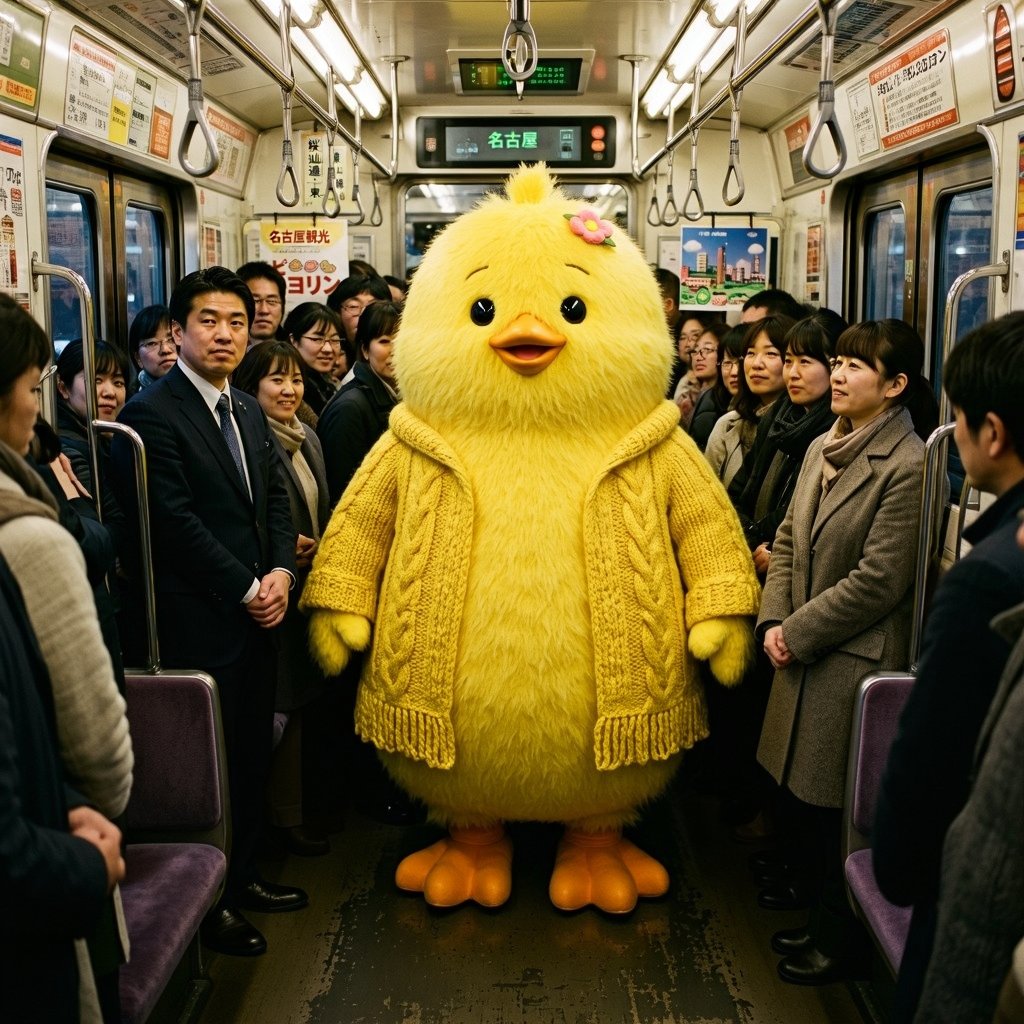
Yellow Chick Mascot on Japanese Train
A photorealistic surreal commuter-train scene featuring a giant fluffy yellow chick mascot among anonymized passengers.
这是一个用于 人像角色 的 GPT Image 2 提示词案例。你可以复制下方 prompt 生成相似图片;商用前请复核 Awesome GPT Image 2 Prompts 来源归因和原始权利。
需要完整提示词集合?请使用 人像角色 主题页获取更多同类示例,或打开 GPT Image 2 提示词库 查看完整示例索引、可复用结构和来源归因。
免费 1K 极速预览
无需注册,立即生成一张预览图。
1437/4000
提示词
可复制提示词
Create a photorealistic, slightly whimsical scene inside a crowded Japanese commuter train in {argument name="city" default="Nagoya"}. In the exact center aisle stands a large life-size mascot character: a round fluffy {argument name="animal" default="yellow chick"} with soft shaggy fur, black glossy eyes, a small orange beak, orange webbed feet, tiny wings, and a small pink flower hair clip near the top of its head. Dress the mascot in a chunky knitted {argument name="clothing item" default="mustard-yellow cable-knit cardigan"} with visible braided patterns and fringe at the hem, matching the body color. Surround it with standing adult commuters in winter business attire and coats, lined along both sides of the aisle; their faces should appear intentionally blurred or anonymized. The train interior should be realistic and dense: silver handrails, hanging strap handles, fluorescent ceiling lights, purple seats at the sides, worn dark floor, windows and sliding doors, and Japanese advertisement posters throughout. Include overhead digital route signs, one prominently showing {argument name="destination text" default="名古屋"} in green Japanese text. Use a wide-angle eye-level composition, symmetrical perspective down the train car, warm indoor lighting, high detail, documentary street-photography realism mixed with surreal mascot humor. No extra characters in the aisle, no watermark, no captions, no cartoon rendering.提示词变量
从提示词中识别到的可编辑 argument 占位符及默认值。
变量
city
默认值
Nagoya
变量
animal
默认值
yellow chick
变量
clothing item
默认值
mustard-yellow cable-knit cardigan
变量
destination text
默认值
名古屋
Best for
- - 人像角色 方向的视觉探索
- - 图片生成与参考图改写
- - 需要保留来源归因的可复用 brief
可以替换这些部分
- - 主体、产品、角色或场景
- - 画幅、镜头、光线和背景
- - 品牌、文字、颜色和输出限制
推荐模型与设置
- - 模型:gpt-image-2
- - 输入模式:文生图
- - 画幅:source
- - 商用状态:需复核原始来源
如何使用这个提示词
- 1. 复制提示词并先保留原始结构。
- 2. 替换主体、场景和输出渠道。
- 3. 每次只调整一个镜头、光线或风格变量。
- 4. 检查结果媒体、文字、来源和权利风险。
限制、来源与复用提醒
- - 生成结果是可编辑草稿,不是事实、法务或权利证明。
- - 商用前复核来源链接、人物、品牌、Logo、文字和第三方素材。
导入自 Awesome GPT Image 2 Prompts。需要保留来源归因。商业使用状态:allowed;付费使用前请复核原始权利。
同分类案例
优先推荐同分类、同输入模式且风险更低的案例。
复用与来源说明
看完案例后,再安全复用这个提示词。
- 1.复制 prompt,或点击生成入口在 Dovoo 中直接打开。
- 2.按你的用途调整变量、画面比例和参考图。
- 3.发布或商用前,复核来源权利、归因要求以及品牌、肖像或版权风险。
这个提示词可以商用吗?
当前商业使用状态为 allowed。付费或公开使用前,请复核原始来源、许可、品牌限制和法务要求。
这个案例来自哪里?
该案例导入自 Awesome GPT Image 2 Prompts;复用时请保留来源归因,并打开来源 URL 检查最新授权信息。