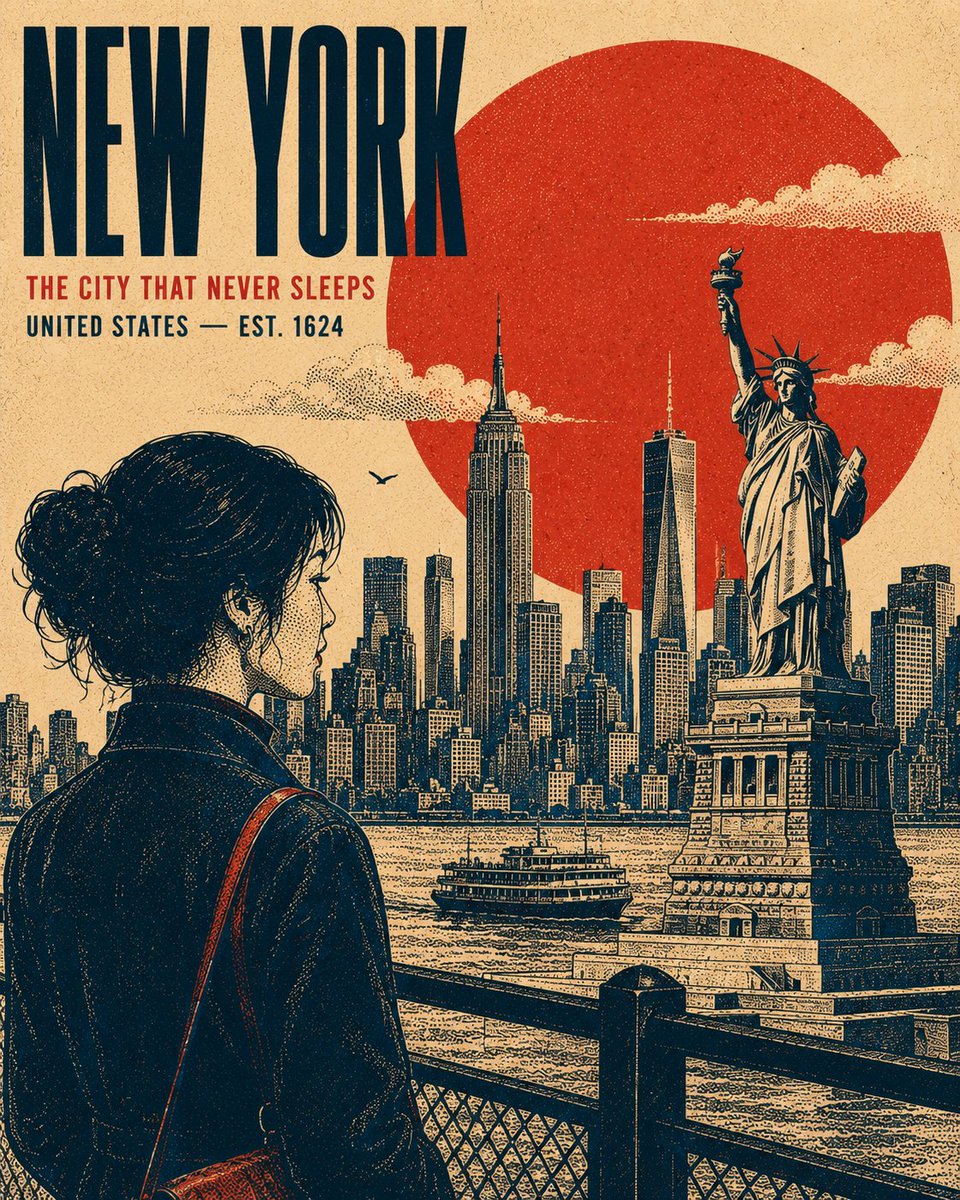
Vintage Retro Screen-Print Poster
A versatile prompt for creating authentic vintage travel or cultural screen-print posters, featuring stippled textures, bold typography, and a layered graphic aesthetic.
这是一个用于 平面设计和海报设计 的 GPT Image 2 提示词案例。你可以复制下方 prompt 生成相似图片;商用前请复核 Awesome GPT Image 2 Prompts 来源归因和原始权利。
需要完整提示词集合?请使用 平面设计和海报设计 主题页获取更多同类示例,或打开 GPT Image 2 提示词库 查看完整示例索引、可复用结构和来源归因。
免费 1K 极速预览
无需注册,立即生成一张预览图。
2998/4000
提示词
可复制提示词
Create a premium 4:5 vertical retro screen-print poster illustration centered on {argument name="subject" default="New York"}. The composition should feel like a refined vintage travel or cultural print, while remaining adaptable to any location, historical period, landmark, or subject. TYPOGRAPHY: Place the primary title "{argument name="main title" default="NEW YORK"}" in a bold, condensed uppercase sans-serif, positioned within a balanced area of negative space. Add a smaller supporting line "[SECONDARY HEADLINE / LOCATION / DATE]" beneath it. Maintain strong typographic hierarchy, restrained spacing, and an authentic archival-poster character. MAIN SUBJECT: Feature [PRIMARY SUBJECT] as the dominant visual element, positioned within the lower or side third of the composition. Use a distinctive pose, silhouette, or profile that communicates the character of the subject. Include carefully rendered defining details, natural contours, expressive features, clothing or architectural details, and subtle highlights without making the artwork photorealistic. GEOMETRIC ANCHOR: Introduce one bold, simple geometric shape behind or around the main subject to create visual separation and establish a strong graphic focal point. BACKGROUND: Construct the environment as several flat, layered graphic planes rather than a conventional realistic scene. Use recognizable elements associated with [LOCATION / SUBJECT] — distant silhouettes, architectural forms, structural details, vegetation, terrain, atmospheric elements, or cultural motifs. Avoid a strong vanishing point. Build depth through overlapping shapes, scale, linework, and tonal density. Render clouds, smoke, mist, foliage, or atmospheric details as controlled stippled clusters where appropriate. RENDERING STYLE: Authentic vintage screen-print / silkscreen poster aesthetic. Create all tonal modeling exclusively through stippling, halftone patterns, and varying dot density — concentrated dots for shadows and sparse dots for highlights. No smooth gradients, airbrushing, photorealistic shading, or digital 3D rendering. Use crisp contour lines with consistent visual weight, subtle riso-style registration shifts, imperfect ink edges, natural paper grain, and faint woven-print texture. The result should feel physically printed rather than digitally rendered. COLOR SYSTEM: Use exactly four carefully selected high-contrast colors appropriate to the subject: {argument name="color theme" default="deep navy"}, [COLOR 2], [COLOR 3], [COLOR 4]. Do not introduce additional hues. Generate intermediate tonal values exclusively through stipple density, halftone overlap, and ink coverage, never by adding new colors. COMPOSITION: Strong editorial balance, clear focal hierarchy, generous negative space, layered depth, bold silhouette design, authentic vintage graphic-design proportions, and carefully controlled visual density. Keep the artwork sophisticated, collectible, and suitable for a premium travel or cultural poster.提示词变量
从提示词中识别到的可编辑 argument 占位符及默认值。
变量
subject
默认值
New York
变量
main title
默认值
NEW YORK
变量
color theme
默认值
deep navy
Best for
- - 平面海报 方向的视觉探索
- - 图片生成与参考图改写
- - 需要保留来源归因的可复用 brief
可以替换这些部分
- - 主体、产品、角色或场景
- - 画幅、镜头、光线和背景
- - 品牌、文字、颜色和输出限制
推荐模型与设置
- - 模型:gpt-image-2
- - 输入模式:文生图
- - 画幅:source
- - 商用状态:需复核原始来源
如何使用这个提示词
- 1. 复制提示词并先保留原始结构。
- 2. 替换主体、场景和输出渠道。
- 3. 每次只调整一个镜头、光线或风格变量。
- 4. 检查结果媒体、文字、来源和权利风险。
限制、来源与复用提醒
- - 生成结果是可编辑草稿,不是事实、法务或权利证明。
- - 商用前复核来源链接、人物、品牌、Logo、文字和第三方素材。
导入自 Awesome GPT Image 2 Prompts。需要保留来源归因。商业使用状态:allowed;付费使用前请复核原始权利。
同分类案例
优先推荐同分类、同输入模式且风险更低的案例。






复用与来源说明
看完案例后,再安全复用这个提示词。
- 1.复制 prompt,或点击生成入口在 Dovoo 中直接打开。
- 2.按你的用途调整变量、画面比例和参考图。
- 3.发布或商用前,复核来源权利、归因要求以及品牌、肖像或版权风险。
这个提示词可以商用吗?
当前商业使用状态为 allowed。付费或公开使用前,请复核原始来源、许可、品牌限制和法务要求。
这个案例来自哪里?
该案例导入自 Awesome GPT Image 2 Prompts;复用时请保留来源归因,并打开来源 URL 检查最新授权信息。