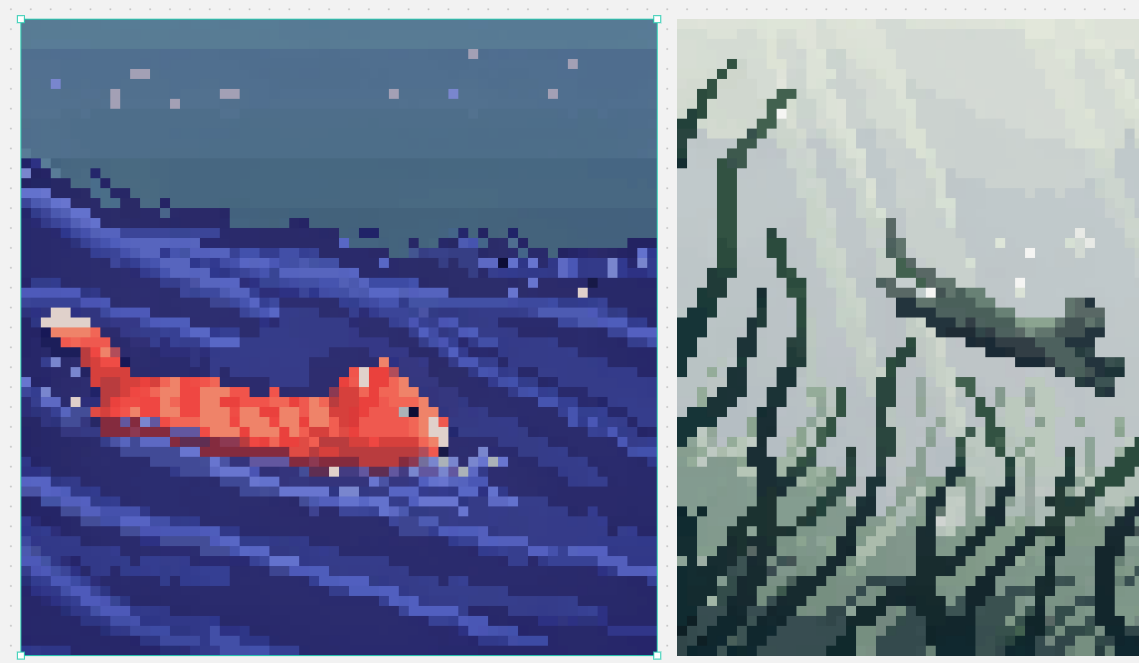
Split Pixel Art Canvas
Generates a two-panel pixel art comparison canvas with a selected ocean fish scene and a misty mountain landscape.
这是一个用于 插画与艺术 的 GPT Image 2 提示词案例。你可以复制下方 prompt 生成相似图片;商用前请复核 Awesome GPT Image 2 Prompts 来源归因和原始权利。
需要完整提示词集合?请使用 插画与艺术 主题页获取更多同类示例,或打开 GPT Image 2 提示词库 查看完整示例索引、可复用结构和来源归因。
免费 1K 极速预览
无需注册,立即生成一张预览图。
1108/4000
提示词
可复制提示词
目标:创建一个设计画布风格的分割屏幕像素艺术对比图,并排显示 2 个正方形像素艺术面板。

画布:宽幅横向画布,尺寸约为 1139×671 像素,浅灰色工作区背景,带有细小的灰色斑点。放置两个水平对齐的大型正方形艺术作品,中间留有狭窄的垂直间隙。仅在左侧艺术作品周围添加一个明亮的青色选择轮廓,并带有小的方形角/边手柄,就像在编辑器中被选中一样。

布局:左侧面板占据略多于画布宽度的一半,并由青色选择框包围。右侧面板高度相同但可见裁剪区域略窄,紧贴右侧边缘。保持两件艺术作品均为低分辨率块状像素艺术,具有清晰的方形像素,且无抗锯齿效果。

左侧面板主题:深靛蓝色和蓝色的夜间海洋场景像素艺术。一条橙红色的小锦鲤或金鱼从左向右游动,位于左下方至中心区域,尾尖呈淡奶油色,分段的身体上有较浅的橙色高光。水面为深海军蓝,带有对角波浪条纹以及紫罗兰色、长春花色和电蓝色的分层横带。上三分之一是柔和的蓝灰色夜空,散布着 8 个淡薰衣草色、粉色和蓝色的方形星状像素。氛围:宁静、复古游戏场景、水下/夜间海景。

右侧面板主题:以低饱和度绿灰色像素艺术呈现的雾气山景。高耸的锯齿状山脊和悬崖峭壁填满画面,带有深青色轮廓和棱角分明的雪地或雾气白面。包含一条横跨中右区域的蜿蜒深色山脊或树枝状岩架,背景上方有淡雾氛围。使用柔和的鼠尾草绿、灰色、灰白色和深森林绿调。

视觉风格:正宗的 16 位像素艺术,大而可见的方形像素,有限的调色板,高对比度轮廓,除阶梯式像素抖动外无平滑渐变。使两个面板看起来像是来自不同像素艺术模型的示例:左侧为色彩丰富的海洋主题,右侧为单色雾气奇幻景观。

可自定义细节:左侧鱼的颜色 {argument name="fish color" default="orange-red"};左侧场景主题 {argument name="left scene theme" default="night ocean"};右侧景观主题 {argument name="right landscape theme" default="misty green-gray mountains"};像素艺术比例 {argument name="pixel art scale" default="large crisp square pixels"};选择轮廓颜色 {argument name="selection outline color" default="bright cyan"}。

约束:仅显示 2 个主要图像面板。不要添加文字、徽标、角色、UI 菜单或水印。仅在左侧面板周围保留类似编辑器的青色选择边框。
提示词变量
从提示词中识别到的可编辑 argument 占位符及默认值。
变量
fish color
默认值
orange-red
变量
left scene theme
默认值
night ocean
变量
right landscape theme
默认值
misty green-gray mountains
变量
pixel art scale
默认值
large crisp square pixels
变量
selection outline color
默认值
bright cyan
Best for
- - 插画艺术 方向的视觉探索
- - 图片生成与参考图改写
- - 需要保留来源归因的可复用 brief
可以替换这些部分
- - 主体、产品、角色或场景
- - 画幅、镜头、光线和背景
- - 品牌、文字、颜色和输出限制
推荐模型与设置
- - 模型:gpt-image-2
- - 输入模式:文生图
- - 画幅:source
- - 商用状态:需复核原始来源
如何使用这个提示词
- 1. 复制提示词并先保留原始结构。
- 2. 替换主体、场景和输出渠道。
- 3. 每次只调整一个镜头、光线或风格变量。
- 4. 检查结果媒体、文字、来源和权利风险。
限制、来源与复用提醒
- - 生成结果是可编辑草稿,不是事实、法务或权利证明。
- - 商用前复核来源链接、人物、品牌、Logo、文字和第三方素材。
导入自 Awesome GPT Image 2 Prompts。需要保留来源归因。商业使用状态:allowed;付费使用前请复核原始权利。
同分类案例
优先推荐同分类、同输入模式且风险更低的案例。






复用与来源说明
看完案例后,再安全复用这个提示词。
- 1.复制 prompt,或点击生成入口在 Dovoo 中直接打开。
- 2.按你的用途调整变量、画面比例和参考图。
- 3.发布或商用前,复核来源权利、归因要求以及品牌、肖像或版权风险。
这个提示词可以商用吗?
当前商业使用状态为 allowed。付费或公开使用前,请复核原始来源、许可、品牌限制和法务要求。
这个案例来自哪里?
该案例导入自 Awesome GPT Image 2 Prompts;复用时请保留来源归因,并打开来源 URL 检查最新授权信息。